Below the gains table, there is a section which contains parameters for True audio, in which the user can set step size and state for True audio.
On the right side a section for often used information, settings and actions can be found:
- Clear W-filter (more in section W-Filters)
- RNC state – one of four states can be selected (Off/On/Bypass/Freeze)
 Selected state is marked as green.
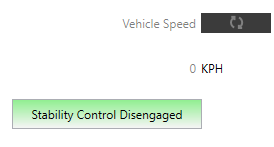
 - Stability Control – inform about stability control state and is visible when stability control is supported by RNC. It can be:
- grey when FDDL Mode is in disabled state
- green when FDDL Mode is in retry or dyn. leakage state and instability detected is 0
- red when FDDL Mode is in retry or dyn. leakage state and instability detected is greater then 0,
The caption of label can be
-
- “Stability Control Disabled” when label is gray
- “Stability Control Engaged” when label is green
- “Stability Control Disengaged” when label is red
- when FDDL Mode is in retry mode then label contain number of retries in brackets ex:”Stability Control Engaged (6)”
- Activate polling – automatically refresh the Vehicle speed and Stability control. By default polling is off, after clicking it, arrows on the button will change to green color and the polling will start