
1.Introduction
The VNC-ALA CAO is created for Vehicle Noise Compensation and Automatic Level Adjustment (VNC-ALA) as a reference project. It implements level control so as to help the user to get a similar subjective experience regardless of the vehicle noise.
Vehicle Noise is known to be created by the engine, tires and wind. This needs to be compensated. The VNC-ALA feature does level control based on noise-related vehicle information such as speed, fan and roof status. With a local microphone input streaming cabin noise information, VNC-ALA processes audio content of entertainment and announcement, continuously calculates and adjusts the necessary gain offset for different frequency bands. Thereby the user is able to seamlessly listen to the sound system regardless of the ambient noise.
The VNC-ALA consists of three main building blocks, the ALA CAO, the VNC CAO, and the Noise Estimator.
VNC-ALA CAO has two variants.
VNC Variant uses no noise estimator module and mic input. This variant does not adjust gain based on cabin noise.
VNC+ Variant is based on noise estimator and mic input is used
2.Signal Flow Description
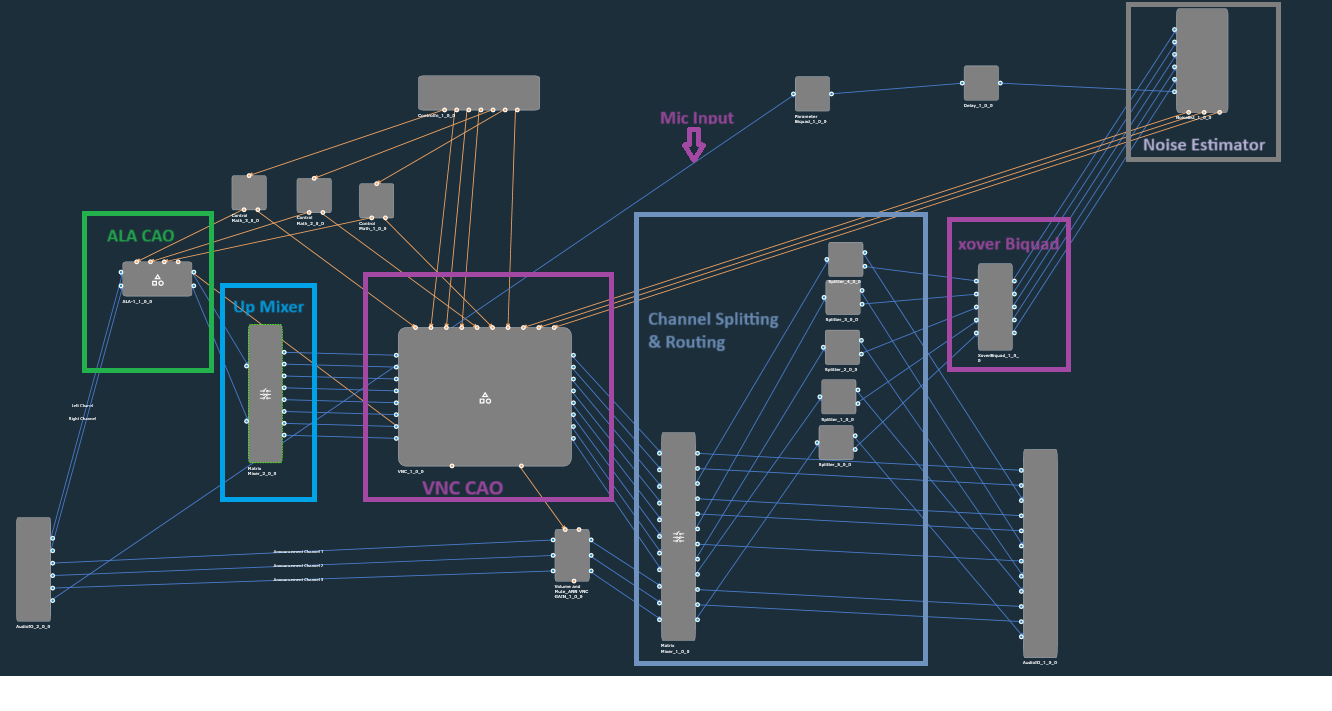
VNC+ Variant SFD (VNC ALA CAO with noise Estimator)
VNC Variant SFD (Without Noise Estimator)
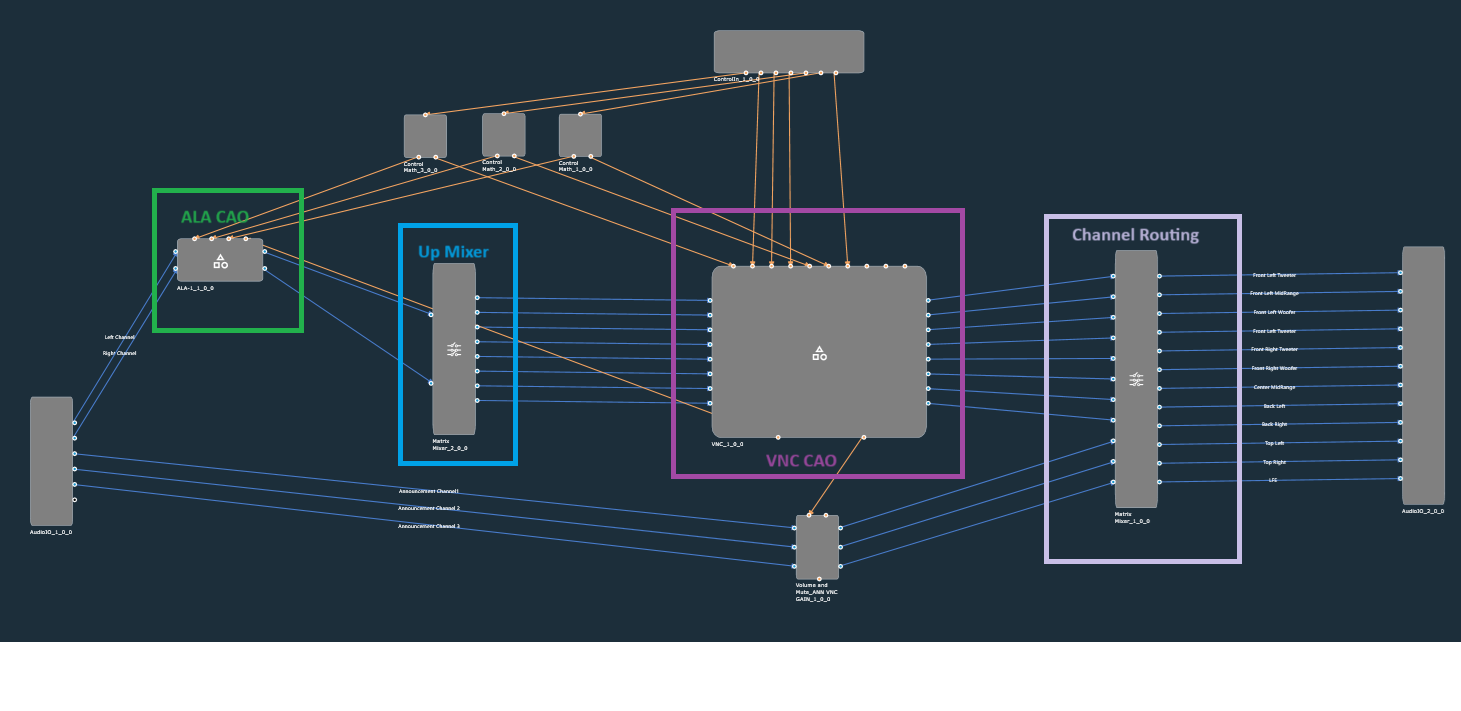
The reference signal flow demonstrates the VNC-ALA feature in a simplified setup. The Upmixing, Channel Routing, and System Tuning sections are only very basic placeholder implementations for the purpose of demonstration. The VNC-ALA feature consist of the three main components: ALA CAO, VNC CAO, and Noise Estimator (NoiseEst). These three components are placed at different locations in the audio pipeline and may even be distributed to separate cores.
The ALA CAO includes the ALA related audio objects and is typically placed at the beginning of the audio pipeline. ALA is affecting the Entertainment (or Background) audio signals.
The VNC CAO combines the VNC related audio objects and is typically placed after the upmixing section. The VNC is affecting the upmixed Entertainment (or Background) signals and the Announcement (or Foreground) audio signals.
The Noise Estimator requires as input signals a microphone signal, picking up the cabin noise, and the woofer loudspeaker signals, taken from the very end of the audio pipeline. Please note Noise Estimator is not used in VNC variant of project.
The VNC-ALA reference signal flow has 6 input channels:
- Entertainment channel 1 (Stereo Left)
- Entertainment channel 2 (Stereo Right)
- Announcement channel 1 (Mono)
- Announcement channel 2 (Mono)
- Announcement channel 3 (Mono)
- Mic
There are 8 output channels:
- Tweater channel 1 (Front Left)
- Woofer channel 1 (Front Left)
- Tweater channel 2 (Front Right)
- Woofer channel 2 (Front Right)
- Tweater channel 3 (Rear Left)
- Woofer channel 3 (Rear Left)
- Tweater channel 4 (Rear Right)
- Woofer channel 4 (Rear Right)
The reference signal flow receives 7 control signals:
- Vehicle Speed
- Fan Speed
- Roof State
- Mute
- HU Vol
- Gal Vol
- Ann Vol
2.1.VNC Signal Flow Description

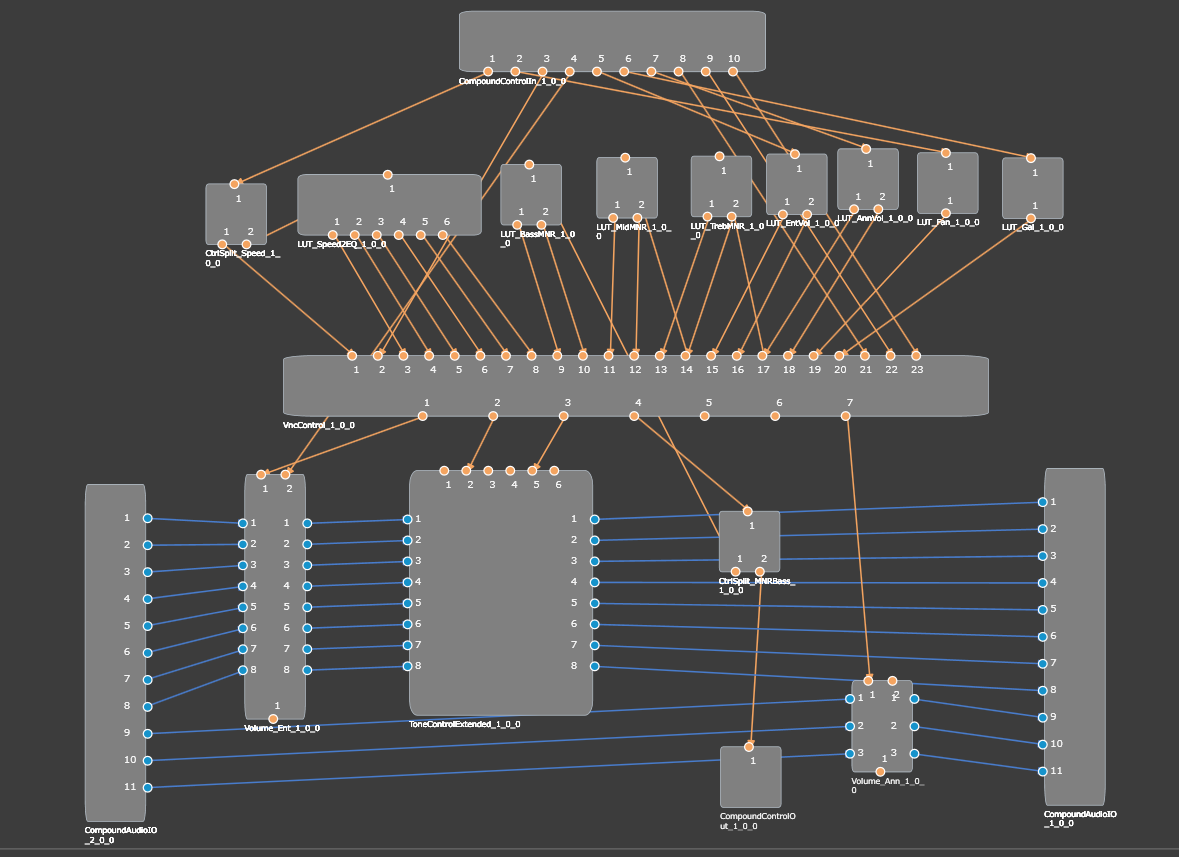
The VNC CAO has 11 audio input and output channels:
- Entertainment channel 1
- Entertainment channel 2
- Entertainment channel 3
- Entertainment channel 4
- Entertainment channel 5
- Entertainment channel 6
- Entertainment channel 7
- Entertainment channel 8
- Announcement channel 1
- Announcement channel 2
- Announcement channel 3
The VNC CAO receives 10 control signals:
- Vehicle Speed
- Fan Speed
- Roof State
- Mute
- HU Volume
- GAL
- Announcement Volume
- NoiseEst Doorslam Counter
- NoiseEst Smallest RMS error
- NoiseEst Median RMS error
The VNC CAO sends 1 control signal:
- MNR (for ALA CAO)
VNC CAO – Internal signal flow
2.2.ALA Signal Flow Description

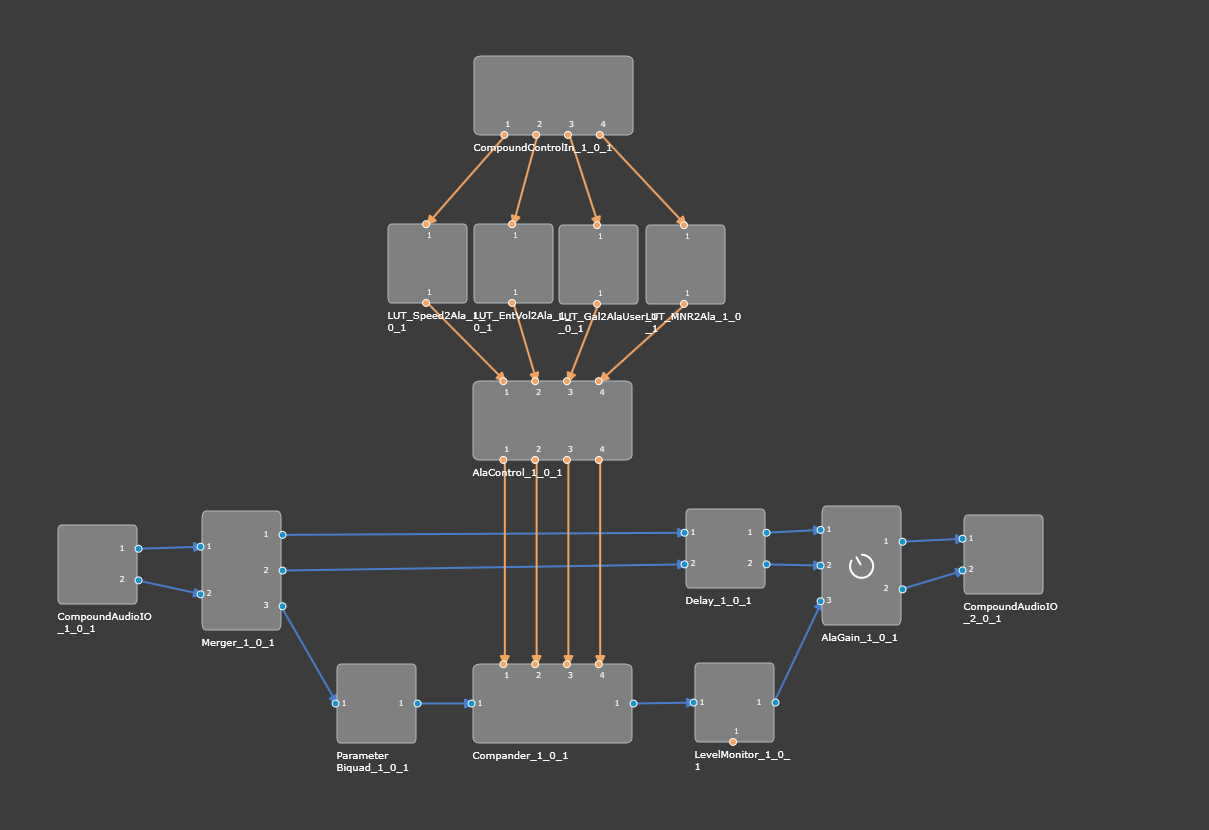
The ALA CAO has 2 audio input channels:
- Entertainment channel 1 (Stereo Left)
- Entertainment channel 2 (Stereo Right)
There are 2 audio output channels:
- Processed Entertainment channel 1 (Stereo Left)
- Processed Entertainment channel 2 (Stereo Right)
The ALA CAO receives 4 control signals:
- Vehicle Speed
- HU Volume
- GAL
- MNR (from VNC CAO)
ALA CAO – Internal signal flow
The following Figure shows the internal signal flow of the ALA CAO.
2.3.Noise Estimator
The purpose of the noise estimation module is to estimate the level of noise in the vehicle coming from the engine, the road, and other error sources while music is playing. For more details about this audio object refer to NoiseEst Audio Object.
3.Tuning Panel

The Main Panel simulates control signals from the car. It also shows the VNC-ALA working status.
The “VNC Control Signals” section offers multiple scales for the user to simulate the control signals from the car.
The Tuning section provides quick access to the VNC, ALA, and Noise Estimator Panels.
The Monitoring section is not editable. It merely shows the VNC-ALA control status. In order for the monitoring section to show the live values, the live streaming for the following parameters needs to be initiated in the Streaming Window (also see screenshot below):
- NoiseEst
- Quality static
- Quality adaptive
- VNC
- ToneControl_VNC
- GainStateBand1
- Gain
- GainStateBand2
- Gain
- GainStateBand1
- Volume_Ent
- VolumeStates
- Volume
- VolumeStates
- ToneControl_VNC
- ALA
- LevelMonitor
- LEVEL_VALUE
- LevelMonitor

3.1.VNC CAO - Panel
On the VNC CAO panel there are multiple scales to adjust VNC and volume ramp characteristics. It also contains two subpanels for VNC.
- Tone Control: EQ tuning based on VNC outputs.
- VNC LUT: lookup tables for other VNC tuning parameters.


3.2.ALA CAO Panel
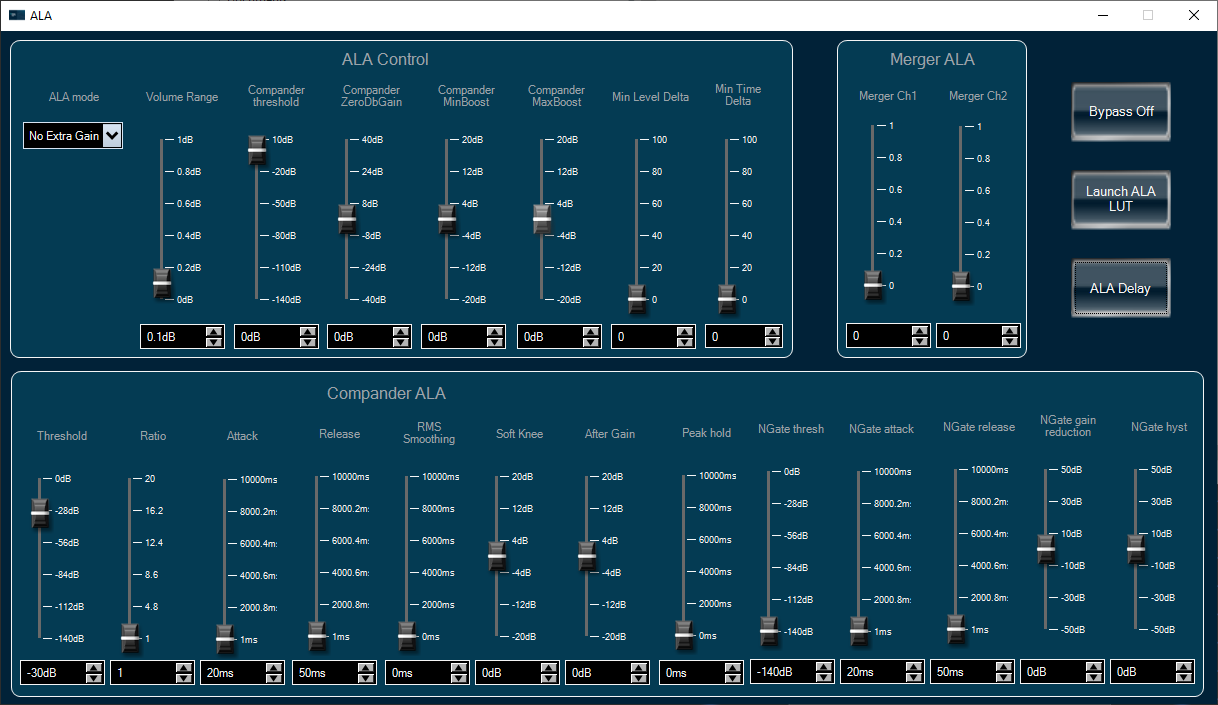
This panel handles all ALA tuning parameters. In addition, there are one Bypass button and two subpanels.
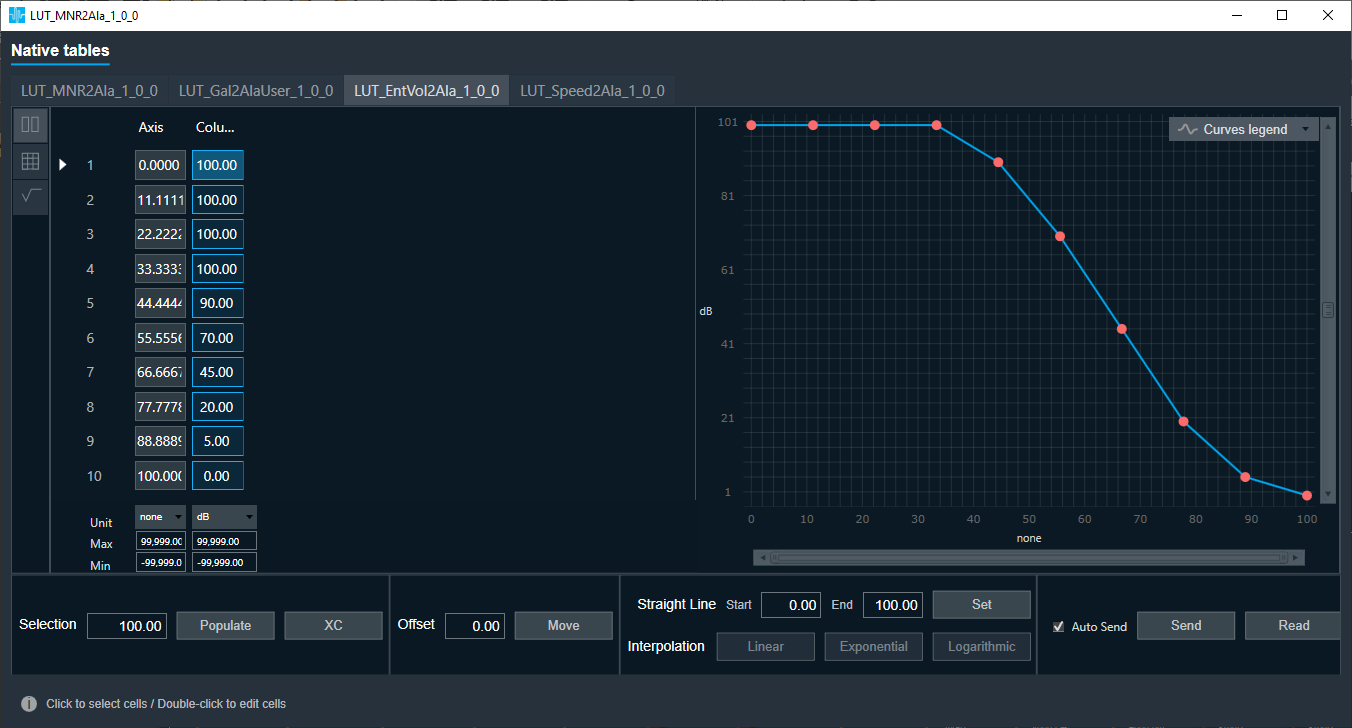
- ALA LUT: lookup tables for other ALA tuning parameters, arranged together with VNC lookup tables.
- ALA Delay: delay setting for the stereo inputs, to compensate for the ALA processing time.
Noise Estimator Panel
This panel contains tuning parameters for the noise estimator, which processes the microphone signal and produces noise-related information for the VNC object.

3.3.Noise Estimator Panel
This panel contains tuning parameters for the noise estimator, which processes the microphone signal and produces noise-related information for the VNC object.
4.Integration Guide
Preset Files
- For VNC-ALA CAO – we have the preset file : Vnc_Ala_preset0.set .
- For VNC CAO, ALA CAO and NoiseEst AO, the preset files are VNC_Preset.setr, Ala_Preset0.setr and NoiseEst_Preset.setr respectively.