GTT GUI Issues
| Issue Title | Description | Potential Solution |
|---|---|---|
|
GTT Crashes while launching streaming window. |
Performance counters cannot be accessed while starting streaming. |
One of the reason, GTT may crash while starting streaming could be the Performance Counters are not properly initialized or they are corrupted. This could be solved by rebuilding the performance counters. To rebuild all Performance counters including extensible and third-party counters, type the following commands at an Administrative command prompt. Press ENTER after each command. Rebuilding the counters: Resyncing the counters with Windows Management Instrumentation (WMI): Reference: https://support.microsoft.com/en-in/help/2554336/how-to-manually-rebuild-performance-counters-for-windows-server-2008-6 |
|
Streaming Viewer stops when Laptop is removed from docking station |
||
| Workaround for LUT parameter sets unit problem[Backward compatibility]
|
This issue will happen with every single LUT object in every set group with this device file. What seems to happen is the panel is appending the unit of each parameter into the set file, which is corrupting it. |
This workaround required for projects which are exported earlier than N+1 release. Import earlier exported project Open Signal Flow designer , if all LUT objects belong to same group, launch panel by double clicking any LUT object. If each LUT objects belongs to different groups. Launch panels separately for each group. Close opened LUT panels. Open Parameter sets view , right click on column header of red color highlighted set and click ‘Store’ context menu to get latest set values. You can observe red highlights are cleared and units are removed for each state variable. |
| Unable to import/export projects in GTT | If the FIPS Algorithm Policy is enabled in the computer, GTT fails to import/export any project. |
|
| Chart Rendering issue | If any issues related to Chart rendering in RTA or Streaming window. |
Please update GPU/ Video card drivers to latest version. One issue found in Dell system Latitude 5420 and solved with below steps:
|


AudioworX License
| Issue Title | Description | Potential Solution |
|---|
AmpSrv2
| Issue Title | Description | Potential Solution |
|---|---|---|
|
AmpSrv2 disconnected from GTT |
Disconnection can have several sources:

|
Check whether GTT requests the disconnection by doing the following:

If GTT disconnects, AmpSrv2 should still be connected to the target device. |
Installation
| Issue Title | Description | Potential Solution |
|---|---|---|
| GTT Launch | User trying to launch GTT from a different account (which was not used for installing GTT). | Please note this is not a valid scenario as this not fully tested , hence we recommend to use same account, which was used for installing GTT, to launch GTT. |
| SQL Installation Fails |
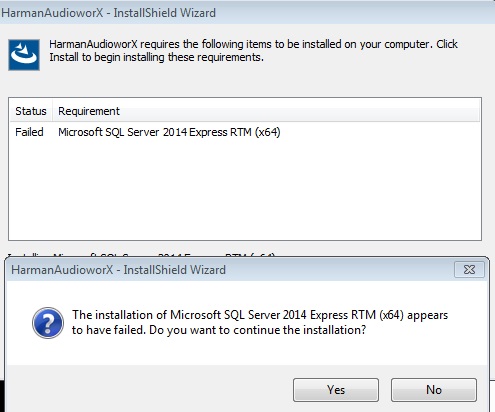
Installer complains that SQL RTM installation has failed.
|
There seems to be another version of SQL Compact edition installed on the box.
Microsoft SQL RTM has a rule to check if there is any restart pending on machine, if pending SQL installation will fail. |
| Service Installation error message | During installation below error message appears |
This error comes if default .Net 3.5 is not enabled on windows. Please check if the feature is enabled from windows features , to do this follow below steps:
|
| Installer Error Message |
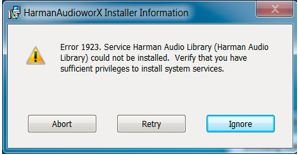
During installation the error message below appears.
|
This error message appears if there are previous residues of service left. Follow the steps below:
Same steps can be used for Harman License Manager as well. |
| Database Error Message |
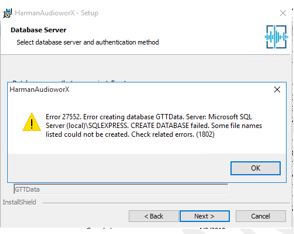
During installation at database selection step I am getting below error:
|
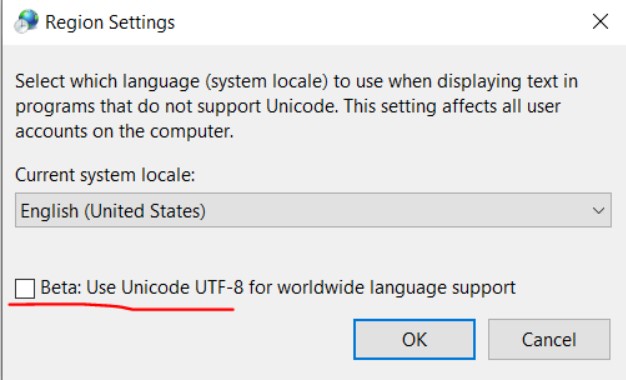
There are chances that the below checkbox is checked. Uncheck this. This is available in Control Panel -Time & Language > Region Settings.
To reach the above option, Goto Control Panel > Clock and Region > Region > Administrative tab. |
| O Release Installation error |
During installation of O release I am getting below error
|
|
| Installation failing without any specific error. | In some scenarios we have seen, installation fails without any error, just says “Installation interrupted” |
This issue mainly come due to issue in SQL state on system. For example, if SQL port is blocked or service is in stopped state. To resolve this follow below steps to write to database:
Make sure to do for both Client and server.
Sometimes we have to repeat these steps couple of times so that GTT installer can write to database. |
|
HarmanAudioworX installation fails with the following error snap shot.
|
Sometimes the SQL Express is not installed with the pre-reqs. This may be because the system would have had the SQL Express installed previously and uninstalled, however the registry is not cleaned properly and the Pre-reqs wrongly detects the installation and skips. |
Manually install the Microsoft SQL 2019 sever Express edition. Link: SQL_2019
|



| Issue Title | Description | Potential Solution |
|---|---|---|
| GTT Launch | User trying to launch GTT from a different account (which was not used for installing GTT). | Please note this is not a valid scenario as this not fully tested , hence we recommend to use same account, which was used for installing GTT, to launch GTT. |
| SQL Installation Fails |
Installer complains that SQL RTM installation has failed.
|
There seems to be another version of SQL Compact edition installed on the box.
Microsoft SQL RTM has a rule to check if there is any restart pending on machine, if pending SQL installation will fail. |
| Service Installation error message | During installation below error message appears |
This error comes if default .Net 3.5 is not enabled on windows. Please check if the feature is enabled from windows features , to do this follow below steps:
|
| Installer Error Message |
During installation the error message below appears.
|
This error message appears if there are previous residues of service left. Follow the steps below:
Same steps can be used for Harman License Manager as well. |
| Database Error Message |
During installation at database selection step I am getting below error:
|
There are chances that the below checkbox is checked. Uncheck this. This is available in Control Panel -Time & Language > Region Settings.
To reach the above option, Goto Control Panel > Clock and Region > Region > Administrative tab. |
| O Release Installation error |
During installation of O release I am getting below error
|
|
| Installation failing without any specific error. | In some scenarios we have seen, installation fails without any error, just says “Installation interrupted” |
This issue mainly come due to issue in SQL state on system. For example, if SQL port is blocked or service is in stopped state. To resolve this follow below steps to write to database:
Make sure to do for both Client and server.
Sometimes we have to repeat these steps couple of times so that GTT installer can write to database. |
|
HarmanAudioworX installation fails with the following error snap shot.
|
Sometimes the SQL Express is not installed with the pre-reqs. This may be because the system would have had the SQL Express installed previously and uninstalled, however the registry is not cleaned properly and the Pre-reqs wrongly detects the installation and skips. |
Manually install the Microsoft SQL 2019 sever Express edition. Link: SQL_2019
|