You need to have a device added to GTT in order to open existing tuning data. For information on how to
create or import a device, refer to Create a Signal Flow.
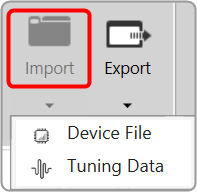
Click on Import and select Tuning Data. Use this option to open an existing tuning file (*.set or *.setr).
Users can use the following hints to see if the “open tuning file” has made any changes to the device:
- Check the State Variable Explorer to see if the values of the corresponding state variables have changed.
- If the device and GTT are in sync, sending tuning data should cause the frequency response to change.
- The user can manually create a set column to obtain the current state of the state variables after opening the tuning data file on the device.
- The user can use the set column that is already present after opening the tuning data file on the device and pressing the “store” button. If the set column in the set file contains state variables, the user can view the modifications.