- Synchronous Sample Rate Converter is used to convert the input sample rate to the required output sample rate.

- Two options are provided to convert the sample rate. Both these options are mutually exclusive.
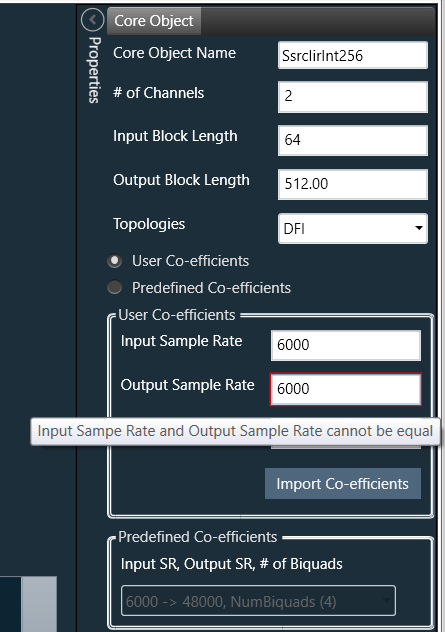
- User Coefficients mode: In this mode, user has to provide the input and output sample rate. Input and output sample rate should not be equal. The Number of Biquads field is read only. User has to import the coefficients clicking on the button “Import Co-efficients”. Based on the number of coefficients in the file, the Number of Biquads is updated. Sample file link
- Validations for User Coefficients mode: The Input and Output sample rate cannot be same. A validation is shown when same values are entered.
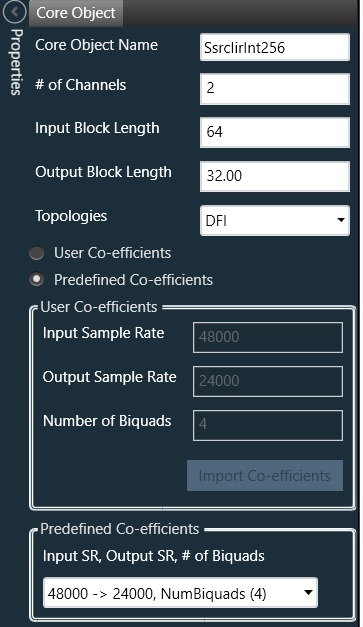
- Predefined Coefficients mode: In this mode, the Input sample rate, Output sample rate and Number of Biquads are read from the xAF dll and on selecting the value in the ComboBox, the corresponding coefficients are fetched from xAF dll.
- User Coefficients mode: In this mode, user has to provide the input and output sample rate. Input and output sample rate should not be equal. The Number of Biquads field is read only. User has to import the coefficients clicking on the button “Import Co-efficients”. Based on the number of coefficients in the file, the Number of Biquads is updated. Sample file link
- Biquad Co-efficients has to be re-imported when ever the mode is switched between Predefined Co-efficients mode to User Co-efficients mode.
Output block length (Displayed as read only field) = (Output sample rate /Input sample rate) * Input block length