Noise Generator Panel is used to change noise type and noise level. In SFD user can configure number of output channels. The same noise type and level will be applied to each channel.
Noise Generator panel works only with PRO object modes – Pro-Prbs and Pro-Lcg. Panel will not work in WhiteNoise and PinkNoise Object Modes
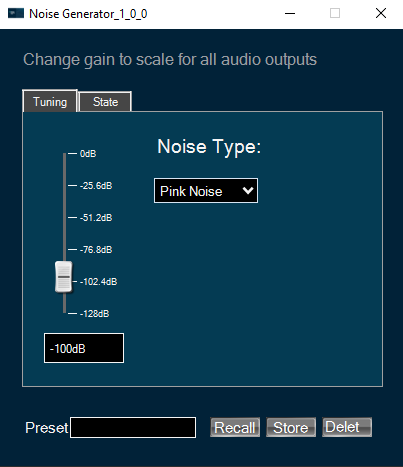
Changing Noise Level
You can change the noise level by three ways:
Use the mouse to change the slider’s position.
Hover over the slider and use the mouse wheel.
Enter an exact value into the text box below the slider.
Changes will take place after hitting “Enter” key or by moving the focus away from the text box.
Changing Noise Type
You can change the noise type by clicking on combobox and selecting the type. Possible noise generator types are:
- White Noise
- Pink Noise
State tab looks and feels equally to Tuning tab and configures state settings correspondingly.