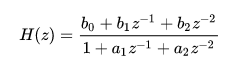
This object adjusts the input audio buffers according to the bi-quadratic filter coefficients passed into the object via tuning and places the resulting audio in the output buffers
From SFD, the user can select a filter topology via the “Biquad Topology field”:
- Direct Form I
- Direct Form II
- Transposed Direct Form II
The user can also set the number of channels (the number of input and output channels is the same), the number of filters and what memory layout to use via an additional variable:
- Coefficient Layout– In this layout, the filter coefficients are unique per channel. The number of filters selected above would apply per channel in this layout. If the number of filters above is selected to be two, then two unique biquad sets of coefficients will be applied across each channel.
- Coefficient One Layout– This layout will share a set of filter coefficients across all channels. If the number of filters above is selected to be two, then the same two biquad sets of coefficients will be applied across all channels.
The objects tuning variables are described below:
The five values below represent filter coefficients per biquad. Coefficient Layout exposes five values per biquad per channel, whereas Coefficient One Layout exposes one set of coefficients per biquad and these are shared across all channels.
- b0
- b1
- b2
- -a1
- -a2
b are numerator coefficients and a, denominator. The coefficients are expected to be normalized (*1/a0). And a1 and a2 are expected to be negated before being passed in.