The Dual Device reference project uses two target devices – a virtual amp IVP and a Griffin eval board – to demonstrate the concept of dual device control with one instance of GTT.
While improvements are being made to GTT to automatically detect and configure device connections in future versions, a manual setup of multi-device target connection is required at this time.
The Griffin target connection should be set up first, followed by the IVP connection.
Open AmpSrv2 and choose MCP RS232 protocol from the drop list
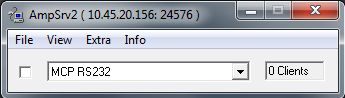
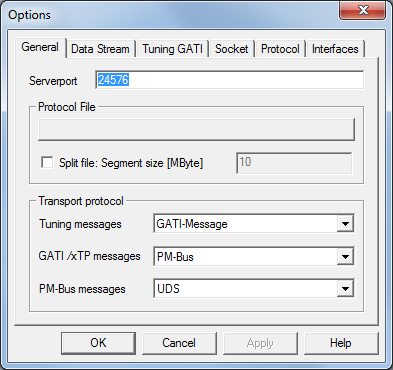
If AmpSrv2 is not already set up this way, choose File/Options/General and enter 24576 for the Serverport number
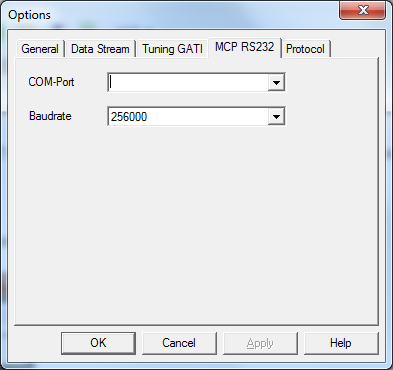
Choose File/Options/MCP RS232 and select a valid COM port and 256000 baud rate
Send the signal flow, reset the target board and connect the device in the usual way (please refer to GTT documentation for more info)
Open a second instance of AmpSrv2
Choose the Message protocol
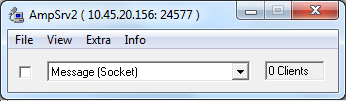
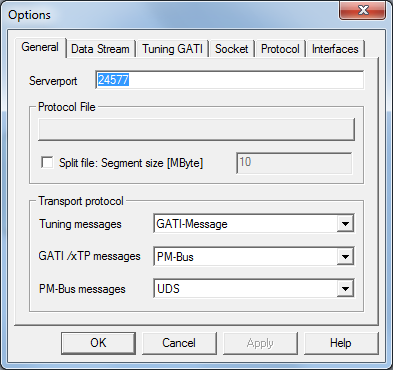
Choose File/Options/General and enter 24577 for the Serverport number
Open IVP with the virtual amp running
Send the signal flow, reboot the device and connect to the device/virtual device in the usual way (please refer to GTT documentation for more info)