
1.Purpose of this Document
Features which are provided:
- Instantiation of core signal flows, complete with SRC.
- Each core will instantiate a single instance of a new class: CAudioCore. This is the single point of contact for the platform core.
- Integrated xTP support
- Simplified IPC (single API)
- Clear requirements for user (abstract methods and class based system)
- Changes listed which require attention from user and/or integrator
- New audio object(s)
- Breacking changes
The changes listed are always compared to the previous release. Upgrading from older versions may require an iterative process to update all mandatory APIs.
Platforms and further Information For more details on supported platforms and other information under https://confluence.harman.com/confluence/pages/viewpage.action?spaceKey=INTAXRSDK&title=Harman+AudioworX+-+Audio+Algorithm+Catalogue.2.W Release
2.1.Potentially Relevant Changes
MasterPresetController
- Methods of MasterPresetControl.h have been moved to CMasterPresetControl class and not available as static functions anymore. In order to call MPC related functions manually now an instance of the MPC class is required.
- xTPInterpreter, MPC and Device parser are extended due to custom actions and Core Object settings in Master preset controller :
- Core object processing state changes
- Custom actions
- Control set
- Custom xTP commands
- Audio Object processing state
- Refresh control (not yet supported in GTT)
- Prepared for Swoosh (not yet supported on MPC GUI side)
- Below two APIs are changed from previous version of xAF and it is aligned in AudioworX CCB meeting
- IxTPInterpreter::handleSlotUpdate()
- m_MasterPresetControl is a class and not a structure. Hence integrator should use :MasterPresetControl.m_SlotMap
- IxTPInterpreter::loadDefaultSlot()
- m_MasterPresetControl is a class and not a structure. Hence integrator should use :MasterPresetControl.xAFGetDefaultSlot(m_SlotRequested)
xTPInterpreter
- switchInstanceState method was renamed to switchCoreObjectState
- m_MasterPresetControl type has changed from xAFMasterPresetControl to CMasterPresetControl
- core object id (16-bit) is being used instead of instance id (8-bit) for below virtual methods mentioned.
- virtual methods modified
- xAF_Error switchCoreObjectState(MessageBuffer& message, xUInt8 core, xUInt16 coreObjID, CalcStates targetState, xFloat32 fadeTime) const;
- xAF_Error onStateChange(MessageBuffer& msgBuf, xUInt8 core, xUInt16 coreObjectID, CalcStates rampState)
- xAF_Error onSlotLoaded(MessageBuffer& msgBuf, xUInt8 core, xUInt16 coreObjectID, slotloadingstatus status)
- new virtual method has been added
- xAF_Error filterPresets()
- xAF_Error processAction(const xAFAction& action)
- xAF_Error handleFileUpdate(xUInt16 fileID)
- xAF_Error handleFileMapUpdateInternal()
AudioCore
- swoosh support added (switch between current and new preset without ramping)
ChunkParser
- getCheckSum() const
- getCheckSumAlgorithm const
SetiParser
- Added support for swoosh (optional parameter in the constructor)
- SETIParser(CAudioProcessingBase* framework, xBool swooshEnabled = false);
Seti Files
- added a new chunk type for audio object state changes per preset
Device load slot status
- slotloadingstatus enum extended by 2 additional states
- enum slotloadingstatus
{
XTP_DEVICE_SLOT_LOADED = 0x00,
XTP_DEVICE_SLOT_LOADING_IN_PROGRESS,
XTP_DEVICE_SLOT_LOAD_NOT_POSSIBLE,
XTP_DEVICE_NUM_LOAD_SLOT_STATUS
};
- enum slotloadingstatus
FileController
File Controller feature allows user to select and manage multiple files on the embedded device (DSP side). GTT’s file controller UI is used for this purpose.
- xTPInterpreter module is updated to support file controller related xTP commands.
- StaticStorageInterface class has getSize virtual method to be implemented by platform
-
- FLMP and ANYFILE are added as flash file types
-
-
- FLMP is for filemap. There is single filemap file per device. it contains information about all files. each file has fileID, name, size and checksum.
- ANYFILE is for pcm, wav or any other file. Each file has a unique id.
-
StaticStorageInterface* openMemoryStorage(memAlloc alloc, flashfileType type, xUInt32 coreID, xUInt32 instanceID, IOBase::AccessMode mode, xUInt16 contextID);
-
Platform already implements this function. Platform passes this function during xtp interpreter initialization. Implementation has to updated to handle newly added flashfiletypes — FLMP and ANYFILE
- when type is FLMP, coreID/instanceID/contextID are not relevant. FLMP is single file per device.
- when type is ANYFILE, contextID is fileID. Each file is identified by a unique fileID. coreID and instanceID are not relevant.
-
- IxTPInterpreter::onXTPMessageFileController()
- Method handles all the xTP commands related to the file controller.
- IxTPInterpreter::handleFileMapUpdate()
- Virtual method that is called by IxTPInterpreter after filemap is received. Platform implements this function. Filemap parsing with DeviceParser is done here
- IxTPInterpreter::handleFileUpdate()
- Virtual method that is called by IxTPInterpreter after a file is received. It is optional for platform to implement this.
- DeviceParser::readFileControllerProps()
- Parses filemap. used by platform’s implementation of IxTPInterpreter::handleFileMapUpdate()
- DeviceParser::getFileControllerResults()
- For getting a copy of filemap data structure xAFFileMap. Used by IxTPInterpreter::handleFileMapUpdate() after sucessfully parsing filemap.
-
-
AudioCore or AudioCoreBase instatiation
-
virtual StaticStorageInterface* getOpenStoragePtr(flashfileType type, unsigned int contextualData, IOBase::AccessMode mode) const = 0;
- Platform already implements this virtual method when instantiating AudioCore or AudioCoreBase class. In order to support the newly added flashfiletypes — FLMP and ANYFILE, platform has to update the implementation of this function.
-
Logger
A logger is introduced that has 5 severity levels which are, ‘CRITICAL’, ‘ERROR’, ‘WARNING’, ‘INFO’ & ‘DEBUG’. Audio objects and the framework/system have their own separate flags for enabling logs. By default, the audio objects will have all its log statements compiled out. To see logs from the audio object, code has to be recompiled with the necessary flag.
| Implementation |
To add log statements, the developer will inherit from the IxAFLog class declared in xaflog.h. Following this, the class that is logging will define a function called logger with the following argument list: void logger(xAFLogLevel level, const xInt8* const fmtStr, …) const The main purpose of this function is to access the type and ID of the object that is logging. For example, the type could indicate that it is the audio object that is logging, and the ID could indicate the block ID, virtual core ID and core object ID. The ID and the type are then passed on to another function that is implemented by the platform: void xAFLogMessage(xAFLogLevel logLevel, xAFLogObject objType, xUInt32 objectID, const xInt8* message) |
| Usage | Example log statements for audio object:
Example log statements for the framework is:
Logs for audio objects are disabled by default. The macro to enable them in cmake is: XAFLOG_CONFIG_AO. Another option to enable them is to use the cmd line argument while executing the python build script (–logConfigAO=logLevel; logLevels=[‘none’, ‘critical’, ‘error’, ‘warning’, ‘info’, ‘debug’]) |
| Backwards incompatible change | The earlier logging mechanism had two functions for setting and getting the logger function, which are now removed.
|
2.2.Audio Object Changes
Major Tuning version changes (backwards incompatible changes -> possible tuning data loss for the mentioned AOs)
Basic audio object(s)
- FilePlayer (0.1 -> 0.2)
Advanced audio object(s)
- no objects
Minor Tuning version changes (backwards compatible change -> tuning data retained)
Basic audio object(s)
- Delay (0.2 -> 0.3)
- LevelMonitor (0.0 -> 0.1)
- Volume (0.2 -> 0.3)
- ControlMath (0.3 -> 0.6)
- ControlMultiAdder (0.0 -> 0.1)
- Lut (0.1 -> 0.2)
- FastConv (0.0 -> 0.1)
- FaderMixer (0.0 -> 0.1)
- MatrixMixer (0.3 -> 0.7)
- Splitter (0.0 -> 0.2)
- WaveGenerator (0.2 -> 0.3)
Advanced audio object(s)
- AudioLevelizer2 (newly added)
- AlaControl (0.1 -> 0.2)
- Compressor (0.0 -> 0.1)
- FiraMimo (0.0 -> 0.2)
- FirMimo (0.2 -> 0.3)
- MonoDetect (0.0 -> 0.1)
- PowerManager (0.0 -> 0.1)
- VenueVerb (0.4 -> 0.5)
3.V Release
3.1.Potentially Relevant Changes
CoreInfo structure change.
This is not relevant except in a case where the platform developer is instantiating an AudioCore from hardcoded info (or they have some utility to generate this info).
The CoreInfo structure has been modified as follows:
Member numProbePoints removed.
New member added of type ‘StreamingInfo’ which has the following definiton:
struct StreamingInfo
{
StreamingInfo();
xUInt8 numProbePoints; ///< number of parallel probe points required; this numnber will define the actual queue size for ProbePoints
xUInt8 numSfdMeters; ///< number of sfd meters. The size required is numSfdMeters * sizeof(float).
xUInt32 streamingDataSzInBytes; ///< number of bytes required for streaming of variables like state variables, state mem of third party etc.,
};
THXParser return value change
This file is not commonly used outside of xAF but just in case: the read function will now return 0 for an EOF rather than -1. This change follows a change in the chunk parser file to correctly detect error cases.
3.2.Audio Object Tuning Changes
The following audio objects have minor tuning changes which can be automatically upgraded inside GTT.
Control Math (0.2 -> 0.3)
Delay (0.1 -> 0.2)
File Player (1.0 -> 1.1)
Limiter (0.3 -> 0.4)
Matrix Mixer (0.1 -> 0.3)
Parameter Biquad (1.0 -> 1.1)
Tone Control Extended (1.2 -> 1.3)
Volume (1.1 -> 1.2)
XOver Biquad (0.0 -> 0.1)
CFQLS (1.2 -> 1.3)
ClariFi (1.0 -> 1.1)
Compressor (0.2 -> 0.3)
Compander (0.0 -> 1.0)
Ducker (1.0 -> 2.1)
FIRAMIMO (3.0 -> 4.0)
Logic7 (1.2 -> 1.3)
MultiStageEnvelope (1.0 -> 1.2)
NSPCenterExtraction (1.0 -> 6.0)
QLS (1.2 -> 1.3)
VenueVerb (1.3 -> 1.4)
4.U Release
4.1.xTP Contract between cores and MCU
Previously there was an unfair expectation that was put on the MCU by the xTPInterpreter implementation. This expectation was that any request sent from xTPInterpreter to another core would block on that send, and the next line would already have the response to the query. xTPInterpreter has been updated to be send messages without the expectation of immediate response. It now expects ‘XTP_NO_RESPONSE’ to be returned by any core IPC message, and the actual response to come back from the core on a separate thread (which will make its way to xtpInterpreter’s sendMessage function).
Flow:
IxTPInterpreter => m_IPCInterfaces[coreID]->sendMessage => platform IPC => AudioCore->onXTPMessage()
ReturnFlow:
AudioCore->onXTPMessage()[return value] => platformIPC => IxTPInterpreter->sendMessage()
When sending to the core from xtpInterpreter platform IPC should return XTP_NO_RESPONSE unless there is some actual error in sending the IPC message – it can return some error code in this case (or generically xAF_FAILURE).
After processing an XTP message on the core (the context is within the receive method in platform IPC code) if the message length (msgBuf.msgLen) is > 0 then this message should be sent back to the MCU. The return value of the function can be either xAF_SUCCESS, or some error. In the case of an error the error has already been encoded into an xTP error response – but the platform can use this error for logging as well if they wish. XTP_NO_RESPONSE should not be expected here as the core should return any unhandled commands as an error (in AudioCoreBase).
4.2.Audio Object Exceptions
We have changed the internally used macro for exceptions to avoid clashing with platform definitions. Previously the macro was PLATFORM_ASSERT but now the macro is XAF_ASSERT. (XafAssert.h)
In general we do not want any audio object throwing exceptions. In the future we will be considering updating the Audio Object API to allow returning errors from init – this was avoided in the past because of the breaking change it would introduce but throwing exceptions is a worse way to handle init errors.
4.3.Updated File Sending (xTP)
Specifically in order to accommodate the AI object and its larger signal flows – but for other more extreme signal flows as well – we have updated the method of sending flash files over xTP.
Previously there were two approaches – one which used an 8 bit counter and one which used a 4 byte offset and size. The 4 byte method was only used for tuning files and the preset info chunk, this is changed so that this approach is used for all formats now. This changes our max size from ~50KB-ish to 4GB.
This change is covered automatically if the platform is using our xTPInterpreter file, but if some custom xTP code is used then the following commands have to be updated.
4.4.DSFD File Format
The size of additional variable data (which is a member of audio object properties within signal flow data) has been changed from 2 bytes to 4 bytes to accommodate the AI Object (which greatly exceeded 64kb). GTT and xAF are updated to handle this change – and old (previously saved) sfd files should still work. For reference the parser changed is DSFDParser.
Old files have a different chunk ID which is supported in the updated parser (it will read 2 bytes instead of 4) but new files have a new chunk ID which specifies it uses 4 bytes instead. If you try to load a new file in an old version of the framework you will get an error (because the chunk ID is unknown).
When using U release GTT with U release xaf – you will get the updated chunk ID when sending data.
U release GTT and previous xaf release will give you the old chunk ID.
Previous GTT and new xaf will also give you the old chunk ID (but it will load).
4.5.Audio Objects with tuning minor version changes (U-release)
The following audio objects have changed their tuning minor version:
- LUT (1.0 -> 1.1)
- TonecontrolExtended (1.1 -> 1.2)
- ControlMath (1.1->1.2)
- ALA Control (2.0->2.1)
- Compressor (0.2->0.3)
- FIR MIMO (1.1->1.2)
- Venue Verb (1.1->1.3)
- VNC Control (4.0->4.1)
5.T-Release
5.1.Block Control API
Block Control API is added in this release to enable sending multiple control signals from one audio object (AO) to another in one functional call.
- virtual xAF_Error controlSet(xSInt32 index, xUInt32 sizeBytes, const void * const pValues);
- void setControlOut(xSInt32 index, xUInt32 sizeBytes, const void * const pValues);
In GTT’s SFD, when an AO implements Block Control API, Block Control inputs and outputs are shown as dark orange dots. Block Control connections between two AOs are represented by think orange lines. Regular control inputs and outputs continue to be in light orange color. Regular control connections between two AOs continue to be in light orange colors.
Integration involves these steps. Please refer ControlGrouper implementation for reference
- declare support for Block Control in static meta data and dynamic metadata
- in the getObjectIo implementation specify control group as one control input
- in the createDynamicMetadata API, fill-in Group number appropriately.
-
typedef struct {xFloat32 Min; ///< min value for control signals for the selected modexFloat32 Max; ///< max value for control signals for the selected modestd::string Label; ///< label for current controlxSInt32 Group; ///< group number} metaDataControlDescription;
-
- to received Block Control input, use controlSet(xSInt32 index, xUInt32 sizeBytes, const void * const pValues) API in the implementation
- to send Block Control output, use setControlOut(xSInt32 index, xUInt32 sizeBytes, const void * const pValues) API in the implementation
5.2.Interface related changes
DeviceParser
The get method was changed to avoid a casting from void** and doing null pointer checks. The new api will set the data for the given parameter and given target type, which are given as a reference.

Messages
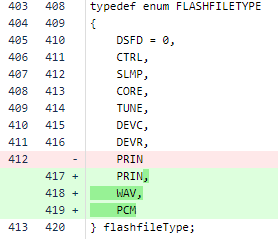
New flash types have been added to support reading audio data formats stored as wav or raw pcm data
xTPUtil
Error message function APIs got updated to have a consistent and type safe parameter handling.
- returnFailXTP

- returnFailXTPWithFullErrorID
This function was extended to make use of the MessageBuffer type and a more convenient usage of parameters.

5.3.Master Preset Controller
Master Preset Control
All Master preset controller changes are mentioned in this section.
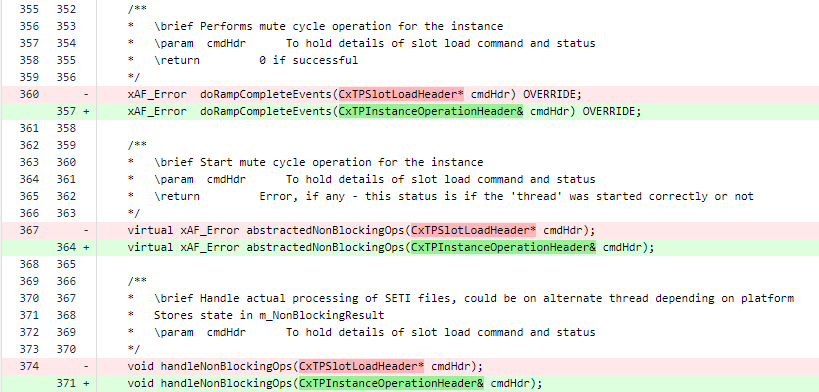
- AudioCoreBase.h
5.4.Application related changes
Static storage interface
This extension in the application is required to support the new flash types required for the File Player audio object which will be released soon.
For the VirtualAmp application on windows Fileinterface is used to get access to the files. On embedded it is up to platform to decide which interface to return and how to handle the access to the audio files.

5.5.Audio Objects with tuning minor version changes
The following audio objects have changed their tuning minor version during T-Release:
-
Compressor

-
FIRAMIMO

-
Limiter

-
Logic7

- Wave generator

- Template

6.S-Release
6.1.Master Control API change
Due to some leftovers how the master controller has initialized its memory there were some hard coded static arrays used which had a max size of 10. This is a bug when using more than 10 controls in the project.
This bug got fixed, but requires a really small api change on application code side.

6.2.Memory Allocator API change
Data buffers placed in low latency memory leads to lower MIPS consumption and hence there will be numerous request for low latency memory. As there is limited low latency memory, the allocator allocates in the next available higher latency memory whenever the requested low latency memory is not available. Hence the memory statistics compiled with the requested latency might not be correct.
An additional argument is passed to the memory allocator APIs to return the allocated latency for the requested data segment and this assigned latency level is used for calculating the memory usage at each latency level.
The memory allocator APIs in the following xAF types header files are changed as shown below:
XafTypesC.h:
typedef void* (*memAlloc)(unsigned int size, unsigned int align, enum xAF_HEAP, enum xAF_memLatency requestedLatency, xAF_memLatency* assignedLatency);
XafTypes.h:
typedef void* (&memAllocRef)(unsigned int size, unsigned int align, enum xAF_HEAP heap, enum xAF_memLatency requestedLatency, xAF_memLatency* assignedLatency);
In the below classes, the APIs related to memory allocation are changed as given below:
CAudioCoreBase:
void* m_Allocator(unsigned int size, unsigned int align, enum xAF_HEAP heap, enum xAF_memLatency requestedLatency, xAF_memLatency* assignedLatency);
InitializationMsgParser:
void* m_memAlloc(unsigned int size, unsigned int align, enum xAF_HEAP heap, enum xAF_memLatency requestedLatency, xAF_memLatency* assignedLatency);
CAudioProcessingBase:
void* heapCreator(unsigned int size, unsigned int align, enum xAF_HEAP heap, enum xAF_memLatency requestedLatency, xAF_memLatency* assignedLatency);
ChunkParserMem:
void* m_memAlloc(unsigned int size, unsigned int align, enum xAF_HEAP heap, enum xAF_memLatency requestedLatency, xAF_memLatency* assignedLatency);
The template to create object is also modified as below:
createObject(void* (*heapCreator)(unsigned int size, unsigned int alignment, enum xAF_HEAP heap, enum xAF_memLatency requestedLatency, xAF_memLatency* assignedLatency)) {}
In addition, following extern APIs used outside the framework are also modified:
extern CAudioObject* createAudioObject(int id, void* (*heapCreator)(unsigned int size, unsigned int alignment, enum xAF_HEAP heap, enum xAF_memLatency requestedLatency, xAF_memLatency* assignedLatency));
extern CAudioObjectToolbox* createAudioObjectToolbox(int id, void*(*heapCreator)(unsigned int size, unsigned int alignment, enum xAF_HEAP heap, enum xAF_memLatency requestedLatency, xAF_memLatency* assignedLatency));
6.3.Preset Loading Configurability / Overrides
For this release (s+2) – the way master preset controller has been implemented has changed a good bit. Much of the code that was required to be implemented by the platform team is now internal to the xTPInterpreter. There are two primary reasons for this.
-
- We want less wasted work on the platform side (easier implementation and maintenance)
- We’ve changed process for loading slots so that the xTPInterpreter has the ability to respond to each phase of the process.
At the same time we have added the ability for a preset to request not to ramp before its load.
Previously the setup was more of a fire and forget – the ramping data and preset data was sent out to each core, which took care of everything and then sent a status message after the ramp up was complete.
Now the process is as follows:
- for each instance with a preset that requires muting, the state switch command is sent (ramp time is set for the entire slot)
- after the instance is muted it returns to the master core (xTPInterpreter) to get the next step (onStateChange)
- This method is virtual and the platform can use it to provide custom scenario handling
- each preset load command is sent
- likewise after each load is completed there is a callback to the xTPInterpreter class which is virtual and can be modified (onSlotLoaded)
- Each instance which was muted in the first step is now unmuted – and once again there is a callback to the onStateChange method
The idea here is to enable synchronization between cores, and enable the platform to respond to custom scenarios where the functionality provided in the slot map through GTT is not meeting a specific requirement.
If you’re responsible for integration – you will need to:
- utilize the provided methods which were moved from your child xTPInterpreter implementation into xTPInterpreter itself.
- You may or may not have used these methods from our winpc code which were moved:
- onSlotLoaded
- onStateChange
- groupPresetBasedOnInstance (deleted)
- loadPresets – this is still the entry point to the whole process
- You may or may not have used these methods from our winpc code which were moved:
- xTPInterpreter now utilizes allocators – so your initialize function call will need to be updated.
- master preset control API was changed to use the correct sized primitives in some cases (mostly going from uint to uchar) – probably not relevant unless you’re using these API’s for a different purpose
- The method ‘handleSlotUpdate’ is now returns an xAF_Error as status and has specific requirements:
 /*! //xTPInterpreter.h

*   Abstract method to fire when a new preset map is received

*   The implementer should deinit (if req) load and init master preset controller (m_MasterPresetControl) in this method

*   \return     status of the operation [xAF_SUCCESS]

*/

virtual xAF_Error handleSlotUpdate() = 0;
- Whatever memory you allocated to keep track of presets can be deleted now
6.4.Preset and Slotmap writes over xTP
GTT/Platform can use xTP commands to send Preset and Slotmap files over xTP.
xTPInterpreter running as part of the master preset controller on micro/dsp, uses InitializationMsgParser module. InitializationMsgParser uses static storage callback API. This API implemented in plaform code, is expected to return the handle of type StaticStorageInterface*, based on flashfileType and other relevant arguments.
API extended from S release:
typedef enum FLASHFILETYPE { DSFD = 0, CTRL, SLMP, CORE, TUNE, DEVC, DEVR, PRIN } flashfileType;
typedef StaticStorageInterface* (*openMemoryStorage_t)(memAlloc alloc, flashfileType type, xUInt32 coreID, xUInt32 instanceID, IOBase::AccessMode mode, xUInt16 presetID);
There are three xTP commands related this topic. Please refer xTP Specification document for the details. GTT sends these in the order shown below, when user clicks on SendToDevice button in Preset Controller window.
- send presetConfig (aka. preset info)
- preset and slotmap size information sent over xTP. Implementation is optional.
- flashfilteType of PRIN is used
- send presets. preset data correspoding to each preset ID
-
- preset data binary data sent over xTP.
- flashfilteType of TUNE is used
-
- send slotmap
- slotmap data sent over xTP. This command already exists before S release
- flashfilteType of is SLMP is used
There is no change to the AudioCore callback API implemented by platform on DSP.
6.5.Streaming and ProbePoints
In previous releases, the streaming and probe point queue memory was always allocated to the maximum size. This “problem” has been solved by adding a new configuration to the virtual cores. From the S release onwards, the user can configure whether live streaming is required and how many probe points are needed. According to these settings, xAF will allocate the memory for the ProbePoint queue.
If unchecked, no memory is allocated in the AudioCore class, i.e. no instance of the ProbePoint queue is created. A value of 0 will only allocate memory for state variable streaming, resulting in 2 * 16 * 4 = 128 bytes (safety factor * max state variables * sizeof(float)). For each enabled probe point, the queue is increased by the largest block length used in the xAF instances, multiplied by sizeof(float).

The streaming data is queued in the audio cores owned by ProbePointQueue and must be unqueued by the platform according to its preference.
Option 1: Create a separate thread that is called whenever the CPU is not busy with audio processing. The tricky part here is to ensure that this thread gets the right priority to send its data, which is not an issue for state variable data, but could become a challenge with audio probe points.
Option 2: Call dequeue immediately after AudioCores calc has been executed. This is the preferred option from a Windows perspective, as the timing is difficult to handle on Windows while using blocking socket calls.
An example for both options can be found in the VstInOutRouter in the awx_winpc repository
7.Legacy Releases
7.1.Rolling Stones
7.1.1.AO Update Integration Guide
- REMEMBER! Naming is important just like audio object naming. Class names and file names must match the patterns described here.
- Also – the directory structure here is in reference to xAF but AAT objects follow a similar structure.
- Enable Object (if disabled for update)
- public/include/audioobjectids.h
- cmake for object
- private/src/<category>/CMakeLists.txt
- If a newly enabled category – disable other objects
- private/src/<category>/CMakeLists.txt
- The following files are specific to xAF but I am leaving them in here to show that we build different libraries for each file type. This is important for being able to separate toolbox and testing code from executable code.
- Update framework/buildToolbox.cmake (linked only for toolbox usage)
- include(${CMAKE_CURRENT_SOURCE_DIR}/basic/toolbox/CMakeLists.txt)
- Update framework/buildMemRecs.cmake (linked for toolbox and unit test usage)
- include(${CMAKE_CURRENT_SOURCE_DIR}/filter/memrecs/CMakeLists.txt)
- Update framework/buildBao.cmake (the object code itself, always linked)
- include(${CMAKE_CURRENT_SOURCE_DIR}/filter/CMakeLists.txt)
- see basic/toolbox and basic/memrecs
- Update framework/buildToolbox.cmake (linked only for toolbox usage)
- Memory Records -> new class : inherit from CMemoryRecordProperties and the object itself
- see basic/memrecs/GainMemRecs
- class CMemRecs : public CGain, public CMemoryRecordProperties
- Object toolbox method put in a toolbox class. which inherit from AudioObjectToolbox class and the object’s memrec class. Add cpp files and header files
- see basic/toolbox/GainToolbox
- class CGainToolbox : public CAudioObjectToolbox, public CGainMemRecs
- Update your CMake files w/ your new cpp files
- Update unit tests
- DDF tests to be new class inheriting from the object’s toolbox (so it can run exclusively on platforms which the tool executes, say windows)
- CGainToolboxTest : public AudioObjectUTBase, public CGainToolbox
- standard ‘audio’ tests inherit from the object’s memrec class (this is so we can correctly instantiate the object on target)
- CGainUnitTest : public AudioObjectUTBase, public CGainMemRecs
- update the category’s cmake to conditionally include the toolbox cmake
- DDF tests to be new class inheriting from the object’s toolbox (so it can run exclusively on platforms which the tool executes, say windows)
- Mem records test should not be part of toolbox cpp – there’s no way to actually verify except on target so it should be run there
- Remove code handling subblock overrun as it is now illegal ( we must assume not contiguous ) (assuming you want to save the code memory!)
- If the object has any tuning memory at all (state or param) then implement the following methods:
- xInt8* getSubBlockPtr(xUInt16 subBlock)
- This method should return NULL if a subblock is not supported, else the pointer to the start of the subblock requested
- xSInt32 getSubBlockSize(xUInt16 subBlock)
- This method should return the size in bytes of the requested subblock, or 0 if invalid
- xInt8* getSubBlockPtr(xUInt16 subBlock)
- Every state variable that was handled in tuneStateXTP now has to be handled in tuneXTP along side parameters.
- The subblock ID’s cannot overlap between the two (you cannot have subblock 0 state and subblock 0 parameter)
- Analyze state variables for consolidation between state and param
- ParameterBiquad simply deletes the states and uses only param now – this is because it is now legal to write directly to parameter memory during execution. This is now thread safe.
- If memory was duplicated for latency purposes – optimize with subblock restructure
- DDF Code needs to be updated
- Category is no longer designated on the STATE_VARIABLE tag
- Remember the above rules – one category per subblock – one subblock category definition period
- XMLHelper methods are updated but there are several ways to accomplish this :
- On template declaration Add “IDOffset=0” if subblock is 0, and “Category=Tuning” or “State” for the category.
- Example from FIR : <Object HiQnetOffset=”1″ Name=”Channel1″ IDOffset=”0″ Category=”Tuning” Template=”FIRTuning2″ />
- On any object definition, the same applies. This will apply the category and subblock to ALL nested declarations. so make sure they are all in the same subblock
- Example from Delay – the entire object is in one subblock : <Object Name=”Delay_1_0_0″ TargetOffset=”0x0″ BlockID=”0.5.0″ Category=”Tuning” IDOffset=”0″ HiQnetAddress=”3.0.0″ AudioObjectTypeId=”1006″>
- Also the template itself could hardcode a subblock and category – this isn’t really recommended as it isn’t a good use of templates.
- You can create a new level (same as #2 really) in your hierarchy where you define the category/subblock
- Example from Demux : <Object Name=”Demux SubBlock 0″ HiQnetOffset=”1″ IDOffset=”0″ Category=”Tuning”>
- On template declaration Add “IDOffset=0” if subblock is 0, and “Category=Tuning” or “State” for the category.
- Enable unit test category if disabled
- private/tests/xaf_unit_test_config.cmake
- Update unit/integration test cmakes (in your category folder)
- enable your test files
- private/test/unit/<category>/CMakeLists.txt
- private/test/integration/<category>/CMakeLists.txt
- disable others if they are currently enabled but this is a newly enabled category
- enable your test files
- Don’t forget to conditionally compile the toolbox unit tests for say Win32/Win64
7.1.2.Configuring Memory Latency Level
Memory latency levels refers to the access speed of the memory segments. The access speed of the memory where the data is placed, significantly affects MIPS consumption of an algorithm. Thus in a given SFD, placing the data buffers (memory records) in the memory segments in an optimal way is crucial for overall MIPS consumption.
The latency level of each memory record can be set in two ways –
- By the developer during coding based on the perceived complexity of the object
- By the Signal Flow Designer during design phase based on the existing objects in the design and the available resources on the platform.
By default the latency levels of all the memory records of all the objects are set to the highest level (16) during instantiation. The developer can set the recommended latency level in the method – getMemRecords(). If the latency level for a specific memory record is not set in this method, the default level set during instantiation will remain. The latency level and other memory details (size and alignment) are passed to the GTT in response the function call – getTuningInformationBufferXML().
With the details of all the memory records of all the objects through the method – getTuningInformationBufferXML() – GTT presents the information through the below GUI to the Signal Flow Designer.
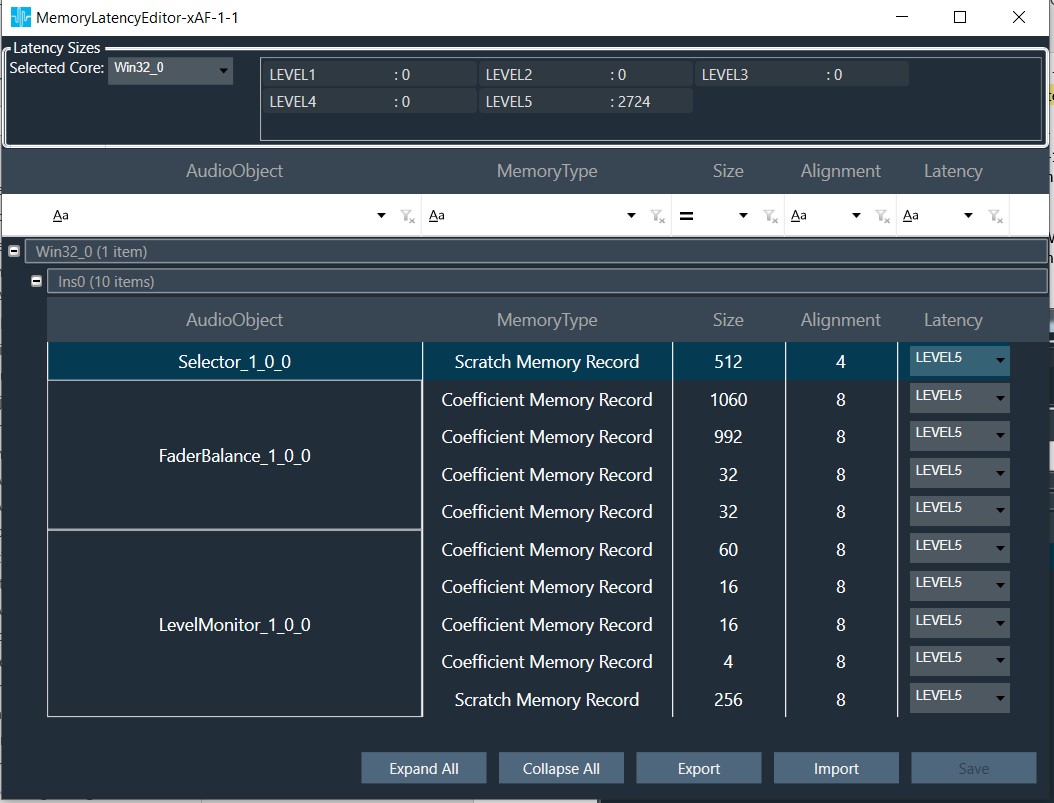
The Signal Flow Designer shall change the latency level (with the drop-down menu) for optimal performance based on the available resources and importance of this particular memory record among the other memory records of the other objects present within the signal flow. The total memory requirement for the signal flow in each memory level is displayed at the top. The desired memory latency table can also be exported to a file / imported from a file.
These memory details are passed to the device as part of SFD.
On boot-up the framework shall parse the SFD data with the DSFD Parser and allocate memory for each object at the configured latency level in the method – initFramework().
7.1.3.Framework Feature Configurability
With the R-Release a new configuration option has been added. By default the high configuration will be build. Following configurations are supported and can be selected:
- low
- high (additional features)
- Swag (Mips & Memory)
- ProbePoint (formerly LiveStreaming)
To utilize this functionality you can append this argument to the python build commands: –featureConfig=high or -fc=high
These two commands result in mostly the same binary but with these exceptions. Low will exclude AudioProcessing and AudioCore and provide only AudioProcessingBase and AudioCoreBase.
When implementing as a platform developer – either with or without AudioCore – you will choose your feature set by choosing which class to instantiate.
Here are examples from our IVP project
Implementing AudioCore for full features (when building with -fc=full) class CVSTCore : public CAudioCore, public CWinCoreShared
Implementing AudioCoreBase for the basic features (no profiling or probe points) class CVSTCoreLite : public CAudioCoreBase, public CWinCoreShared
It is worth noting you can build full and instantiate the lite class – they’re included. You’ll just have to rely on your linker settings to exclude the extra code.
As above – if implementing only for AudioProcessing the same applies. AudioProcessing vs AudioProcessingBase.
7.1.4.ClariFi memory allocation for optimized MCPS on GUL
Some of ClariFi memory records include FFT buffers. The MCPS performance of ClariFi standalone depends on allocation of these buffers to lower memory latency levels. More details on this is available here.
7.2.Queen
7.2.1.Framework Initialization
To initialize the framework platform needs to call only CAudioProcessing::initFramework() which will allocate memory for framework and audio objects and also initialize both framework and audio objects.
7.2.2.Memory Latency Level Configurability
This feature provides control to a signal flow designer over memory latency selected for objects. The SFD designer can configure the memory latency levels using GTT to optimize the MIPS requirement.
7.2.3.In Place Computation
In-place computation feature allows audio objects to convey to the GTT the capability of operating audio object to use same buffers for input and output. Flag isInplaceComputationEnabled can be checked in static metadata of the audio object from signal flow.
For isInplaceComputationEnabled audio objects, the audio object processing states bypass and stop would have the same behavior as bypass has the buffer usage limitation.
7.2.4.Windows application library separation
The build process on Windows was done in one step to generate the library and dll. Now the application has been separated and placed in a new repository – awx_winpc.
Hence forth library generation shall be done in xAF repo followed by dll/application generation in the awx_winpc repo. Same procedure shall apply to build unit test application for Windows PC. To know exact commands refer readMe.txt in the respective repositories.
7.2.5.Core type in SFD
While creating the device user needs to select target core type carefully. SFD might not work if user selected wrong core type because it is used to calculate memory records sizes.
7.2.6.Deprecated xTP commands
Get memory size xTP command is deprecated.
7.2.7.Platform input and output buffers
Since xAF is reusing platform buffers, platform should give pointers to the inputs which has valid and non-overlapping memory.
7.3.Pink Floyd
7.3.1.Memory Reader Official Release
We have a utility called memory reader, which implements the file I/O interface. This class is used to stream data from a memory location as if it was an actual file. Previously this existed only as an internal tech tool, but users have requested it so now it is officially released. You can find the header in the public includes folder, under Interface.
7.3.2.New Core Objects
In this P release, following two new core objects are added:
- Float To Fixed
- Fixed To Float
These objects works as part of the Audio Core class. The object will not handle more than one type of conversion per instance.
This object is used to convert float or fixed to fixed or float. This is typically used for a system which outputs fixed point audio (say 24 bit in integer format) but processes in float.
7.3.2.1.Float To Fixed Core Object
The float to fixed (float2fixed) core object accepts audio buffers that are in floating point format and outputs buffers that are in fixed point format (16-bit, 24-bit, 32-bit etc). The user can configure the scalar value to indicate the required fixed point format of the output samples. This scalar value is multiplied with the floating point input samples to generate the fixed point output samples.
7.3.2.2.Fixed To Float Core Object
The fixed to float (fixed2float) core object accepts audio buffers that are in fixed point format (16-bit, 24-bit, 32-bit, etc) and outputs buffers that are in floating point format. The user can configure the scalar value to suit the fixed point format of the input samples. The fixed point input samples are divided by this scalar value to generate the floating point output samples.
7.3.2.3.Core Objects Design Details
The details given below are common to both the core objects:
- Float To Fixed
- Fixed To Float
Design Variables
- Configurable number of channels
- Supports all sample rates and block lengths
- Floating point scalar value provided as Additional Variable
Platform Dependencies
This core object shall be accessed through the Audio Core class of the xAF framework. The platform shall not directly interact with this core object.
API
During Initialization:
- coreObjectTypeID getType()
Returns the core object ID :CORE_OBJ_FLOAT2FIXED (5) or CORE_OBJ_FIXED2FLOAT (6) - xFloat32 getProcTime()
Returns the duration (in seconds) of one block of data. - xUInt32 getInputSampleRate()
Returns the sample rate the object operates at. - xUInt32 getOutputSampleRate()
Returns the sample rate the object operates at. - xUInt16 getInputBlockLength()
Returns the input block length of the object. - xUInt16 getOutputBlockLength()
Returns the output block length of the object. - xUInt16 getNumAudioInputs()
Returns the number of input channels of the object. - xUInt16 getNumAudioOutputs()
Returns the number of output channels of the object. - xAF_Error init(const CoreObjectInfo& objInfo, memAllocRef allocator, xUInt32& memoryAllocated)
objInfo Struct that has base info and pointer to additional config data
allocator Allocator method
memoryAllocated Variable to return the amount of memory allocated[bytes]
CoreObjectInfo:
xUInt16 numInputs; // Number of channels
xUInt16 inBlockLen; // Input Block Length
xUInt32 inSampleRate; // Operational sample rate
void* coreObjConfig;
Pointer to additional configuration data
Byte 0 – 3: Scalar value (4 bytes)
Audio Interrupts (Algorithm Execution):
- xAF_Error calc(float** inputs, float** outputs)
inputs: Pointer to audio input buffers
outputs: Pointer to audio output buffers
7.3.3.LoadSeti Callback
When a new preset data is to be applied, the instance output is ramped down to mute state and the new preset data is applied before ramping up the instance output to its normal level. This is to avoid any artifacts / glitches. The reading of new preset data from the memory and their application is handled in the function doMuteCycleOperation() that furthers calls the function loadSETIDataFromInterface().
This function doMuteCycleOperation() was a blocking call that might span across multiple audio interrupts [calc()]. To have un-interrupted / non-blocked calc(), provision is made to call back loadSETIDataFromInterface() from a different context. The default callback is provided by the framework that is made public to have the possibility to be called from the custom callback.
Two new public APIs have been introduced:
- abstractedNonBlockingOps() – Default callback function that calls the below function
- handleNonBlockingOps() – this further calls loadSETIDataFromInterface()
API:
/**
* Start mute cycle operation for the instance
* \param cmdHdr To hold details of slot load command and status
* \return Error, if any – this status is if the ‘thread’ was started correctly or not
*/
virtual xAF_Error abstractedNonBlockingOps(CxTPSlotLoadHeader* cmdHdr);
/**
* Handle actual processing of SETI files, could be on alternate thread depending on platform
* Stores state in m_NonBlockingResult
* \param cmdHdr To hold details of slot load command and status
*/
void handleNonBlockingOps(CxTPSlotLoadHeader* cmdHdr);
7.3.4.CAccelerator Class Update
To close the HW accelerator driver properly, the following two APIs were introduced in CAccelerator class.
closeAccelerator() will be called by HAL which further calls closeHwAccelerator() API which will be implemented by platform.
closeHwAccelerator() is a pure virtual function that shall be overridden by the platform code.
/**
* API called from HAL to close requested accelerator driver
* \param isClosed make sure accelerator is closed once
* \param accelerator handle of accelerator
* \return xAF_SUCCESS when successful
*/
static xAF_Error closeAccelerator(xBool isClosed, CAccelerator& accelerator);
/**
* To close Hardware accelerator driver
* \return success if close is successful
*/
virtual xAF_Error closeHwAccelerator() = 0;
7.3.5.Memory Requirement API
A new API retrieveTotalMemUsed () was introduced to track the memory allocation done by the core and framework. This API shall be called from the application to get the memory details.
Another API – resetMemAccumulators() is introduced to clear all the memory counter variables to zero.
API:
/**
* This method is used to retrieve the memory usage numbers
* \param buffer A buffer allocated by the platform
* \return Structure containing all the accumulated memory thus far
*/
tTotalMemoryReq retrieveTotalMemUsed(xInt8* buffer = 0);
/**
* Resets all memory accumulated values to 0
*/
void resetMemAccumulators();
7.4.Oasis
7.4.1.BAO Separation
We’ve separated BAO’s so they can be linked individually to optimize memory. To do this, we have consolidated the method for generating the BAO ‘library’ with the external audio object library.
7.4.1.1.BAO Object Configuration
Basic audio objects (BAOs) can be linked individually, versus linking all of them, to optimize memory.
All BAO’s are always compiled, but linking is controlled by modifying a file which includes object ID’s. Simply comment out an object ID definition from the header belowand re-run the cmake to stop linking an object.
AudioObjectIDs.h
By default, this file is used by the internal CMAKE to select which BAO’s are linked. It is located in public/include. Note, AudioIO and ControlIn are always linked. Users can edit this file directly, or supply their own file.
To supply your own AudioObjectID header :
- Copy the existing AudioObjectIDs.h file to use as your base (these ID’s are important! do not change)
- In your CMAKE which calls the external/src cmake, set the variable below to your header file path
- ID_PATH_BAO
- If you do not set this variable, the script will default to the file in public/include
What happens:
- CMAKE runs a python script which crosschecks all ID’s provided to it through headers, with the include paths provided. (BAO header paths are provided for you)
- All successful matches are added to the external audio object switch statement that creates the objects. This is the only actual reference to the class, and causes the linkage.
7.4.2.Moving configurable BAO header files
The BAOs can be linked individually as discussed in the section – BAO separation.
The header files of all the BAO were inside their respective sub-folders under the folder:
\extendable-audio-framework\private\include\framework
To facilitate the support of linking BAOs on requirement basis, the sub-folders with the header files of all the configurable BAOs under the above folder are moved to the new public folder:
\extendable-audio-framework\public\include\AO
Following are the sub-folders moved:
- basic
- control
- dynamic
- filter
- mixer
- monitor
- routing
- source
Please note that the common utility files under the folders – basic and source – were not moved.
Accordingly the include path of all the files that were using these header files were modified.
Note, this change also took us towards relative include paths to allow simpler setup on external linking. We are moving towards only requiring ‘public/include’ to be added to the include paths. Now all internal CPP files include these headers with relative paths.
7.4.3.Platform API
AudioCore API updates
DequeueAll
There is a new public method in AudioCore that can be used to force dequeueing all messages.
void AudioCore::dequeueAll();
This method simply calls the normal dequeue method with unlimited time. It doesn’t have a purpose in the normal use of AudioCore but is provided in case there is a situation where a message MUST be processed immediately.
AudioCore Buffer Changes
The alignment requirements for AudioCore buffers are updated. The buffers must now be 16 byte aligned. This change is driven by the requirement in AudioProcessing. Note if you use AudioProcessing directly you will have to ensure those buffers are 16 byte aligned too.
To be clear, each buffer within inputs (inputs[0], inputs[1]) must be allocated on a 16 byte boundry.
xAF_Error AudioCore::calc(xAFAudio** inputs, xAFAudio** outputs);
xAF_Error CAudioProcessing::calc(xAFAudio** inputs, xAFAudio** outputs)
Hardware Abstraction Layer (HAL) updates
Following are the additions to the HAL APIs:
/**
* \brief Create the HAL instance in parallel to core class using singleton design pattern method.
* If the API is called first time and instance is not created, API will create instance.
* Otherwise it will return an error for trying to create the singleton twice.
* \param alloc function for allocating memory
* \param dealloc function for deallocating memory
* \param osal pointer to application OSAL
* \return xAF_SUCCESS after successfull instantiation of HAL instance
*/
static xAF_Error createHalInstance(memAllocRef alloc, memDeAllocRef dealloc, COsal* osal);
OS Abstraction Layer (OSAL)
The audio framework and HAL can access OS resources by using the COsal supported by the target platform. The OSAL exposes APIs that can be used by audio framework and HAL to perform their tasks. COsal should be instantiated by the platform similar to instantiating core class. COsal should be instantiated once per device and same instance should be registered for multiple instances of core class or framework instance. The APIs in COsal class are listed below.
/**
* Creates a semaphore object, allocates required resources and assigns the values of maxValue and initialValue to it.
* \param maxValue Maximum count value for the semaphore object
* \param initialValue Initial value for the semaphore object
* \return Pointer to semaphore object.
*/
virtual XAF_OSAL_SEM_HANDLE* osalSemCreate(xUInt8 maxValue, xUInt8 initialValue) const = 0;
/**
* Deletes the semaphore object and releases the allocated resources
* \param sem Semaphore object to be deleted
* \return xAF_SUCCESS when successful otherwise errorcode.
*/
virtual xAF_Error osalSemDestroy(XAF_OSAL_SEM_HANDLE* sem) const = 0;
/**
* \brief Takes the semaphore object if it is available. Otherwise the calling task or thread
* will be blocked. This should not be called from interrupt service routine.
* \param sem Semaphore object for synchronization
* \return xAF_SUCCESS when successful otherwise errorcode.
*/
virtual xAF_Error osalSemWait(XAF_OSAL_SEM_HANDLE* sem) const = 0;
/**
* \brief Takes the semaphore object if it is available. If the semaphore is not available,
* the calling task or thread will not be blocked.
* \param sem Semaphore object for synchronization
* \return xAF_SUCCESS when successful otherwise errorcode.
*/
virtual xAF_Error osalSemTryWait(XAF_OSAL_SEM_HANDLE* sem) const = 0;
/**
* Releases or signals the semaphore object.
* \param sem Semaphore object for synchronization
* \return xAF_SUCCESS when successful otherwise errorcode.
*/
virtual xAF_Error osalSemPost(XAF_OSAL_SEM_HANDLE* sem) const = 0;
/**
* \brief Enables protection for shared resources from concurrency access
* The instructions below this API will be executed atomically
* \return xAF_SUCCESS when successful otherwise errorcode.
*/
virtual xAF_Error osalEnterCriticalRegion() const = 0;
/**
* \brief Disables protection for shared resources from concurrency access
* The instructions above this API will be executed atomically
* \return xAF_SUCCESS when successful otherwise errorcode.
*/
virtual xAF_Error osalExitCriticalRegion() const = 0;
7.5.Nirvana
7.6.Miles Davis
7.6.1.Platform API Changes
Some platform APIs were modified (with CCB approval). These APIs are listed and explained below:
CAudioProcessing related API changes
If using the old-school xAF and are still allocating instances from the platform, this change is now needed:
newly added API`s: see addition
AudioCore related API changes
With the latest AudioCore class in xAF
Audio Core now loads core files itself (the platform doesn’t need to do that anymore)
The platform can still request the memory information (objInfo) from the instance member directly.
newly added API`s: see addition
Deprecating one of the two required platform memory allocators and de-allocators
Prior to M, we had 2 memory allocators (and de-allocators) associated with porting Awx to a new platform.
- The first one was a simple one that takes size and alignment only
- The second takes heap pool requested as well as memory latency on TOP of size and alignment.
In M, we deprecated the simple allocator and switched all components to use the second allocator described above:
- Audio Core ctor:
- Platform memory handler
- xAFInitMasterControl and xAFDeallocMasterControl need to use the second allocator and deallocator instead of the simple ones
- xAFInitMasterPresetControl and xAFDeinitMasterPresetControl need to use the second deallocator instead of the simple ones
- InitializationMsgParser c-tor needs to be passed in the second allocator/deallocator instead of the simple ones
- The SFD and Device Parser init methods needs to be passed in the second allocator/deallocator instead of the simple ones
Switching from Memory Pointers to Memory References
In addition, for all the C++ (non C) classes above, the memory pointers being passed in have been switched to memory references instead.
IO Classes Modification Needed
The File / Flash interface classes implemented by the platform inherit the generic classes and must implement the getInstanceOf method which has now changed to take in an allocator (don’t use new anymore – allocator passed must be used). For example for a file interface for win32 platform, the change looks something like:
7.6.2.Additions
Audio Core
Audio Interrupt Handling
There is no specific API that needs to be implemented to make use of the new strategy – using AudioCore automatically enables using queues for state tuning and control.
Audio Core Helper methods
- getOutputBufferBlockSizes
- getInputBufferSampleRates
- getOutputBufferSampleRates methods have been added to the audio core class and can be called from the platform
Core Output Routing
This method returns the routing of the core output to the platform.
Resetting state history
If the platform detects a NaN or needs to reset the history of objects within a signal flow, an API has been added to allow that. The platform triggers the method and the framework then takes care that all objects reset their history.
From Audio Core:
AudioProcessing
Audio Interrupt Handling
If the Audio Core class is not taken advantage of, then implementing the new audio interrupt handling system for tuning will require that the platform instantiate and implement the queeing as well as call the appropriate tune methods. If the changes below are not done in the platform, then there is no protection against interrupts that could result in audio corruption, NaNs, etc
First, a queue manager needs to be instantiated. This will handle queuing tune state and control messages till the framework is ready to use them.
Second, when a state tuning message is received, call
AudioProcessing –>setAudioObjectStateForQueue() instead of AudioProcessing –> setAudioObjectState()
then add the instruction to the queue manager via
Third, when a control message is received, call
Finally, in the audio interrupt thread, after CAudioProcessing –> calc() is called, call dequeueAll on the queue manage
Resetting state history
The actual resetting of the history has been done for Parameter Biquad, Coefficient Biquad, Crossover Biquad, Tone Control and the delay objects so far.
deinit
deleteStorageInterface
getProcessingState
setProcessingState
HAL Layer
Hardware Abstraction Layer (HAL)
The target platforms have various types of hardware accelerators. These hardware accelerators are used to enhance the processing power of the audio objects. Each accelerator exposes different APIs to use them. HAL comes into picture for unifying the access for various hardware accelerators by exposing common APIs, audio objects can use them to access the accelerator.
The HAL has to be instantiated in shared memory region so that all cores can access it. The API getHalInstance is used to instantiate the HAL. The HAL instance should then be registered to audio core (or AudioProcessing instance), whichever the platform is integrating
To then pass the HAL instance to Audio Core, use CAudioCore::setHalInterface
OR to pass the HAL instance to AudioProcessing, use CAudioProcessing::setHalInterface
7.7.LED ZEPPELIN
7.7.1.Audio Core - Overview
See special addition to release notes here (mostly user info) Release Notes
AudioCore is our new class which represents a core (in xTP terms) and a thread/process in platform terms. This is the first object in the xAF hierarchy that allows the user to utilize different sampling rates and block lengths within its structure. AudioCore has existed behind the scenes for a while but we’re bringing it out into the light in this release.
Audio Core support is greatly expanded in this release. To take advantage of these features, you need to inherit from the base CAudioCore class and implement these methods:
- virtual StaticStorageInterface* getOpenStoragePtr (flashfileType type, unsigned int contextualData, IOBase::AccessMode mode) const = 0;
- method which ties various xAF data types to specific locations on the platform
- virtual extObjDel getExternalObjectDel() const = 0;
- method which provides the framework access to additional audio objects (this was an existing API for CAudioProcessing)
- virtual CTicksFn getTicksDel() const = 0;
- method which provides the framework access to a platform ‘tick’ for benchmarking purposes. (this was an existing API for CAudioProcessing)
- virtual CTimeProfFn getTimeDel() const = 0;
- method which provides the framework access to a platform time (this was an existing API for CAudioProcessing)
Additionally, these methods from ICoreInstanceComms, which CAudioCore inherits from.
- virtual logDel getLog() const = 0;
- this is used to log information from within CAudioCore and CAudioProcessing
- virtual IIPCInterface* getIPCInterface() const = 0;
- returns a reference to the interface which can communicate to the xTPInterpreter
The following are virtual, so can be overridden for specific purposes.
- virtual xAF_Error setInstanceMemoryLatencies(unsigned int instanceID);
- In case a platform wants to override the default memory latencies for various xAF memory banks
7.7.2.Audio Core - Usage
The VirtualAmp (VirtualAmpEffect.h/cpp) files, which are located in the toolbox DLL and VST, will always be the most up to date when it comes to utilizing the xAF API, but we will go over some details here in addition. The VirtualAmpEffect class inherits from both CAudioCore and IxTPInterpreter.
Audio Core
- Implementation
- For CAudioCore to work, the abstract methods in the previous section are required. The platform will implement a class based on CAudioCore for each physical CPU core in the device. See VSTCore.cpp for example.
- Abstract Method Info
- virtual StaticStorageInterface* getOpenStoragePtr (flashfileType type, unsigned int contextualData, IOBase::AccessMode mode) const = 0;
- virtual extObjDel getExternalObjectDel() const = 0
- virtual CTicksFn getTicksDel() const = 0;
- virtual CTimeProfFn getTimeDel() const = 0;
- virtual logDel getLog() const = 0;
- virtual IIPCInterface* getIPCInterface() const = 0;
- Construction
-
- The constructor (CAudioCore(allocatorDel alloc, deAllocatorDel deAlloc, simpleAllocatorDel simpleAlloc, simpleDeAllocatorDel simpleDeAlloc)) requires references to two pairs (hopefully one eventually) of alloc/dealloc methods. These are used to create and destroy various internal structures during process and initialization.
- Allocate and deallocate methods: VirtualAmpEffect
- The constructor (CAudioCore(allocatorDel alloc, deAllocatorDel deAlloc, simpleAllocatorDel simpleAlloc, simpleDeAllocatorDel simpleDeAlloc)) requires references to two pairs (hopefully one eventually) of alloc/dealloc methods. These are used to create and destroy various internal structures during process and initialization.
-
- Core Data
- Currently this is loaded externally and provided via the init method, but by ‘M’ should also be internally created.
- To initialize the required structures, provide a core data file to an instance of CoreChunkParser
- Core Chunk Parser will (if successful) give you two structures
- CoreInfo
- CoreObjectInfo[]
- These are both used to initialize AudioCore
- Core Chunk Parser will (if successful) give you two structures
- Usage
- Open an I/O interface class which derives from StaticStorageInterface (see this) and points to your core data
- Use CoreDataParser
- CoreDataParser will use the interface to the data and decode it into usable structures.
- This method in VirtualAmpEffect accomplishes both steps 1 and 2 : loadCoreInfo
- Create an instance of your CAudioCore class
- In VST we initialize all of the core classes from the same place, this is not likely to be done on platform.
- CVSTCore(CVirtualAmpEffect& dllOwner, allocatorDel alloc, deAllocatorDel deAlloc, simpleAllocatorDel simpleAlloc, simpleDeAllocatorDel simpleDeAlloc);
- m_AudioCores[coreId] = new CVSTCore(*this, allocate, deallocate, allocateMem, deallocateMem);
- Initialize the CAudioCore instance using the structures you retrieved from CoreChunkParser
- retValue = m_AudioCores[coreId]->init((*dynCoreInfo), dynCoreObjectInfo, lObjMemInfo);
- You can retrieve information about the initialized signal flows using various utility methods
- xAF_Error getInputBufferBlockSizes(const xUInt16*& sizes, xUInt16& len); – return the buffers required for each input channel
- xAF_Error getOutputBufferBlockSizes(const xUInt16*& sizes, xUInt16& len); – return the buffers required for each output channel
- xAF_Error getCoreInterruptDuration(xFloat32& timeInS); – return the time in seconds between each calc call
- unsigned int getNumAudioInputs() const { return m_NumInputs; }
- unsigned int getNumAudioOutputs() const { return m_NumOutputs; }
- Finally, the method you call with audio!
- xAF_Error calc(float** inputs, float** outputs); – platform allocates both input arrays and output arrays.
7.7.3.xTP Interface
The VirtualAmp (VirtualAmpEffect.h/cpp) files, which are located in the toolbox DLL and VST, will always be the most up to date when it comes to utilizing the xAF API, but we will go over some details here in addition. The VirtualAmpEffect class inherits from both CAudioCore and IxTPInterpreter.
xTPInterpreter and IIPCInterface
xTPInterpreter is the new xTP utility class. It will process xTP messages which come into the system. It is an interface which will allow you to ferry xTP messages from core to core without worrying about the parsing or command support.
Before we can go too deep into xTP Interpreter, we need to discuss the IIPCInterface class (interface). This interface contains a single method:
virtual int sendIPCMessage(unsigned char* msg, int len) = 0;
This format is the only one used by xAF for core to core communication. The idea here is that the platform provides a version of this class for each route a signal needs to take, say from MCU to DSP1 and then another for the reverse. Implementation can be of any type the platform desires, but this is designed as a blocking call, so the code should spin while waiting for a response.
The parameters are:
msg: the incoming message buffer
len: the length of the incoming message
return value: the length of the returned message.
Note that the same buffer is used for the returned message.
The buffer is currently assumed to be 256 bytes.
For initialization of the interpreter, the platform will provide one IIPCInterface per CAudioCore in the system.
Here is the list of abstract methods required for IxTPInterpreter child class creation. You will create one instance of this per platform and the type is specific to the architecture of that platform.
- virtual xUInt8 getRebootStatus() = 0;
- Returns whether the device needs to be re-initialized or not
- XTP_DEVICE_SIGNAL_FLOW_STATUS_ACTIVE – if no signal flow changes or immediately after successful reinit
- XTP_DEVICE_SIGNAL_FLOW_STATUS_RECREATION_IN_PROGRESS – if re-init is in progress
- XTP_DEVICE_SIGNAL_FLOW_STATUS_MANUAL_REBOOT_REQUIRED – if a manual reinit/reboot is required
- Returns whether the device needs to be re-initialized or not
- virtual xAF_Error initiateReboot() = 0;
- Starts a reboot (or reload)
- virtual xAF_Error loadPresets(CxTPSlotLoadHeader* hdr) = 0;
- Load the presets
- virtual void handleSlotUpdate() = 0;
- Fires when new preset map is received
- virtual char* getProductName(xUInt8& size) = 0;
- Return pointer to product name (max 20 chars)
- virtual xAFMasterPresetControl& getMasterPresetControl() = 0;
- Getter for the instance of xAFMasterPresetControl
Use the initialize method (xAF_Error initialize(IIPCInterface** ipcInterfaces, unsigned int numberOfCores, InitializationMsgParser& msgParser)) to set up the class, once that is done (and successful) pass all received xTP messages into the onXTP method. As indicated in the method arguments, an initialized instance of InitializationMsgParser is also required.
7.8.KISS
7.8.1.Initialization Message Parser - API Update
The process for initializing the InitializationMsgParser has changed. This change helps enforce structure and removes the possibility invalid pointers can be passed in as arguments.
See this CCB ticket for specific details : https://jira.harman.com/jira/browse/COCINTC-2242
7.9.JOURNEY
7.9.1.Multiple Instance Multiple Core support for dynamic SFD with GTT
In order to be able to use dynamic signal flow, a flash/file I/O scheme needs to be implemented on the desired target device. Please refer to Section “Tuning Sets (SETi) implemented” of this document. The way dynamic signal flow works is explained in the sections below.

Signal Design
The signal flow is designed in the GTT. Once completed, it is sent through an xTP message to the xAF. Refer to the GTT documentation for more information regarding how to design the signal flow in the SFD.
Saving the signal flow on target device
On the target device, the xTP layer should have a way to use an instance of InitializationMsgParser class. This class is available in the interface library that is delivered with xAF. Below is an example of instantiating an instance:
Note: initializationParser is initialized in platform code.
When an instance command is received, the reference below should be used to parse the xTP message and store it in flash or where the target device choses. In the file where the xTP message parsing takes place, you should see the following:

Instantiating the Signal Flow from the signal flow stored on the device
Once the step above is complete, the signal flow can be instantiated by rebooting the system. To do this, the following code should be implemented along with the initialization of the framework. You can use the DSFDParser class, which is also included in the xAF interface library. Below is a brief example of how to load one instance onto a given core.
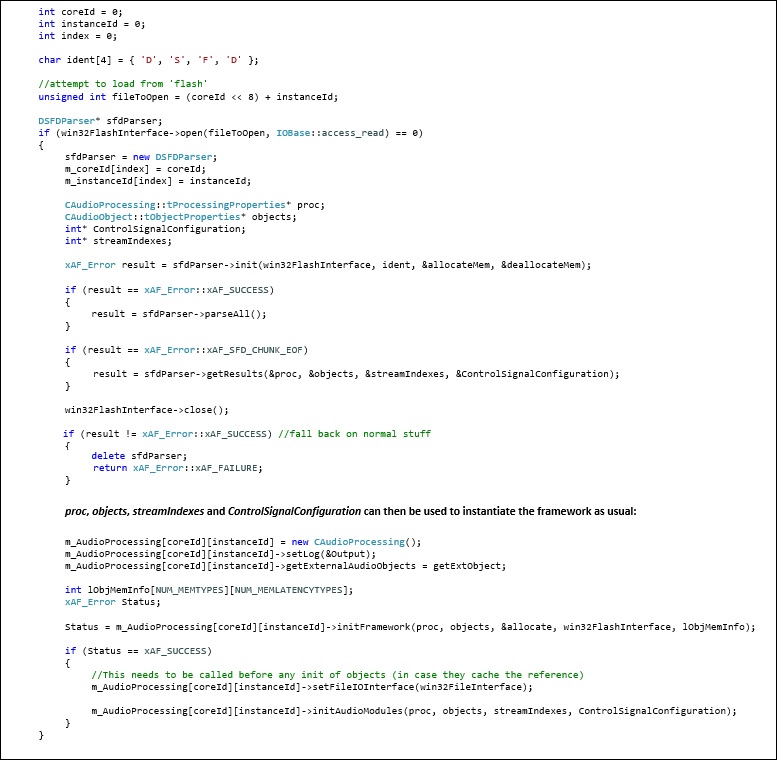
Example Implementation
In current release, examples are available for IVP and Summit. For IVP, the signal flow file, sectXX.flash, is stored in the IVP Plugins folder indicated by user settings. You can find a reference implementation on the xAF repo in the VirtualAmpEffect file at the following location:
On Summit, the SD card is used as a storage medium. You can find a reference implementation on the Summit repo on the xAF_examples branch. The projects that have implemented this are:
- reference/xaf_reference_app/a15_app
- reference/xaf_reference_app/c66_app
- reference/xaf_reference_app/multicore_app
You need to be concerned about the src/audiorouter.cpp file.
Example Link: https://bitbucket.harman.com/projects/GST/repos/car-audio-global-repository/browse?at=release%2FAwx_Journey_10.0.19.25
7.9.2.Control Module Configuration
Just as in dynamic signal flow, a flash/file I/O scheme needs to be implemented on the desired target device. Refer to Section “Tuning Sets (SETi) implemented” of this document. The following explains the way dynamic signal flow for control works.
Master Control Design
The control flow is designed in the GTT. Once completed, it is sent through an xTP message to the xAF. Refer to the GTT documentation for more information on how to design the control flow in the SFD.
Saving the master control data on the target device
On the target device, the xTP layer should have a way to use an instance of the InitializationMsgParser class. This class is available in the interface library that is delivered with the xAF. The InitializationMsgParser can be initialized as it is shown in Section “Multiple Instance Multiple Core support for dynamic SFD with GTT” of this document.
Once it is initialized and xTP message, XTP_DEVICE (0x64), is received, it should trigger the parseMessage as shown below:

Instantiating the Control Module Flow from the Control Flow stored on the device
Once the step above is complete, the master control flow can be instantiated by rebooting the system. To do this, the code below should be implemented along with the initialization of the framework. You can use the DeviceParser class, which is also included in the interface library. Below is a brief example on how to load the master module.

Once m_numPins and m_controlMsgMap are populated, they can be used to instantiate the master module:
xAFInitMasterControl(&g_masterControl, m_controlMsgMap, m_numPins, UNUSED_VAR, memAlloc alloc);
Example Implementation
In current release, examples are available for IVP. The control module file, sect131072.flash, is stored in the AudioFrameworkDLLS folder indicated by IVP. You can find a reference implementation on the xAF repo in the VirtualAmpEffect file at the following location:
7.10.INXS
7.10.1.Master Preset Control Module Configuration
The purpose of this module is to facilitate configuring presets for the entire device containing multiple cores/instances of xAF. Refer to the xAF Specification for more details.
Master Preset Control Design
User can prepare the presets for each signal flow using GTT. Once the presets are prepared, user should prepare slot map which gives information on presets to be recalled for a particular slot. Refer GTT user guide for creating slot map and presets. Each slot can also be configured with fade in, fade out times using which platform can choose to apply Instance mute/unmute while applying a new slot.
Saving the master preset control map file and presets on the target device
Presets and slot map should be prepared and saved using Global Tuning Tool. Saving them on to the device is currently an offline process. Platform has to supply slot map during initialization of Master preset control Module and saved presets should be accessible by the particular cores where presets are recalled.
Presets can also be saved on the device using the procedure saving/loading seti files (more in section “Tuning Sets (SETi) implemented”).
Instantiating the Master Preset Control Module with slot map stored on the device
To instantiate Master Preset Control Module, platform has to load the slot map prepared/saved from Global Tuning Tool. Platform can use the DeviceParser class, which is included in the interface library to parse the slot map. Below is a brief example on how to load the slot map.

Once m_presetCtrlMap is populated with parsed slot map, it can be used to instantiate the master preset control module as shown below.
xAF_Error err = xAFInitMasterPresetControl(&g_masterPresetControl, m_presetCtrlMap, &allocateMem);
After successful instantiation of the master preset control, the default slot gets loaded into the instance(s).
Loading A New Slot
Master preset control module loads default slot during reboot. To load a different slot at runtime, the xTP command 0x64 with function Id 0x02 needs to be sent to the amplifier. Refer to the xTP specification for details on 0x64 command.
This command supports two operations:
- “Get Active Slot ” via operation Id “0x02”
This command retrieves the currently active slot on the device. Platform can call xAFSetActiveSlot() to get Active slot
- “Load Slot ” via operation Id “0x03”.
Load slot command loads the preset as per device id and slot id given in the command.
To load the new slot following steps needs to be performed:

Detail about the APIs used to load a new slot is as below:
- Call xAFGetRampTimes(xAFMasterPresetControl* masterPresetControl, float* fadeInTime, float* fadeOutTime, unsigned int slotId) to get the fade in or fade out time
- Call xAFGetNumPreset(xAFMasterPresetControl* masterPresetControl, unsigned int* numPreset, unsigned int slotId) to get the number of presets for a particular slot
- Call xAFLoadSlot(xAFMasterPresetControl* masterPresetControl, xAFPreset* presets, unsigned int slotId) API to get a list of presets (contains preset id, core id and instance id) for a particular slot
- Call the following framework APIs setInstanceMuteRampUpTime(float val), setInstanceMuteRampDownTime(float val) to set the ramp times for performing instance mute operation
A new slot is applied in steps of instance mute/unmute cycle as follows:
- Call setInstanceMuteState(int val) API to initiate the instance mute. The response xTP command is sent back as the instance mute is in progress (0x01)
- Platform is responsible for polling the status of instance Mute by calling framework function getInstanceMuteRampingState()
- Once Mute is completed platform can apply the preset file using framework API loadSETIDataFromInterface(IOBase* IOInterface)
- Call setInstanceMuteState(int val) to unmute amplifier
- Once un-mute is completed slot is completed and a second response is sent back to
- GTT for indicating a successful load(0x00)
Example Implementation
In INXS-Release, you can find a reference implementation on the xAF repo in the VirtualAmpEffect file at the following location:
7.10.2.Passing in memory allocators and deAllocators to interface classes
In this release, instead of using “new” to allocate heap memory in xAF interface classes, pointers to memory allocator and de-allocator methods are now passed in during initialization:
typedef void* (*memAlloc)(unsigned int, unsigned int);
typedef void (*memDeAlloc)(void*);
This was done for the following classes/structs:
Master Control:
When calling xAFInitMasterControl, the application now needs to pass in an allocator pointer, alloc.
enum xAF_Error xAFInitMasterControl(xAFSMasterControl* p_masterControl, unsigned int* ControlConfig, unsigned int maxPins, unsigned int maxXafInstance, memAlloc alloc);
memAlloc is simply a pointer to a memory allocation method defined by the application:
Similarly, for deallocation, a de-allocation memory pointer needs to also be passed in:
void xAFDeallocMasterControl(xAFSMasterControl* p_masterControlstruct, memDeAlloc deAlloc);
Chunk Parser:
ChunkParser is the base class that multiple parsing classes inherit from including DSFDParser and DeviceParser. When initializing it, the application has to pass both allocator and de-allocator pointers:
xAF_Error init(IOBase* theInterface, char(&identifierString)[4], memAlloc allocator, memDeAlloc deAllocator);
Initialization Message Parser:
This class is responsible for saving the xTP signal flow data into flash/persistent memory on an amplifier. Accordingly, a memory allocator needs to be passed into the method that allows the parser to access the flash memory:
typedef FlashInterface* (*openMemoryStorage_t)(memAlloc alloc, flashfileType type, unsigned int coreID, unsigned int instanceID, IOBase::AccessMode mode);
The allocator and deallocators also need to be passed into the method to initialize the parser:
xAF_Error initParser(openMemoryStorage_t openPtr, memAlloc allocator, memDeAlloc deAllocator);
7.11.HERBIE HANCOCK
7.12.GENESIS
7.12.1.Modified Hardware Abstraction Concept
Refer to the Audio Object Developer Guide for more information on this subject.
7.12.2.0x6B Implemented and Audio Object tuneStateXTP function for dynamic control
The dynamic state write (0x6B) xTP command has been implemented on IVP and Summit. Once sent to the framework, it triggers the framework through setAudioObjectState() which then invokes the audio objects through tuneStateXTP. Dynamic data supports sub-blocks just like tuning data and follows an identical approach for set up and tuning. Refer to the “Audio Object Developer Guide“ for more information.
Below is an example of implementation when a message is received:

Once the framework receives the xTP message, it triggers the audio object through the newly introduced tuneStateXTP() function which operates similarly to tuneXTP(). Refer to the “Audio Object Developer Guide“ for more information.
7.12.3.Library Management
xAF libraries
The xAF is now delivered as a library for IVP, A15 and C66 processors. However, the option to build the xAF from an external repository is still available. Additionally, the xAF is now delivered with an interface library that contains many helper and utility classes. To build these libraries, refer to the “readme.txt“ at the root of the xAF repository. For example: build.py –platform=summit –target=A15 –profile=Release
xAFBAO libraries
The xAFBao is the basic objects library which is delivered along with xAF library. However, the option to build this library is same as xAF library. The main reason of maintaining it separately is to keep framework and basic objects separate.
xAFBasicOps libraries
Standard utility functions and vector related functions are part of this xAFBasicOps Library. Build procedure is same as xAF library.
Compile or configure a project with xAF
Examples on to build and compile a project with the xAF are available on IVP and Summit. To build a project with the xAF audio objects only, you should link the xaf, xafBao, xAFBasicOps and interface libraries. For any additional objects in other repositories, the following needs to be done.
An AudioIds.h file needs to created, for example:

The defined class IDs will be linked once the repository paths are described as follows in a cmake file, for example objectconfigC66.cmake:

And in a CMakeLists.txt file:

Examples are available in xaf_reference_app/ projects in the xaf_examples branch on the Car Audio Repository for Spartan. An example for IVP is available in the xAF repo at the following location:
7.12.4.Additional Object Configuration for Audio Objects
Refer to the Audio Object Developer Guide for more information on this subject.
7.12.5.Object API modified including object modes
Refer to the Audio Object Developer Guide for more information on this subject.
7.12.6.XML flag deprecated
The XML_FILE_CREATION flag has been deprecated. The TOOLBOX_CREATION flag should be used instead.
7.13.FOO FIGHTERS
7.14.EAGLES
7.15.DEEP PURPLE
7.15.1.Background Tasks
For an audio object to use background methods, it should implement the hasBackgroundMethod():
- bool hasBackgroundMethod() const { return TRUE; }
This allows the framework to know that the object will use background methods. Once the framework knows that, it will trigger the audio object’s backgroundMethod() where the object developer implements the required functionality.
On the platform, the application should trigger the CAudioProcessing::executeBGLogic() to trigger the CAudioObject::backgroundMethod().
7.16.COLDPLAY
7.16.1.Method to set control out from one object to another
A new method is added to the audio object class to facilitate writing control from one object to another. Here is an example of the setControlOut method in use:

7.16.2.File and Flash IO Abstraction
The xAF library contains base classes that can be used to implement file/flash I/O on any platform. These classes are:
- IOBase – This is the base class. Any other I/O class inherits from this class.
- FlashInterface – This class inherits the IOBase It is the base class that other classes will inherit from to implement flash access from a given platform.
- FileInterface – This class inherits the IOBase It is the base class that other classes will inherit from to implement file access from a given platform.
You can find the header files for these classes in the xAF repo at public/include/ folder. Examples are provided for IVP and Summit.
IVP
On IVP, the Win32 I/O files are in:
- FlashInterfaceWin32
- FileInterfaceWin32
You can find the source files in the xAF repo at: private/utils/xAFVirtualAmp/interface.
Summit
On Summit, you can find a reference implementation of these files on the Summit repo, on the xaf_examples branch, under customer/reference/xaf_reference_app/interface:
- FileInterfaceSummit
- FlashInterfaceSummit Note: This would be implemented to open a file right now instead of accessing
flash memory.
For example, this is how to use the FlashInterfaceSummit to read data:
FlashInterfaceSummit* flashTest = (FlashInterfaceSummit*)summitFlashInterface.getInstanceOf(); flashTest->open(0, IOBase::access_read);
7.16.3.Logging
The platform can now set a logging function that enables logging in the framework by: setLog. Below is an example of implementing this on Summit.

where logfunc:

7.16.4.Tuning Sets (SETi) implemented
SETI encoding and decoding is supported in the xAF. However, the framework needs platform implementations for NV memory access. It also needs platform implementations for information on how to name and locate the files to save and load, based on the slot number selected. Each instance has its own bank of save’s (the limit is up to the platform). Here is the general flow:
- xTP or platform condition arises to request a save or load (this is per instance and provides a slot number).
- The platform opens the relevant file interface for the instance, operation, and slot.
- The platform passes the open file interface into the framework using one of the following methods:
- xAF_Error CAudioProcessing::loadSETIDataFromInterface(IOBase* IOInterface)
- xAF_Error CAudioProcessing::saveSETIDataToInterface(IOBase* IOInterface)
- The framework will handle encoding and decoding to and from the file interface.
The platform is responsible for choosing how to organize the stored data (e.g., picking file names that will not collide between cores and instances), and opening the file interfaces with the correct privileges (write clear for saving, read for loading).
For information on the SETi protocol itself, see Confluence – GLAHST.