Create the audio object as described above
Build the library for the audio object and create corresponding header file for the audio object library to expose the functions. An example of a header file can be found under external/inc/Template.h
The object header file name should be similar to the audio object class name. For example if the audio object class name is CTemplate, the header file name should be Template.h
Create a header file which contains object Ids for all the audio objects you want to create.
Example object Id should be similar to Figure below. Also find the same file under /external/inc/AudioIds.h
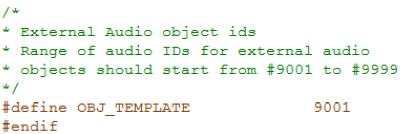
Name of the pre-processor definition should be OBJ_“header file name“. For example if the name of the class is CDcBlocker, then the header file name should be DcBlocker.h and pre-processor definition in AudioIds.h should be #define OBJ_DCBLOCKER 1005
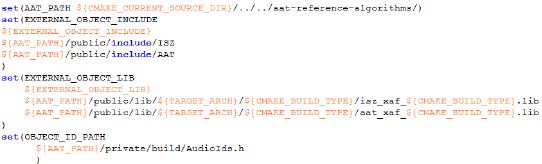
Create a cmake configuration as shown in Figure 17-2and set the following variables
EXTERNAL_OBJECT_INCLUDE: Specify the folders which contains the audio object header files created.
EXTERNAL_OBJECT_LIB : Specify audio object libraries.
OBJECT_ID_PATH: Specify object ID file.
Navigate to external/ folder
Type cmake.exe” . -DTARGET_ARCH=WIN32 -DCMAKE_BUILD_TYPE=Release -DEXTERNAL_OBJECT_CONFIG =”C:/Object_config.cmake”
Note: Assuming Object_config.cmake is under C:/
This will generate the xAFLibraries.sln under external/ folder
Open the solution file with administrator privilege and build the visual studio project
This will produce the xAF Libraries under public/lib/win32/Debug folder if built for Debug mode
and public/lib/win32/Release folder if built for Release mode
The generated libraries will contain the newly created audio object(s)
If user has a MSVC project to build the object library, it can be added to the xAFLibraries.sln for debugging purposes.
Example #1 (Building with cmake on Summit)
Navigate to <car_audio_repo>/customer/reference/xaf_reference_app/c66_app folder and below files are present
- objectconfigC66.cmake
- AudioIdsC66.h
- CMakeLists.txt
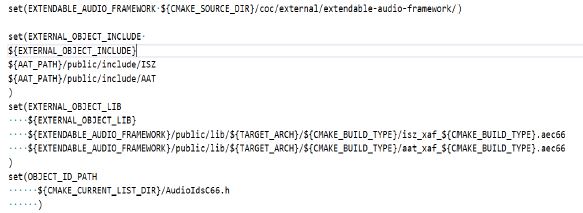
In file objectconfigC66.cmake, the variables EXTERNAL_OBJECT_INCLUDE, EXTERNAL_OBJECT_LIB and OBJECT_ID_PATH are set with audio objects to be built.
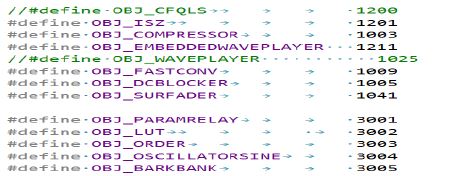
In file AudioIdsC66.h, IDs of the audio objects are present.
In file CMakeLists.txt, add_subdirectory for <xaf_repo>/external folder is done using objectconfigC66.cmake file.
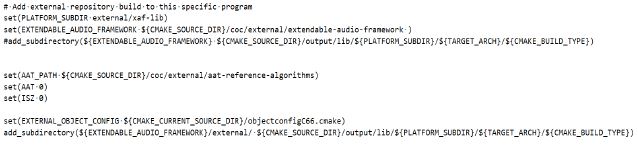
Example #2 (Building with cmake on Win32 )
Navigate to <awx_winpc_repo> folder and below files are present.
- build.py
- CMakeLists.txt
- readMe.txt
Follow the steps listed in the readMe.txt file to generate the xAFVirtualAmp.dll file in the <awx_winpc_repo>/public/lib/win32/Release or <awx_winpc_repo>/public/lib/win32/Debug folder.