Ensure that the hardware is setup as shown in Hardware Setup.
After building the example CCES project, select
-
- Run→Debug Configurations in CCES.
- Create a new Debug configuration under ‘Application with CrossCore Debugger’.
- Select ADSP-SC573 as the “Processor”
- Select Emulator as the “Connection Type”
- Select the platform depending on the debugger used.
- Click finish.
Load the executables in the appropriate slots
-
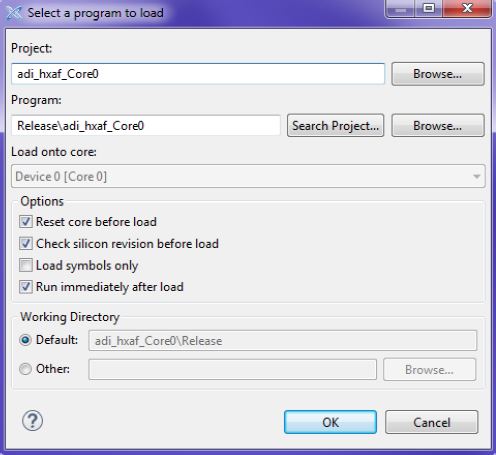
- ‘adi_hxaf_Core0’ onto Core 0 as shown below in Figure below
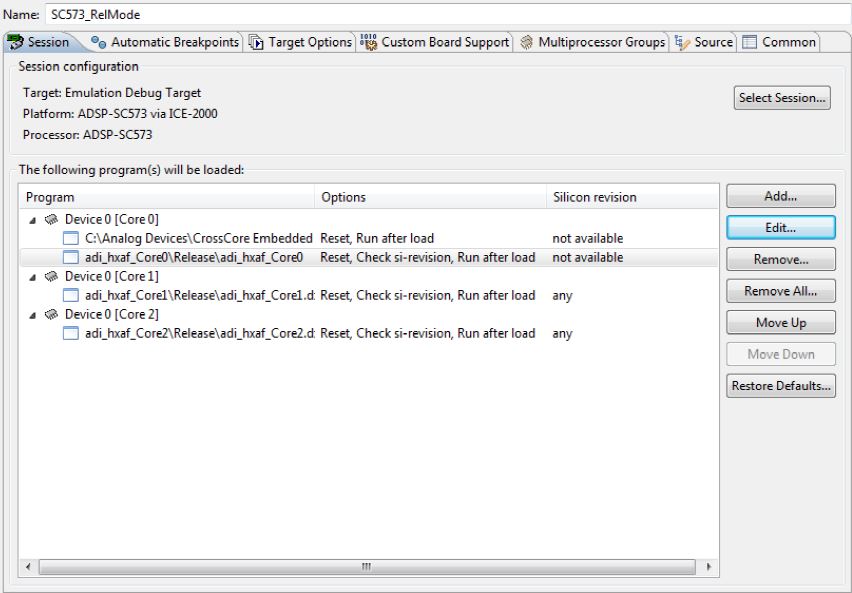
- ‘adi_hxaf_Core1’ onto Core 1 and ‘adi_hxaf_Core2’ onto Core 2
The final configuration should look as shown in Figure below
Select Apply to save the configurations. You can specify a name too at the top.
Do a power reset of the board.
Select Debug to start the process of downloading the software onto the board. Select “Remember my Decision” and yes for all prompts.
Select “Run” → “Resume” for all 3 cores.
Application will load the schematic from flash if a schematic is available and run the schematic else it will wait for the schematic.
While the application is running a new schematic can be loaded from GTT and once the schematic is loaded then the application can be reloaded from CCES to load and run the new schematic. Please see the section ‘Loading schematic’ for more information on how to load the schematics.