Description:
Bass (low frequency) Enhancement is getting popular in the consumer electronics industry where good bass quality is expected from small or flat speakers. Bass performance is lacking in these speakers due to physical limitations and cost constraints. Bass Enhancement solutions are based on the psychoacoustic phenomenon where the human auditory system can perceive fundamental frequency from its higher harmonics. This is done with non-linear operations to generate harmonics that enhance bass virtually.
The AO splits the signal into low pass and high pass based on the tunable cut-off frequency set by the user. The harmonics are generated for the low-pass signal.
Input & Output:
The number of input channels is 2 and the number of output channels is 3.
The input channel order is:
- [1] Left
- [2] Right
The output channel order is:
- [1] Left (High pass filtered)
- [2] Right (High pass filtered)
- [3] Enhanced Mono (Low Pass with harmonics shaping)
Tuning Parameters:
| Name | Unit | Format | Range | Default |
| Bypass | – | int |
0 – Bypass Off 1 – Bypass On |
0 |
| Input Gain | dB | Float | [-30.0,6.0] | 0.0 |
| FcLpIn | Hz | Float | [10.0,1000.0] | 250 |
| DistOdd | – | Float | [0.0,0.5] | 0.1 |
| DistEven | – | Float | [0.0,0.5] | 0.1 |
Control Parameters:
| Name | Description | Range | Default |
| BassEnhancerEnable | BassEnhancer AO On/Off |
0 – Disable 1 – Enable |
1 |
Native Panel
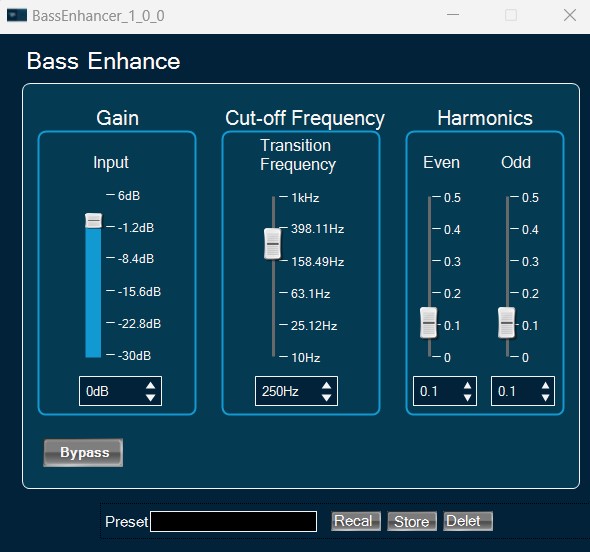
BassEnhancer object supports native panel. The native panel window consists of slider bars for the tuning parameters Gain, Cut-off frequency and Harmonics.
To open the native panel, double-click on the BassEnhancer object in the SFD.