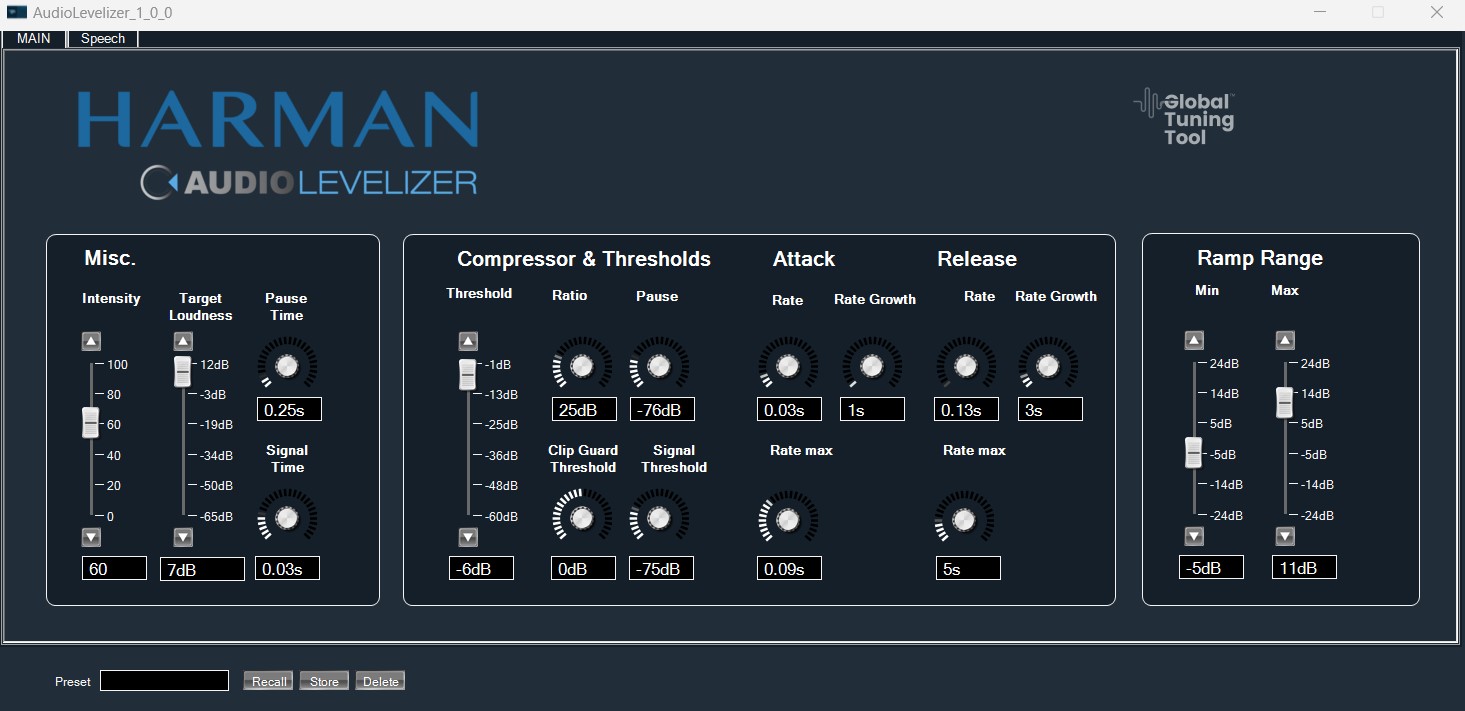
Description:
The AudioLevelizer audio object continuously maintains the perceived loudness of multiple audio sources. It avoids volume adjustments by the user when switching between sources. It induces a fixed latency of 512 samples (~10 ms at 48 kHz sample rate) between the audio input and the output.
It uses TLAM module to reduce the perceived differences in the loudness while it switches between the audio sources. It will use several modules to accomplish this: Delay module, Gain Module, Dynamics Module, Compressor and Statistics Module.
Audiolevelizer does not have any mode of operations or additional variables.
Tuning Parameters:
In the GTT, the AudioLevelizer exposes the following parameters:
| Parameter Name | Data Type | Default Value | Range | Note |
| Intensity | Float | 60 | 0 to 100 % | Sets the balance between dry gain (simple gain determined only by the TargetLoudness control) and wet gain (gain determined by a combination of signal analysis and the TargetLoudness control) |
| TargetLoudness | Float | 7 | -65 to 12 dB | equivalent sound level |
| AttackRate0 | Float | 0.032 | 0.006 to 0.25 s | short term attack rate for overall gain adjustment |
| AttackRateGrowTime | Float | 1 | 0 to 30 s | amount of time from short term to the long term attack rate for overall gain adjustment |
| AttackRateMax | Float | 0.085 | 0 to 0.25 s | long term (i.e. final) attack rate for overall gain adjustment |
| ReleaseRate0 | Float | 0.13 | 0.006 to 12 s | Short term (i.e. start) release rate for overall gain adjustment. |
| ReleaseRateGrowTime | Float | 3 | 0 to 30 s | Amount of time from the short term to the long term release rate for overall gain adjustment. |
| ReleaseRateMax | Float | 5 | 0 to 30 s | Long term (i.e. final) release rate for overall gain adjustment. |
| RampRangeMin | Float | 5 | -24 to 24 dB | maximum allowable attenuation to reach the target loudness |
| RampRangeMax | Float | 11 | -24 to 24 dB | maximum allowable boost to reach the target loudness |
| PauseTime | Float | 0.25 s | 0.001 to 3 s | minimum continuous time the signal must be below the PauseThreshold |
| SignalTime | Float | 0.026 | 0.02 to 0.05 s | minimum continuous time the signal must be above the SignalThreshold |
| PauseThreshold | Float | -76 | -99 to -2 dB | threshold for the signal |
| SignalThreshold | Float | -75 | -99 to -1 dB | threshold for the input |
| ClipGuardThreshold | Float | 0 | -12 to 12 dB | threshold for the maximum allowed peak value |
| CompressorThreshold | Float | -6 | -60 to -1 dB | threshold below which the surround channel compressor is activated |
| CompressorRatio | Float | 25 | 0 to 100 dB | desired ratio of the input to the output gain for the surround channels. |
| SpeechAdjustDepthCenter | Float | 6 | 0 to 12 dB | maximum amount of allowable boost for center channel when speech is detected |
| SpeechAdjustDepthFrontSurr | Float | 0 | -12 to 0 dB | maximum amount of allowable attenuation for the surround and front channels when speech is detected in the center channel. |
| SpeechAdjustAttackTime | Float | 1 | 0.006 to 30 s | attack time for center boost / front attenuation |
| SpeechAdjustReleaseTime | Float | 10 | 0.006 to 30 s | release time for center boost / front attenuation |
| SpeechAdjustThreshold | Float | -6 | -24 to 0 dB | center level threshold for center boost / front attenuation |
Native Panel
Audiolevelizer object supports native panel. The native panel window consists of slider bars and rotary for different tuning parameters viz. compressor threshold, compressor ratio, Attack time, Release Time, Ramp Range etc.
To open the native panel, double-click on the audiolevelizer object in the SFD.