The A15, C66 and M4 xAF libraries for Summit core can be built using the standalone xAF repository. Here are the steps:
Open the command window with administrator privileges and navigate to base directory in the xAF repository:
To build the xAF library for C66:
- Debug mode – Type build.py –platform=summit –target=C66 –profile=Debug
- Release mode – Type build.py –platform=summit –target=C66 –profile=Release
To build the xAF library for A15:
- Debug mode – Type build.py –platform=summit –target=A15 –profile=Debug
- Release mode – Type build.py –platform=summit –target=A15 –profile=Release
To build the xAF library for M4:
- Debug mode – Type build.py –platform=summit –target=M4 –profile=Debug
- Release mode – Type build.py –platform=summit –target=M4 –profile=Release
Note: The xAF library on M4 does not contain any audio objects. It only contains a master control which is hosted on the M4 core.
For the command – build.py –platform=summit –target=C66 –profile=Release – following are the libraries generated in the folder – public/lib/c66/Release:
- xaf-lib_release.aec66
- xAFInterface-lib_release.aec66
- xAFUtil-lib_release.aec66
- xAFMasterModule-lib_release.aec66
- xAFBasicOps-lib_release.aec66
Similarly, other libraries will be generated in their respective folders for the other commands.
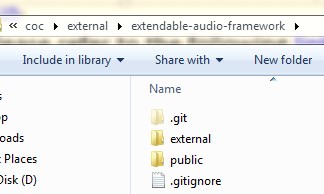
After generating the above libraries, copy the folders external and public (as shown below) into <car_audio_repo>/coc/external/extendable-audio-framework/.
Build xaf_reference_app to generate the Summit binaries.