The Visual Studio sln file, xAFVirtualAmp.sln, is generated and built by Python using cmake. Be sure you install Python 2.7 and add the installed location to the “Paths” environment variable under System Properties.
Configure a Build
By default, the solution virtual device wrapper is configured to work with one instance. If you would like to run multiple instances, you will need to modify the cpp and WinProgram.h files.
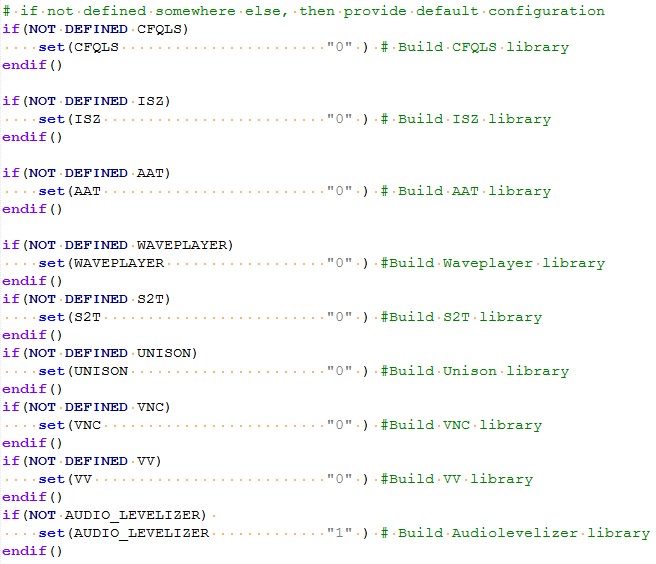
Configure the build by enabling or disabling the audio objects in extendable-audio-framework\build\externalObjConfig.cmake.
You can toggle the fields on and off by setting the macros above to one or zero.
Generate a Build
Open the command window and navigate to the xAF repository base directory.
To generate and build the Visual Studio project for the Win32 platform:
For Release mode, type build.py –platform=WinPc –target=Win32 –profile=Release
For Debug mode, type build.py –platform=WinPc –target=Win32 –profile=Debug
xAF libraries and external objects libraries will be generated in the \public\lib\win32\Release folder for the Release mode and in the \public\lib\win32\Debug folder for the Debug mode.
If you want to open the Visual Studio solution files, go to the output\build_dir_Win32 folder and open xAFLibraries.sln with administrator privileges.
To generate and build a Visual Studio project for the Win64 platform:
- Release mode, type build.py –platform=WinPc –target=Win64 –profile=Release
- Debug mode, type build.py –platform=WinPc –target=Win64 –profile=Debug
xAF libraries and external objects libraries will be generated in the \public\lib\win64\Release folder for the Release mode and in the \public\lib\win64\Debug folder for the Debug mode.
If you want to open the Visual Studio solution files, go to the output\build_dir_Win64 folder and open xAFLibraries.sln with administrator privileges.
To run the xAF unit test:
- Release mode, type build.py –platform=WinPc –target=Win32 –profile=Release –program=unitTest
- Debug mode, type build.py –platform=WinPc –target=Win32 –profile=Debug –program=unitTest
Unit tests are not currently supported on the Win64 platform.
To clean the build artifacts
Type build.py –platform=WinPc –clean
The xAF has tested the solution file using Microsoft Visual Studio 2015 Professional. Older versions may not work.