On successful connection to device user gets the below message box with following options.
- Send – Sends tuning data from GTT to target device.
- Receive – Receives tuning data from target device to GTT.
- Not_Sync – No exchange of tuning data between target device and GTT.
The same message box will have two check boxes.
- Include state data while receive
- By default this check box will be checked.
- Checkbox is checked and receive operation is selected – state data will be received from target device along with tuning data to GTT.
- Checkbox is not checked and receive operation is selected – only tuning data will be received from target device to GTT.
- Include control data while send and receive
- By default this check box will not be checked.
- Checkbox is checked and receive operation is selected – Control data will be received from target device along with tuning data to GTT.
- Checkbox is not checked and receive operation is selected – only tuning data will be received from target device to GTT.
- Checkbox is checked and send operation is selected – Control data will be sent from GTT along with tuning data to target device.
- Checkbox is not checked and send operation is selected – only tuning data will be sent from GTT to target device.
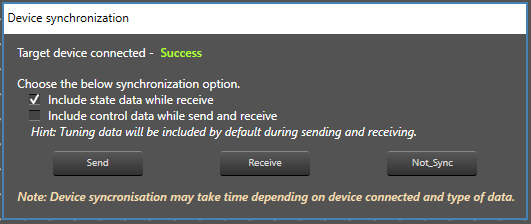
Switching off “Include state data while receive” during receive operation might impact synchronization of some audio object panels.
Sending or receiving data is indicated by a progress window along with a percentage of completion of sending or receiving data. Progress bar will close automatically once the send / receive process is completed.

Progress bar window title will be either “Sending data” or “Receiving data” depending on the functionality user have selected.
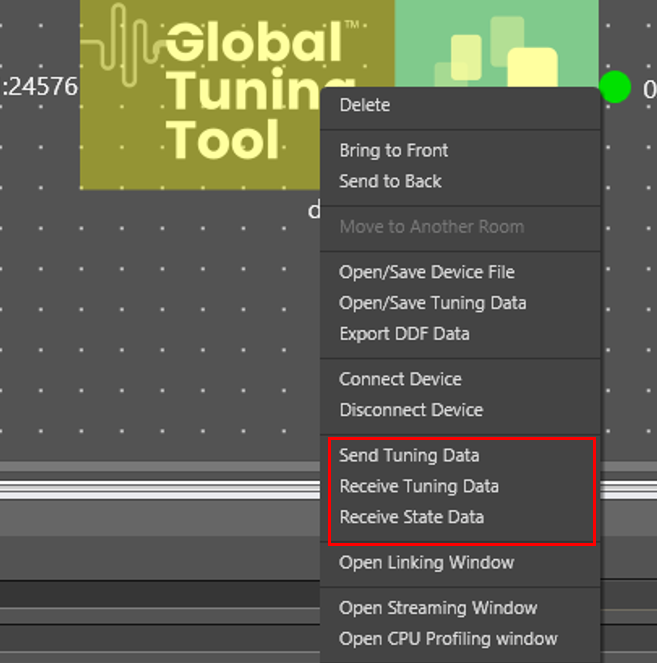
Send and receive operation can be done through device context menu as well. To achieve this, the device should already be in connected state. Following are the options provided as part of context menu.
- Send Tuning Data
- Send tuning data will only send tuning data from GTT to target device.
- Receive Tuning Data
- Receive tuning data will only receive tuning data from target device to GTT.
- Receive State Data
- Receive state data will only receive state data from target device to GTT.
If EOC object is present in the signal flow, Progress window will not show the real progress.