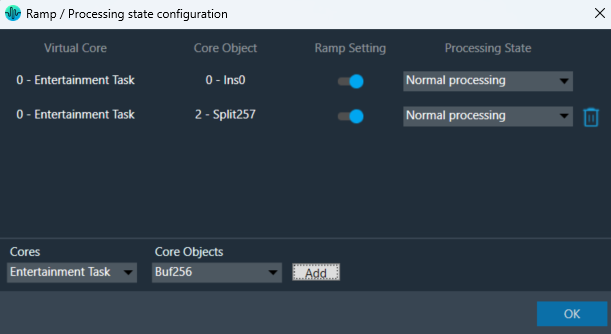
The “Core Object Settings” window is used to control core object transitions and target states. Any core object can be added here optionally, but instances with active set groups for the slot are automatically added.
You can specify which processing state the core object should transition to during the slot load, and if that transition should involve ramping or an instant change.
Core Object Settings includes following processing states:
- Normal Processing state
- Bypass without processing
- Mute with processing
- Mute without processing
By default, ramping is enabled for all instances if not configured. Ramping can be disabled per instances in a core using toggle button.
When Ramping is disabled:
– There is no rampdown to mute phase before applying preset data (but calc is momentarily disabled during the actual load to protect data).
– There is no ramping between processing state changes.

Things to know about this window and how objects transitions will function.
- The ramp time used is configured in the slot, it overrides default core object ramp times.
- Automatically added core objects (instances with active set groups) cannot be deleted from the list.

- You can also manually add and remove other core instances and objects.
If performing control set custom actions or other non preset object tuning – you may end up with multiple ramps (once from core object and once from AO tuning) multiplying against each other.
– When loading a preset though – the tuning method is called with ramping disabled so the object should not ramp.
- Ramp Setting for instances, which load presets function differently than ramp settings for core object switches or instances which do not load presets.
- With Ramping on:
- Core objects and Instances which do not load will use only one ramp if possible.
- example: going from normal to mute we do not need to ramp back up after the mute.
- example: going from normal to bypass we have to ramp down to mute and then up to bypass.
- Instances that load presets will always go to mute for loading the preset and then transition to whatever proper state after.
- Core objects and Instances which do not load will use only one ramp if possible.
- With Ramping off:
- During the ‘muted’ phase which occurs after any rampdowns are finished (if there are indeed rampdowns in the slot) all non-ramping core objects (whether loading presets or not) will instantly switch state to the target state.
- With Ramping on:
Instances which load presets are disabled during the load even if they are unmuted.