Outputs consume Inputs. Whereas Inputs provide data as their function, the output will actually use the data to do something. The data could be displayed or sent somewhere or otherwise processed.
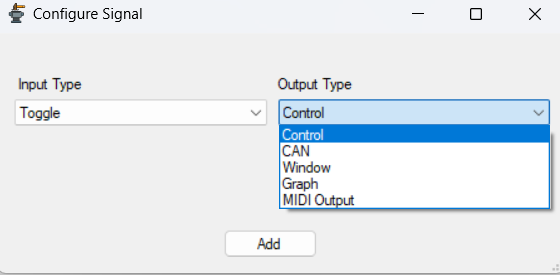
Control: Sends a control message to a connected xAF device, at the rate set by the Signal Rate parameter at the bottom of the panel.
All control outupts will be grouped together in a single message if possible. They all run and then at a final stage they are grouped and sent.
CAN: Opposite of the input CAN but with the same usage. Configure the panel, select a DBC file, select a parameter to encode to.
Window: Show the output value in a floating window.
Graph: Show the output values in a scrolling graph. You can scale the input values by a value, if its useful.
MIDI Output: Opposite of the MIDI input, see “MIDI Input” in Input section for usage. The scale and offset parameters are still scaling first, offset second. You should fit your data into the 0-127 range.