The purpose of the VolumeLite audio object is to control the volume in the audio pipeline. The VolumeLite audio object is light weight and different from “Volume Mute” AO. The object can alter the output volume by either attenuating or amplifying the audio.
This audio object supports ramping and each channel has its own set of – state variables as well as ramping parameters.
Use Case: The object can be used to control the volume of an audio channel.
VolumeLite Properties
Below table describes about the VolumeLite audio object properties and functionality.

| Properties | Description |
| # of Channels | In SFD, the number of channels is specified, and the number of input channels is equal to the number of output channels.
|
| Block Control | The object supports Block Control when the object is configured with more than one channel. It has one block control input which controls the output volume of which size is equal to the number of channels configured for the audio object. Block Control is enabled by default and cannot be disabled. |
Mode
There are no mode available for VolumeLite audio object.
Additional Parameters
| Parameter | Description |
|
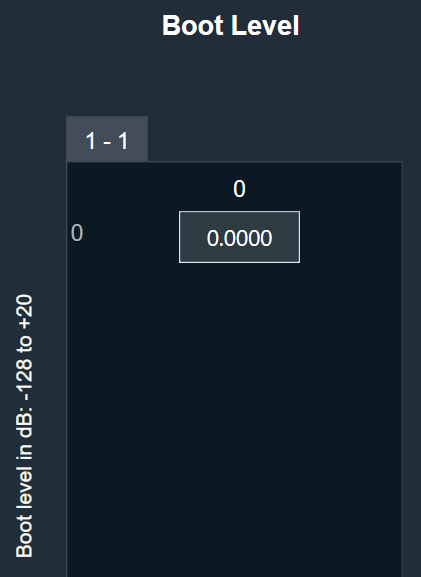
| Boot Level |
It specifies the required volume level at boot time when configured. It is applicable for all the channels. Range: -128 dB to +20 dB. Default: 0 dB |
 |
Tuning Parameters
The following are the tuning parameters that can configure from GTT.
| Parameters | Description | Range | Default | Data Type |
| Ramp Up Time | Ramp up time in ms per channel. | 0 to 1000 ms | 5 ms | Float |
| Ramp Down Time | Ramp down time in ms per channel. | 0 to 1000 ms | 5 ms | Float |
| Ramp Shape | The shape of the volume will change accordingly once it is triggered and applies across all channels. |
|
Linear | ULong |
| Volume | Volume to be applied per input channel | -128 to 20 dB | 0 dB | Float |
All the channels can be tuned with one command as all are in the same subblock compared to Volume Mute object.
Control Parameters
The Volume control is triggered whenever a control message is addressed to the audio object. Block Control is deployed only when object has more than one channel. It has one block control input, the size of which is equal to the number of channels configured for the audio object.
| Parameters | Description | Range | Unit |
| Volume | Volume to be applied per input channel | -128 to 20 dB | dB |
Native Panel
The native panel for VolumeLite audio object is under development.