The Reverb Lite is a reverb algorithm that processes input audio signals by applying artificial reverberation to a dry signal.
Features
- Available in the Immersive Audio section of GTT.
- Supports sample rates: 22.050, 24, 44.1, 48, 88.2, 96, 176.4, 192, 352.8, 384 kHz.
- Supports block lengths from 16 to 4096 in multiples of 16.
- Supports both Win64 and GUL platforms.
Use Case: This audio object can be used whenever you need to apply reverb to a dry signal. It aims to have a low footprint on MIPS as it is an algorithmic reverb instead of performing convolutions with room impulse responses. In the context of immersive audio, one can use it to generate ambience reverb, which needs to be decorrelated if mixed into further channels.
Reverb Lite Properties
Below table describes about the Reverb Lite audio object properties and functionality.
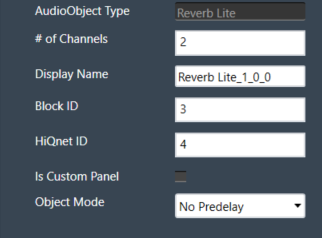
| Properties | Descriptions |
| # of Channels | Enter the number of channels. The number of audio channels it can process is configurable in the SFD.
It supports mono and stereo inputs and the same number of output channels as the number of input channels. |
| Display Name | Display name of the Reverb Lite audio object in signal flow design. It can be changed based on the intended usage of the object. |
This audio object takes the mono/stereo signal as an input and generates reverb from it. The output consists of either the reverb alone (“wet-only”) or a mix between the generated reverb and the original signal. The user can adjust the following parameters:
- Reverb gain, from 0.0 to 1.0
- Reverb time, from 0.0 to 1.0
- Low-pass factor, from 0.0 to 1.0
- High-pass factor, from 0.0 to 1.0
- Pre-delay from 0ms to 500ms (if pre-delay is enabled)
Mode
These are the available modes for the Reverb Lite AO
| Index | Mode | Description |
| 0 | Pre-delay 500ms | Maximum pre-delay of 500ms |
| 1 | Pre-delay Disabled | No pre-delay available. Used to reduce the memory footprint needed by the pre-delay block. |
Additional Parameters
The audio object does not support any additional parameters.
Tuning Parameters
| Parameter | Description | Data Format |
Memory Offset |
Unit | Default Value |
Range |
| Time | Affects feedback damping and output mixing so that a small RT factor resembles a small room, and a large factor approaches infinite reverb time. | float | 0 | None | 0.618 | 0.0 to 1.0 |
| Gain | Linear reverb gain. A value of 0 means no reverb is applied, whereas the maximum gain of 1 applies the maximum amount of reverb in a way that it doesn’t exceed the original signal’s amplitude. | float | 4 | None | 0.25 | 0.0 to 1.0 |
| Lowpass | Internally, three filters are controlled by this, two of them in a feedback path (LP1 and LP2) and PRELP before the feedback path, which affects the reverb bandwidth directly. First order filters are used as they perform well in feedback paths, because they are guaranteed not to exhibit any resonance and offer finer control for soft fadeout of high/low frequencies. | float | 8 | None | 0.75 | 0.0 to 1.0 |
| Highpass | Internally, two first order filters are controlled by this. HP1 as a reverb bandwidth control and HP2 that acts to filter the dampened signal inside the tank circuit. | float | 12 | None | 0.0 | 0.0 to 1.0 |
| Wet only | When set to true, only the generated reverb is present at the output. If false, the input signal is mixed into the output. | ULong | 14 | None | 0 (false) |
0 (false) to 1 (true) |
| Pre-delay | Sets the amount of pre-delay to be applied. Only acts the pre-delay submodule is enabled (Pre-delay 500ms mode) | float | 16 | ms | 0 | 0.0 to 500 |
Control Parameters
There are no control parameters available for Reverb Lite audio object.
Native Panel
Reverb Lite audio object. does not support native panel.