
1.Description
This package contains the DSP framework (xAF), Audio Algorithm Toolbox (AAT), Global Tuning Tool suite (GTT) with embedded Signal Flow Designer (SFD) and AmpSrv2.
- xAF (Extendable Audio Framework) is created to consolidate numerous existing frameworks within Harman into a single vision that provides a single workflow and structure for audio processing development and usage. It is also designed to provide a richer feature set required by internal and external stakeholders.
- GTT (Global Tuning Tool) is a branch of the Audio Architect from Harman’s Professional Division. It focuses on integration of HALO sonic and Audio/Acoustics Measurement, Analysis and Tuning GUIs into one consolidated & comprehensive tool to increase tuning efficiency, performance and quality. It has common interface panels for systems, algorithm designers and developers to ensure seamless and focused development of new algorithms right from the beginning.
- SFD (Signal Flow Designer) is a software component of GTT to create signal flows based on the available audio objects of Harman’s audio algorithm tool-box.
- AAT (Audio Algorithm Toolbox) is Collection of audio objects and audio features. Audio Algorithm Toolbox includes algorithms and technologies for both Audio and HALOsonic.
- AmpSrv2 is a software to connect the tuning tool to either to a physical target device or a virtual amplifier
2.Release Identification
This release is part of a AudioworX release and is delivered as windows installer.
| Release Details | Version | Date |
|---|---|---|
| Release Name | W | |
| Major Release Version (W) | 23.0.0.2427 | 05 – Jul – 2024 |
From L release onwards Harman AudioworX follows the semantic versioning scheme.
3.New Harman AudioworX Features
Check the link for detailed W release scope
LINK: https://confluence.harman.com/confluence/display/INTAXRSDK/Scope+W+Release+23.0.0.2427
3.1.Details on New AWX Features
Below features are developed across the domains of AudioworX ( xAF, GTT ).
Custom actions during Slot load
This feature enables the user to perform custom actions pre/post slot load or pre/post preset load. Following custom actions are supported :
- Configure and set master control pin: Reset the value of a control input. In w+1 will come resending the last received master control (useful on objects like LUT).
- Set Audio object processing state: Change an AO state during slot load, for example switch between high demand AO’s.
- Custom xTP command: send any xTP command you like into the system, or “out” of the system using the “external” version of the command.
These commands can be sent at one of four times during slot load.
- Before the slot load start.
- After the ramp down but before preset load.
- After the preset load but before the ramp up.
- After the ramp up (when slot load is completed).
Key features:
- Ability to send configured custom actions to device online.
- Ability to export configured custom actions.
- Ability to configure Audio object processing state before or after slot or preset load.
- Ability to choose control pin configured in Signal flow and set preferred value before or after slot or preset load.
- Ability to send any xTP command before or after slot or preset load.
- Ability to load the processing state during boot up.
- Ability to Import or Export actions and processing states configured objects will get support in the next release.
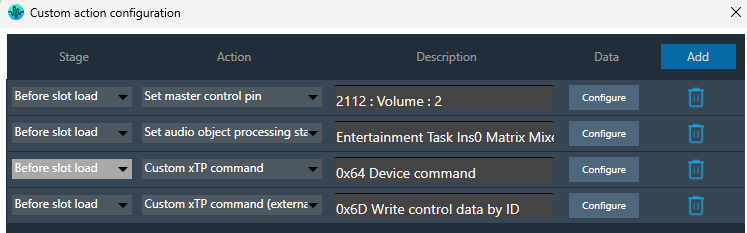
Limitation: Validation of AO States in custom actions if AO is deleted in signal flow will be performed in future release
For more details refer : Custom Action configuration
Core Audio object processing state during slot load
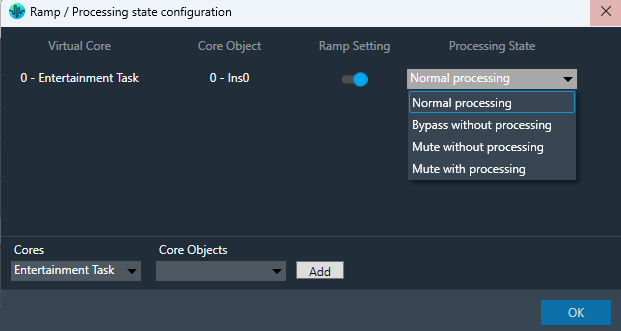
This feature enables user to configure core audio object processing state for individual Slots under Preset Controller
Key features:
– Enables user to change core audio object processing state to
- Bypass without processing: Copies input to output and does execute the core audio object (Saves MIPS).
- Mute without processing: Mutes the output and does execute the core audio object (Saves MIPS).
- Mute with processing: Mutes the output and executes the core audio object (does not save MIPS).
- Normal processing: Normal operational mode.
– Enables user to turn on and off ramping while loading the slots

For more details refer : Core Object Settings
File controller
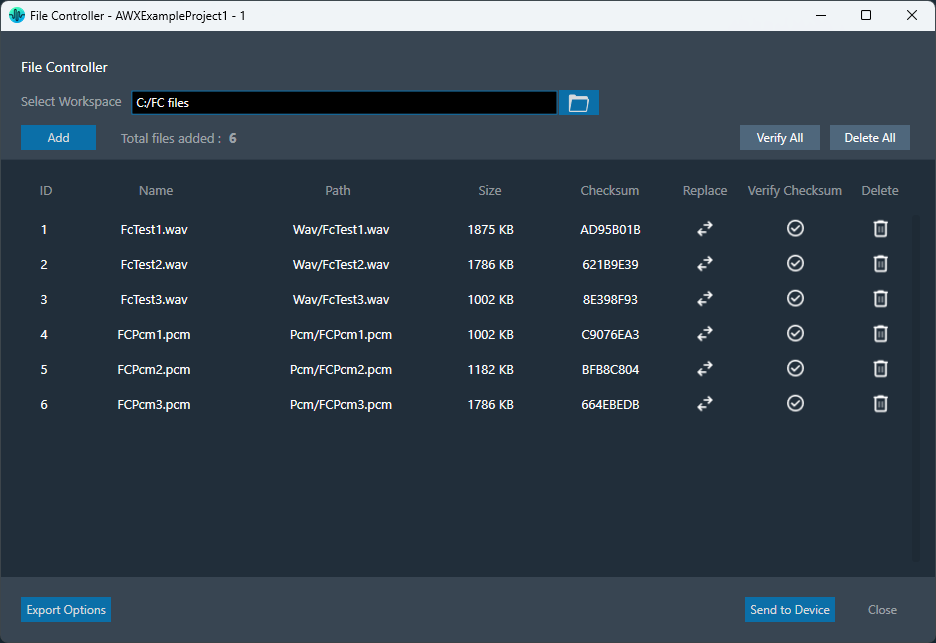
This feature enables the user to flash or export the files from Global Tuning Tool to embedded device. This will facilitate audio object to use the files for different operations. For example: File player utilizes the files flashed using the file controller and performs the file play operation.
Key features:
- Ability to send all the files to the embedded device.
- Ability to export all files and perform offline package for embedded device.
- Ability to verify the checksum from GTT (verifies if file present on GTT and embedded device are same).
- Ability to select workspace for files in GTT.
For more details refer : File Controller
Change Requests addressed
- COCINTC-7543 – AWX to support object bypass/mute/stop without dependency on platform/BSP
- COCINTC-7133 – Change processing state of AOs and xAF instances dynamically
- COCINTC-7084 – Support to bypass instance during startup
- COCINTC-7961 – File Player loading files into GTT
- COCINTC-7184 – Capability to simulate CAN messages in GTT
- COCINTC-7188 – Vehicle Message Record and Replay Capability in AWX
- COCINTC-7187 – GTT Internal and External IP Protection
- COCINTC-7204 – Make AWX available online for public trial
3.2.Details on New xAF Features
Signal Forge (control focused application to compliment GTT)
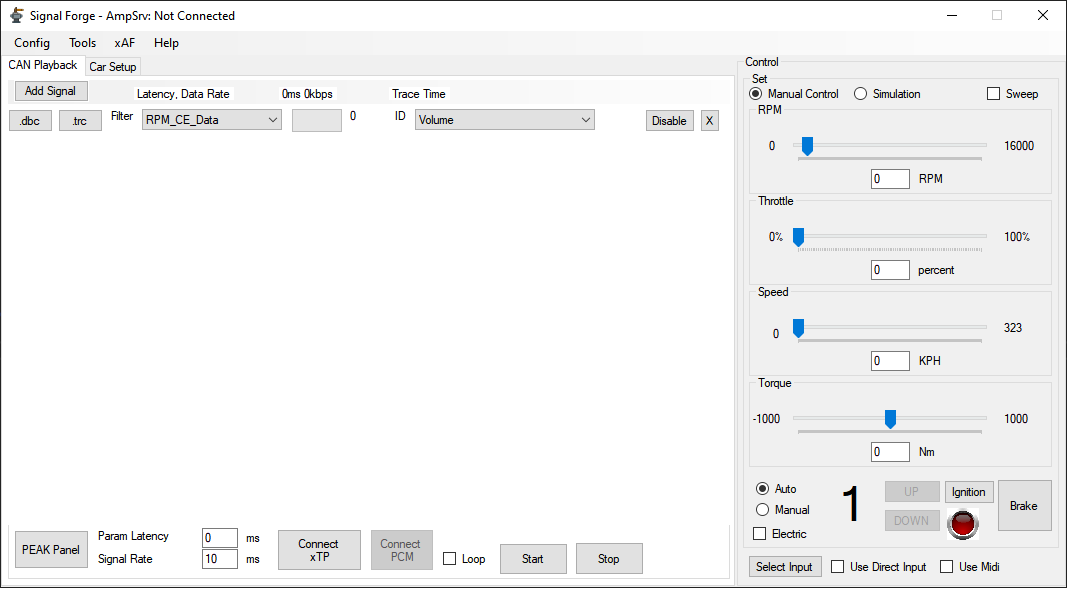
This application is used to route signals between different mediums (any input to any output). It can also be used as a diagnostic tool.
Key features:
- Read vehicle traces (from Vector, Peak, and others).
- Read and write live CAN network data (Peak).
- Read and write live MIDI data.
- Generate engine signals from a basic vehicle simulation (controllable by slider or direct input device).
- Read GTT exported Control Lists.
- Read and write to xTP control signals.
- Diagnostic oriented features:
- Graph and display input values (for diagnostic)
- Send a user specified value (text entry)
- Toggle box (0/1)
For more details, refer SignalForge
File player Enhancements
File player is enhanced with multiple additional features. Below are the new features introduced in the file player
Key Features:
- Support for linear interpolation pitch shifting mode.
- Support Intermittent play mode.
- Support Quick Fade-out.
- Start position as float variable with 2 digit precision.
- File configuration as tuning parameters (enable configuring files at boot time using presets).
- Pitch control in play speed instead of semitones.
- File reset operations to background thread.
- Callback trigger for control out when changes detected on file player state change.
- State variables to read the file player state.
- Ability to work with Filecontroller.
For more details, refer Fileplayer
Logging support from Framework
This feature enables the Audio object and framework developer to introduce logs with different level of severity.
Key features
- Ability to specify severity while adding the logs in AO/framework (‘CRITICAL’, ‘ERROR’, ‘WARNING’, ‘INFO’ & ‘DEBUG’ ).
- By default all framework level logs are enabled up to ‘INFO’ (‘CRITICAL’, ‘ERROR’, ‘WARNING’, ‘INFO’ are enabled) and AO level logs are disabled to reduce MIPS impact.
- Compile time flags to set the log levels.
IVP Performance Enhancements
Below are the enhancements performed for Integrated Virtual Processing :
- Support for multithreading for IVP. Each Virtual core is treated as individual threads. By Default multithreading is switched off.
- xTP processing as separate thread.
- Runtime argument to turn off and on multithreading in VST3.
- Prefill the RTA Channel streams during sound card config.
- Ability to disable plugin host if valid flash files are not present.
SFD metering support
User will be able to monitor control meters for below additional objects :
- LUT
- Control Match
- Control Smooth
- Control Multi Adder
For more details, refer SFD Metering
Delay Matrix Mixer Enhancement & optimization
- Implemented Delay Pool for Delay Matrix mixer AO.
- Enables user to save memory by having Delay pool instead of Channel based max delay configuration
- Delay matrix mixer is optimized by 50%.

Other changes for BAO, IVP/RTA
- Control Math :Added two new modes to the control math object: argmax and argmin
- Splitter : Support for multiple inputs. Enables user to use one audio object instead of multiple AOs in signal flow
- Parameter sets :
- Refactor slot operation to reduce heap size.
- Reduce file close operation.
- API Change for preset optimization (Added slot id for CxTPInstanceOperationHeader ).
MISC Improvements
- Misra warning fixes/improvements
- 1.5K Misra warnings are addressed in xAF and BAOs
- Code coverage improvements
- FastConv
Change Requests addressed
- COCINTC-8106 – [File Player] have “Function” tuning parameter for each channel
- COCINTC-8105 – [File Player] support Quick fade time
- COCINTC-7959 – Functioning File Player with Halo ESS and AVAS
- COCINTC-7853 – File Player callback after each state change
- COCINTC-8223 – File Player Support Interval mode
- COCINTC-7466 – Enable use of MIDI to change control master pin / control signal values
- COCINTC-5613 – Midi input into GTT
- COCINTC-2472 – Virtual amp midi input
- COCINTC-7549 – Debugging Capability in AWX
- COCINTC-8157 – Logging level API changes
- COCINTC-7729 – Add two new modes to the control math object: argmax and argmin
- COCINTC-7842 – Splitter support for multiple input channels
- COCINTC-7586 – Virtual Amp multiple core support
- COCINTC-7738 – Update the functionality of genAudioObjectsLibH.py script
- COCINTC-7697 – Add the requested Slot Id information to the CxTPInstanceOperationHeader
- COCINTC-7700 – Refactor the slot load handling to reduce required heap memory
- COCINTC-8082 – Refactor the slot load handling to reduce required heap memory
- COCINTC-5044 – How to migrate sizeof for pointer when using 64 bit build system for virtualAmp with Q or R xAF
- COCINTC-6743 – We need some way when launching GTT to inhibit the take over of audio devices on the PC
3.3.Details on New GTT Features
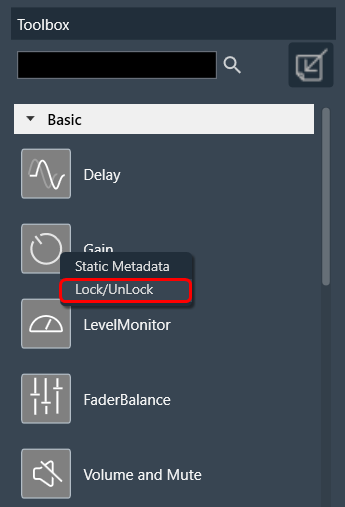
Securing AWX Audio Object
This feature enables user to secure an audio object from exposing state variables, tuning and presets in the signal flow.
Key Features
- Ability to Secure Audio Object in SFD using password.

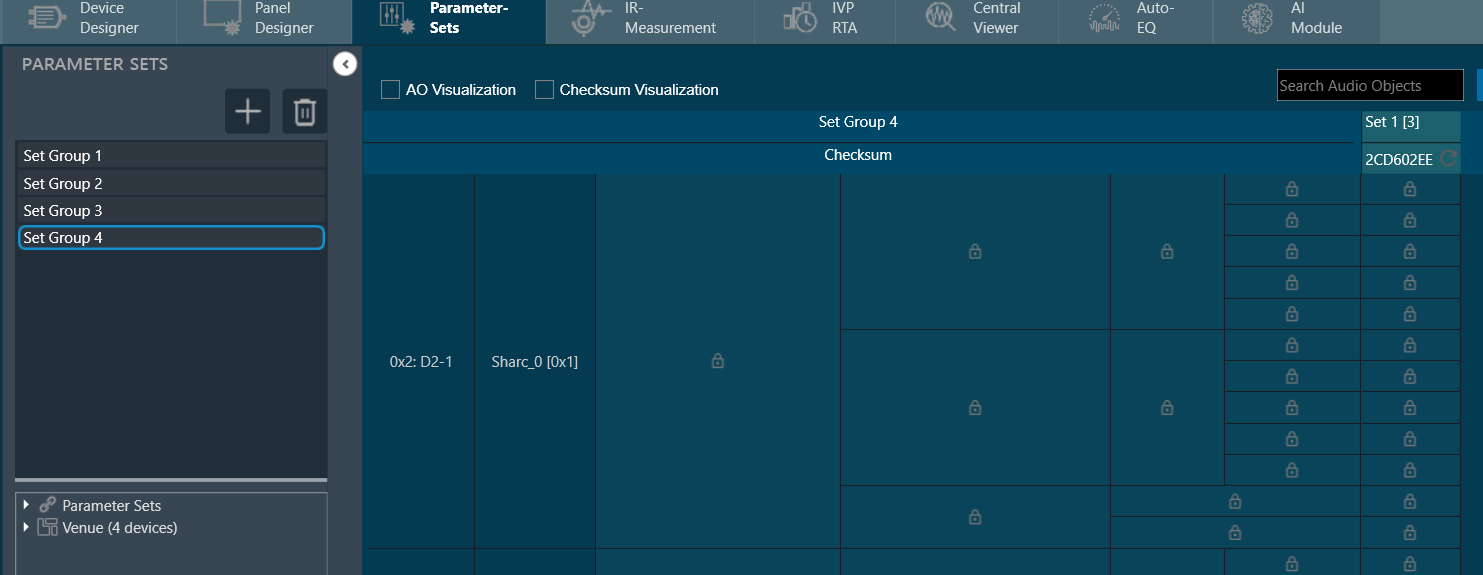
- Hide AO presets in parameter sets.
- Ability to save .set file with secured AO and load it back in parameter sets.
- Support hiding information of Secure Audio Object in Parameter Set View.
- Block native panel/custom native panel.
- Restrict copy, paste, delete operation on Secure Audio Object.
For more details, refer Securing Audio Objects
Custom Actions on Slot Load
This feature enables the user to perform custom actions pre/post slot load or pre/post preset load. Following custom actions are supported :
- Ability to configure the custom actions in Preset Controller as slot map.
- Ability to send configured actions to device for each slot.
- Custom actions supported are
- Change control
- Perform AO processing state
- Perform custom xTP
- Perform control refresh given an ID (xAF only PoC)
- Ability to configure processing state of core objects for each slot in Preset Controller.
- Ability to send processing state of core objects for each slot.
- Ability to persist Core audio object state
- Ability to make audio object processing state persistent
- Ability to load the processing state during boot up
- Ability to load Core audio object state during boot up
- Ability to Import/Export actions and processing states configured.
File Controller
This feature enables user to have centralized file controller. Below are the additional feature from UIUX
Key Features
- Ability to flash the files (wave and PCM) for wave player.
- Centralized file controller (similar to MPC).
- New File controller Option for device..
- Option to set Workspace.
- Support to Select .wav &.pcm file, persistence of relative path and File name.
- Send file & file map to Device.
- Export file map.
- Store file details to gttd file.
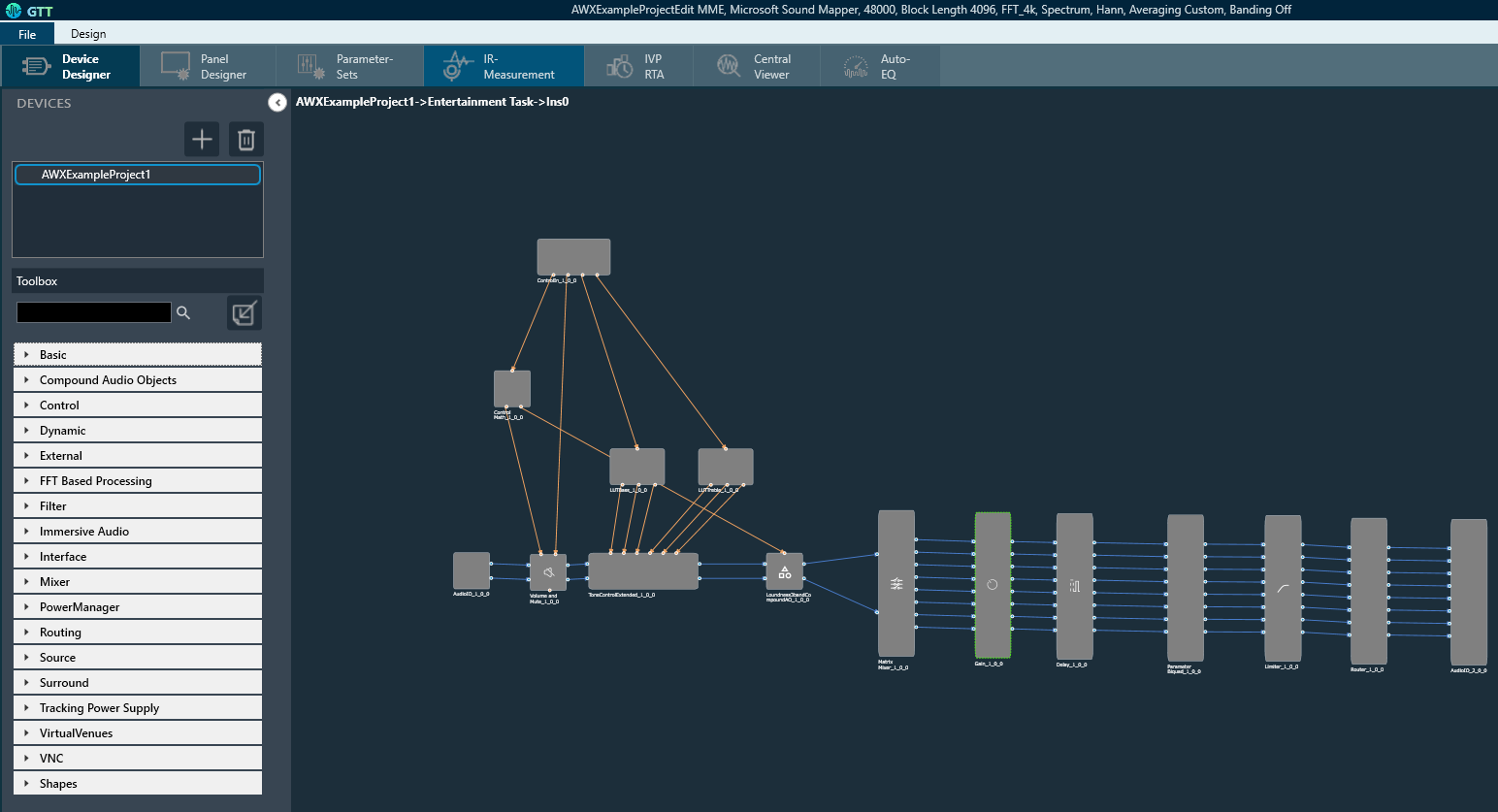
UI/UX New Workflow
Enhanced UI/UX
- Provides keyboard short cuts for operation in main screen.

- New Ribbon Menu Implementation.
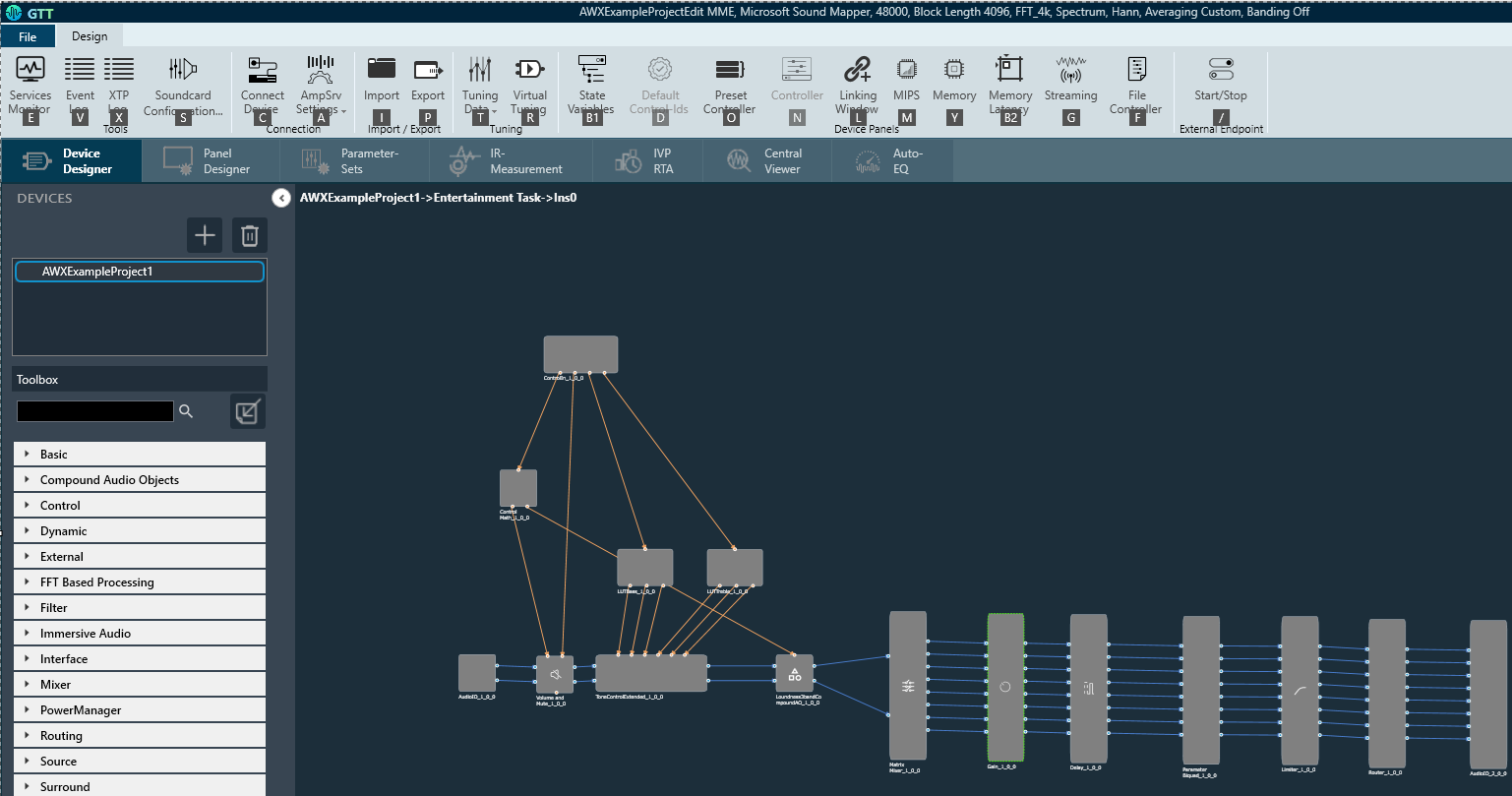
- Landing Page based on new UI/UX workflow.
- Option to Navigate to Preset Controller from Parameter Set view.
IVP/RTA Feature Updates
- Implement D weighting.
- Indicate new Measurement when a measurement is taken.
- Prefill the RTA Channel streams during sound card config
- Display channel entry in Legend for Export the graph as image
- RTA Export graph data -Support comma (,) as Seperator in place of dot(.)
- RTA Advanced settings as Non modal window
- Improve accuracy of Averaged trace RMS SPL values with weighting (ABCD)
- Provide indication of Selected Weighting (A B C) in Ribbon bar live channels view and channels viewer.
- Display all Weightings (Default and ABCD) values in Trace Properties view.
- Use Calibration Unit as Unit of Magnitude Axis in Spectrum Graph.
- Ability to detect Mono sound in sound out devices in GTT.
- Retain trace selection for exported trace list in .txt format.
- RTA for exported trace in .txt format settings details (FFT size, sampling frequency, averaging) is included.
- Ability to copy RTA graph to Clipboard.
Central Viewer Feature Updates
- Capability to perform redo measurements for specific speakers. Re-measured instance can overwrite or append to existing session.
- Capability to export graph data from Central Viewer
- Ability to Import Frequency domain data text files.
- Persistence of Curve Order for Permanent Curve.
- Central Viewer -Waterfall.
- Ability to load Hats text files in Central Viewer.
Halosonic Feature Updates
- EOC NG Phase 2 – VM 1.0 native panel request.
- RNC Native panel updates for RNC Diagnostics.
- GNS Panel- Support Drive Mode.
GTT Performance Improvements
- Performance improvement for project export.
- Save set files.
- Adding a Group or New Set.
- Delete Object from Parameter Set.
SFD Metering Enhancements
- Ability to perform Undo Redo operation for Added /Deleted Level meters.
Native Panel and Update
- Decorrelation Panel for Immersive audio use case
- Logarithmic Scale for Gain Panel
- Display attenuation in Limiter Panel
Auto Eq Updates
- Region based target curve
- Summed speaker frequency responses
- Dynamic update of chart
- Persistence of Optimization Result
- Change of Default Warning Message
- Display New /imported measurements in AutoEQ Tab
- Delay Time Per Channel warning.
Measurement Module Updates
- Option to improve measurement precision by applying compensation of amplitude response of the microphone.
- Interface to display status of MM service and option to start it from application.
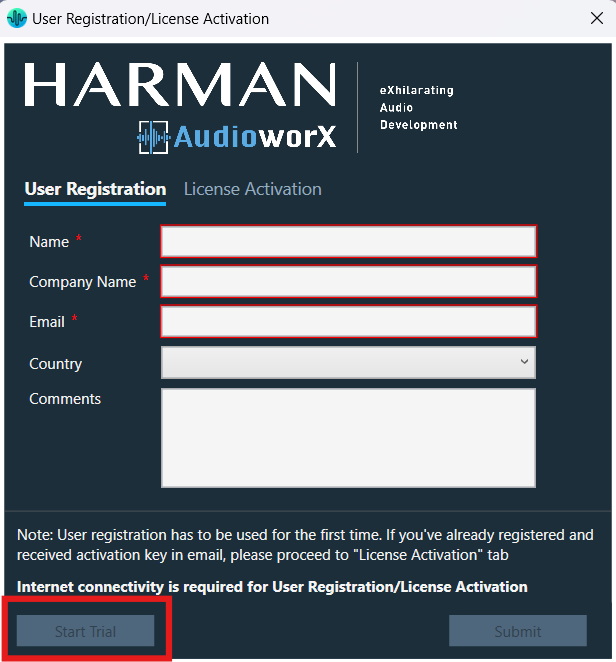
GTT Trial Licensing
This feature enables user to use Global Tuning Tool with trail license
Key features
- Ability to run GTT in trail mode. Trail is enabled for 91 days
- Display License Model and option to upgrade from trial license to subscription
Change Requests Addressed
- COCINTC-7975 – FIRMIMO doesn’t allow full configurability like FIRAMIMO
- COCINTC-7264 – Move RTA meters from Menu Bar to graph area
- COCINTC-5941 – Re-Work Ribbon Bar to improve tab handling
- COCINTC-6760 – DLL library of all revisions that can be accessed by ASE team members
- COCINTC-7960 – Required units are not listed in Device Description File
- COCINTC-2135 – Add support for ‘samples’ unit type in GTT
- COCINTC-7292 – Preselection of OK button on saving Xaf instance with unconnected pins
- COCINTC-6198 – Change the error message when there is a framework version mismatch
- COCINTC-7770 – CAOs can´t be renamed
- COCINTC-7841 /COCINTC-7815 – IMAU – Native Panel for Decorrelation AO
- COCINTC-7964 – AutoEQ for customers
- COCINTC-7451 – AutoEQ: Per Region Target Curve
- COCINTC-7450 – AutoEQ: Summed speaker frequency responses
- COCINTC-7967 – [JLR: Customer HANAS-149] : Project export from GTT (Release V) too slow.
- COCINTC-8209 – GTT LUT Seamless movements
- COCINTC-6765 – GTT State Variable Explorer – Sorting Options
- COCINTC-5508 – SignalFlowDesigner Icons
- COCINTC-1139 – GTT – make all GUI elements operable using a keyboard
- COCINTC-946 – New MM IR – Compensation of microphone response
- COCINTC-4431 – New MM IR – overwrite measurements (re-acquire) from a trace in the IR Viewer
- COCINTC-8110 / COCINTC-7827- Export Graph data from Central Viewer
- COCINTC-6488 – [RTA] – Implement D weighting
- COCINTC-6602 – [RTA] Export graph data
- COCINTC-6575 – [RTA] GUI – Final measurements – flag when a measurement is taken
- COCINTC-5990 – Native gain panel – Set default scaling to log
- COCINTC-5999 – [Central Viewer] – Waterfall
- COCINTC-8042 – HALOSonic: GNS Native Panel Support Drive Mode CCR
- COCINTC-7801 – HALOSonic : RNC native panel update CCR for RNC diagnostic
- COCINTC-7595 – AutoEQ :Fetch new made/imported measurements
- COCINTC-7593 – AutoEQ :Too many “Please select region” messages shown
- COCINTC-7984 – AutoEQ : Change the default warning message
- COCINTC-7479 – AutoEQ : Dynamic update of chart
- COCINTC-7590 – AutoEQ : Delay Time Per Channel doesn’t warn you if not compatible .autoEQ settings are imported
- COCINTC-6884 – Matrix Mixer Panel – Copy Table to Excel Format
- COCINTC-993 – On/off button on groups of linked controls
- COCINTC-4489 COCINTC-8014 – Default Audio Library gets silently changed
- COCINTC-7262 – Missing library description
- COCINTC-7946 – We need GTT to be compatible with HATS files.
- COCINTC-7206 – Import new dll in GTT should save latest used path
- COCINTC-7818 – [RTA]Display all Weightings (Default and ABCD) values in Trace Properties view
- COCINTC-7817 – [RTA]Provide indication of Selected Weighting (A B C) in Ribbon bar live channels view and channels viewer
- COCINTC-7824 – [RTA] By default select configured channels in Ribbon Live channels
- COCINTC-6186 – Add reset functionality to Memory Latency Window
- COCINTC-6187 – Show sum of memory for selected/displayed records in Memory Latency Window’
- COCINTC-6111 – [GTT] Limiter GUI does not display gain transfer diagram
- COCINTC-7138 – Creating/Deleting/Modifying parameter sets in GTT T+3 release takes around 3-4 seconds
- COCINTC-7903 – [JLR]: Adding a button in the Parameter Settings to facilitate the conversion of “metadata” and its subsequent merging with “user data”.
- COCINTC-7649 Graphical and Data Export Functions (Legend placement and Image dimension is improved)
- COCINTC-7531 Losing Matrix settings when adding inputs.
- COCINTC-7470 LUT Load Optimization
3.4.Details on New AAT Audio Objects & Features
X-Release
HiRes Audio Object
- The venue verb newly supports 96kHz sample rate which is verified successfully
W-Release
ALA Control Audio Object
- The range of accepted values for the tuning parameter “Compander Threshold” of the ALA Control AO is updated from (-140, 10) to (-140, 0)
Audio Levelizer 2.0
- Continuously maintains perceived loudness of different audio sources
- Provides single and multi zone configurations to group mono, stereo and 5.1 input channels
- Supports
- Sampling rates 48kHz, 44.1kHz
- Block lengths 16, 32, 64, 128, 256, 512, 1024, 2048 and 4096.
Immersive Audio Compound Audio Object
Premium Surround (2D)
- New upmix algorithm from stereo to 7.1.
Premium Immersion (3D)
- New upmix algorithm from stereo to 7.1.4.
- Supports 4 height speakers to give 3D effect.
- Supports
- sampling rates 24kHz, 48kHz, 96kHz
- block lengths 128 & 256
Bass Management Compound Audio Object
- Deprecated Bass Management compound audio object
Power Manager Audio Object
- Updated the units of tuning parameters Short-term Average Time and Long-term Average Time from “ms” to “s”
Compressor Audio Object
- resetObjectHistory API added
- Updated the range of tuning parameter LookAhead Buffer Size. Upper limit changed from 0.001 to Max Delay (Configurable parameter)
- Updated object modes of operation: One Set and Multi Set
- Updated the set-wise tuning parameters and attenuation parameters for Multi Set object mode configuration.
- Updated the common tuning parameters and channel <n> SetId parameters for Multi Set object mode configuration.
Compander Audio Object
- resetObjectHistory API added
FIR MIMO Audio Object
- Added new additional configuration parameter DownSampling factor, to select sampling rate for low rate filter. Downsampling factors of 4 and 16 are supported.
- Added support for Coefficient format. Filter coefficient of 32 bit float and 16 bit formats are supported. In 16 bit format Q15 fixed point and float16 formats are supported. When Q15 format is selected the coefficient value needs to be in range from -1.0 to 1.0.
- When 16 bit formats is selected GTT will convert float 32 bit coefficient values loaded through CSV file to 16 bit format before sending tuning data.
FIRA MIMO Audio Object
- Separated the memory records corresponding to the input, output and filter coefficient buffers accessed by each of the available hardware FIR accelerators in SHARC ADSP-21593 to facilitate placement of buffers in separate DDR3 memory banks for enhanced accelerator performance.
- Under ideal conditions where the buffers accessed by each accelerator are in different memory banks, the improvement in the total number of FIR filters that can be in the dual accelerator mode was observed to be 90% compared to the single accelerator mode.
VNC ALA CAO
- Two project variants are provided. VNC+ variant uses Noise Estimator. VNC variant is without Noise Estimator
Change Requests Addressed
- COCINTC-7975: FIRMIMO doesn’t allow full configurability like FIRAMIMO
- COCINTC-7162: CLONE – Long-term solution to get FIRAMIMO fully working when DSP load is high
- COCINTC-5861: Compressor Link option missing
- COCINTC-7944: Beep Tone generation on C66x for Hermes Platform
- COCINTC-8012: FIRMIMO: Add downsample mode configurability
- COCINTC-1106: FIRMIMO: Storing FIR coefficents as 16bits
- COCINTC-8065: IMAU – Premium Immersion CAO Productization
- COCINTC-7937: VNC Tuning parameters
- COCINTC-7660: CLONE – Support for mid range tone control gain from VNC Control AO
- COCINTC-7894: Online GTT Documentation – Mono Detection
- COCINTC-8185: Compressor channel linking
- COCINTC-8142: IMAU – Premium Surround Productization – Memory Optimized Version
- COCINTC-4575: Audio Levelizer AO can’t meet customer requirement
- COCINTC-8144: VNC/VNC+: CAO Alignment with ASE
- COCINTC-7917: Compressor with separate tuning controls for channels
- COCINTC-7588: ALZ2.0 – Productize into official AWX release
- COCINTC-8177: [Hermes] – Support required to chose the existing BAO’s to perform boosting of lower input level signals
- COCINTC-7965: ALZ2.0 required for GM
- COCINTC-8064: IMAU – Premium Surround CAO Productization
- COCINTC-7028: CLONE – Enable 2 HWA For FIRAMIMO in ADSP21593/SC593
3.5.Details on New AudioworX RSDK Features
- No updates
4.General Limitations
- Compound Audio Objects (CAO): Compound Audio Objects only are supported with the release 11.0.19.37 and newer. If a project that contains CAOs is used with an older DLL than of INXS release, unexpected results can happen and therefore it is strongly recommended not to use CAO with any DLL prior to the official DLLs of INXS release (9.0.19.13).
- Xover Panel: It is supported from audio library version 13.0.0.2016 (M-release) onwards, and will not launch with older versions.
- Importing projects into AWX P-release, which are saved with older release and contain LUT audio object.
- It is recommended that the tuning set (*.set) file of the project/device should be saved for the older project in existing version of AudioWorX/GTT, before upgrading to S-release and importing the project.
- After S-release has been installed, the existing project may be opened using ‘Import project’ option.
- It is possible to see either or both of the following messages on GTT after the import:
- Can’t load tuning data: Object LUT_Tab_*(****) does not exist (***): This message can be bypassed (by clicking ‘ok’) and should not lead to any issues further on. Upon occurrence of this message, user will find that the data in the LUT native panel has been erased. In such a scenario, it is recommended to simply use the tuning data set file saved earlier to populate the object. ‘Load tuning set’ should work without any issues.
- GTT warning about LUT object being outdated/LUT AO greyed out in GTT: In this case, the user must replace the LUT object with fresh instances, set the correct configuration as before and then use the saved tuning data to populate values. ‘Load tuning set’ should work in this case as well.
- It should also be noted that trying to add a new instance of LUT, somewhere else in the signal flow, without updating existing LUT objects may lead unpredictable behavior. This must be avoided.
- In case tuning data for LUT panel is not saved or not available, the only option for the user in above cases is to re-populate those entries manually.
- CFQLS Limitations
- On Summit, about the CFQLS multichannel, see CFQLS description document.
- Fixed Blocklength of 512, 256 and sampling rate of 48 kHz.
Once GTT project is upgraded to higher version of xAF dll, or project is created with higher version dll, it cannot be downgraded again to a lower version of xAF dll e.g. if project is upgraded from 15.x.x.xxxx to 16.x.x.xxxx dll, it cannot be downgraded back to 15.x.x.xxxx. User has to reimport project saved with 15.x.x.xxxx version.
- GTT/IVP crash because of propagation of wrong core type
-
- Under some circumstances it might happen that your project gets corrupted and GTT closes after clicking reboot or apply button in IVP. If GTT closes again after starting IVP, the following steps are required to recover:
- Go to your specified VirtualAmp.dll folder and delete all flash file, and Start GTT.
- Go to your device
- Change Core type to C66 (or any other than WIN64)
- Save (important)
- Change core type back to WIN64
- Save
- Open IVP
- start PluginHost
- Send device config and/or signal flow
- [SMART] Label names are lost when it’s associated AO (state variable) is removed from signal flow.
- The linking that is done before extract will not be available on CAO edit as we are using a dummy device/core hence the hiqnet address would differ. Workaround: Do the smart window mapping only on CAO edit.
- Biquad number of channels
- Based on requirement AWXNG-9194 we have limited number of channels. GTT does not display the limited channels, but if you enter more than 64 it will show as invalid with tool tip.
- Setting Audio Object States through custom action xTP commands
- Note that it is possible to change the processing states of ControlIn/Out and AudioIn/Out through custom commands. This is not supported and the effects may not be as expected since these are not normal Audio Objects. GTT prevents the user from manually changing the state back.
- Timing based functionality may not work correctly when running signal flows which are over CPU budget for the device.
- Any functionality which is based on on-device time checks or GTT based timeouts or other time checks may have failures. Specifically, during state changes your ramp time is based on the accumulation of increments which are calculated up front. Since calc is running slower these ramping increments are also happening slower. Likewise, the pipeline delay functionality is based on the passage of real time not number of calculations done – so it would not wait long enough for the cores to actually fill buffers as expected since they are running slower than they should. When you load slots in this condition you may see a GTT timeout message indicating the slot load failed, but it maybe it just took too long.
- Legacy Device limitation when using with IVP/VST3: (Legacy device aka. offline device)
- Only one Xaf Instance is supported in legacy device
- HDP Plus
- Blocklengths above 512 are not supported
- Only 48kHz sample rate is supported because of A2B configurations.
- IVP / VST3 builds
- When connecting cores of different block lengths (which is possible so that it can be done on hardware and buffered outside of xAF) note that it will not work in IVP or VST3 in single core processing mode. Processing will not happen when this condition happens.
- Compensation File
- The compensation file is only considered for magnitude curve correction; it has no impact on calculated metrics such as sound pressure level (SPL) and total harmonic distortion (THD).
5.Bugs Fixed
5.1.xAF Bug Fixes
- COCINTC-8095 – [File Player] multi-channel control invalid issue
- COCINTC-7988 – [File Player] Pitch Shift cause obvious harmonic
- COCINTC-8116 – [File Player] Play/Stop function fails during fade-in and fade-out
- COCINTC-8084 – [File Player] One-Shot mode invalid for a period of time after switching fileID
- COCINTC-8058 – [File Player] Switch File ID cause crash issue during playback.
- COCINTC-8023 – Unconnected inputs/outputs channels point to same memory location
- COCINTC-8164 – We incorrectly receive signal on a channel which is supposed to be silent
- COCINTC-8161 – Parameter Biquad Ramping in OneSetMode (win32)
- COCINTC-8092 – Two calls to a destructor of xTPInterpeterPlusIntTest in xTPInterpeterPlusIntTest.DelayTests
- COCINTC-7371 – IVP does not accept audio driver
- COCINTC-7369 – IVP connection broken by Microsoft Teams notification
- COCINTC-7926 – Generator selection file shows sample rate toast message wrongly
- COCINTC-7948 – [RTA]-Car acoustics need power average instead averaged RMS value
- COCINTC-7949 – [RTA]-3dB compensation for all signals is not correct way to match spectra plus values
5.2.GTT Bug Fixes
- COCINTC-8299 – Exported tuning data containing data of deleted audio objects
- COCINTC-8287 – Opening CV / RTA module with low-end GPU/iGPU leads to crash – HARMAN Jira
- COCINTC-8272 – Importing characters to LUT AO makes GTT crash.
- COCINTC-8239 – Updating Version number of a CAO adds supported sample rate and block sizes again
- COCINTC-8258 – Observed Checksum in the presets after sending to device
- COCINTC-8242 – GTT – IVP – Probe points start/stop button
- COCINTC-8061 – [Hermes] – Power manager Panel – Short- and long-term average time unit incorrect display
- COCINTC-8227 – LUT values are not updated on the fly, when the panel is open and “Apply” is clicked in parameter sets
- COCINTC-8225 – EOL is NOT Upgraded into GTT SFD
- COCINTC-8134 -GTT is getting crash while opening the Measurement Module
- COCINTC-7598 – AutoEQ / AudioMath – Db Error
- COCINTC-8156 – Error while opening the venue file
- COCINTC-7997 – Add Audio Pin Label for matrix mixer produces error message.
- COCINTC-7683 -Upper frequency is not directly bounded by max frequency.
- COCINTC-7597 – AutoEQ – Chart dimension changes.
- COCINTC-7594 – AutoEQ – Table info is not aligned in big screen.
- COCINTC-7592 – AutoEQ shows “Calibrated view not possible” every time user switches tabs.
- COCINTC-7473 – X Axis values order in LUT
- COCINTC-8038 – Scroll bar not available in error message. Complete list can´t be visualized.
- COCINTC-7795 – Router Audio Object labels display.
- COCINTC-7982 -[GTTD]automatic upgrade AO error with version in toolbox.
- COCINTC-7891 – Metadata and user data information is lost after loading the set file in Parameter-sets.
- COCINTC-8011 – Grouping LUTs not working as expected.
- COCINTC-7832 – Master Pin list does not update in Custom Panels Designer unless the whole project is re-opened.
- COCINTC-7953 – There is no corresponding control pin variable in state variable list.
- COCINTC-8045 – No error pop up window in GTT when synchronize with the device.
- COCINTC-7970 – ReadControlDataById is failing.
- COCINTC-7882 – Warning after IVP Reboot (and GTT Crash)
- COCINTC-7966 – impulse measurements seem to be rectified in central viewer.
- COCINTC-7911 – AWX V release crash with U release gttd file
- COCINTC-7939 – Errors and parameters mismatch when loading Parameter Set files.
- COCINTC-7942 – [Toyota CY24] GTT tuning data write to flash failed.
- COCINTC-7930 – [RTA]-Traces uncheck all won’t work for all traces until scroll to end.
- COCINTC-7909 – GTT crashes after core object has been pasted.
- COCINTC-7907 – [RTA]Settling of average taking more time on refresh average.
- COCINTC-7923 – Parameter import to AO parameter sets inconsistent.
- COCINTC-7306 – Border Color of Textbox in Custom Panel remains always to WhiteSmoke.
- COCINTC-7890 – [GTT] upgrade CAO failed.
- COCINTC-7881 – GTT Crashed by Shepard Tone Native Panel – Documentation Link Button
- COCINTC-7874 – GTT becomes unresponsive while LUT native panel is opening.
- COCINTC-7873 – LUT hangs for up to 12 seconds each timetable data is manipulated in native panel.
- COCINTC-7860 – [JLR project] Receiving Tuning Data stops at 6% when Native Panel of LUT is opened.
- COCINTC-7782 – LUTs Copy Paste and Fill Tuning Values Takes Considerable Time
- COCINTC-7938 – GTT crashes on multidevice project when loading another CAO panel.
- COCINTC-7980 – IVP Generator Sweep mode does not update end frequency the first time.
- COCINTC-8138 – Copying data from Excel to GTT Look-up-tables generates errors and not all data is copied.
5.3.AAT Bug Fixes
- COCINTC-7896: Bass Enhancer not giving right channel output
- COCINTC-8060: Renault Alpine | Power manager – Short and long term average time format mistake
- COCINTC-8136: [Hermes] – ALA – Compander behavior is not consistent when it is designed as a CAO
5.4.AudioworX RSDK Bug Fixes
- None
6.Obsolete Features
6.1.xAF Obsolete Features
Bypass with processing is not supported for 0x73 Instance command. This is supported by using Core command (0x65)->core object state (01) – AWXNG-6486.
Following BAOs are not supported in further AWX Releases.
- Equalizer biquad
Following are the removed API details and not supported in further AWX Releases.
| Deleted API |
|
| Deleted Members | xAFMem* m_Params; |
| Moved Public API |
|
| Moved Protected Members | staticMetadata m_StaticMetadata; to CAudioObjectToolbox |
| Moved Structures | enum versionTypes to CAudioObjectToolbox |
6.2.GTT Obsolete Features
- Flexera License Tool has been successfully replaced with Soraco License Tool from R+2 release of GTT (18.2.0.2215)
- Measurement Module Impulse Response feature is removed from 19.0.0.2226 & replaced with Measurement Module Impulse Response 2.0
6.3.AAT Obsolete Features
Following AAOs support is deprecated in further AWX Releases:
- Expander, SurFader, ItuDownmix, Time Multiplexer, StereoWidening 1.0, Equalizer biquad,
- PRO Object (ProCompresor, Pro Leveler, Pro De-esser, Pro LevelMax, Pro Crossover, Pro Gate, BSSMixer)
- EmbeddedWaveplayer, BarkBank
Following CAOs support is deprecated in further AWX Releases:
- Bass Management compound audio object
Following AAOs are moved to xAF repository:
- LUT
- FastConv
- FaderBalance
7.Known Issues
7.1.xAF Known Issues
- VST only issues/Limitations:
- The input and output sample rates of the VST must always be 48000 Hz so any audio core with inputs/outputs connected to the device input/output should also be connected to core objects at 48000 Hz.
- IVP:
- Using Block Length <1024 with MME driver in sound card settings will have drop outs. Use Asio or block length greater than or equal to 1024.
Memory measurement: on GTT memory window will show wrong data for Framework if asked memory latency is not respected by platform and memory falls back to different memory latency level. But total memory for Core will remain correct.
- HDP+ Platform known issues:
- CASHYRNC-8511 – Support for multiple file read/write. Required for supporting fileplayer with multiple files. Currently on HDP+ platform tested with single file with multiple channels.
- CASHYRNC-8589 – Support for up-sampling and down sampling. Currently supports zero padding which causes issues when up-sampling and down sampling is performed.
7.2.GTT Known Issues
Known Issues with a workaround and will not be fixed
- AWXNG-5049: [SMART] Label names are lost when it’s associated AO (state variable) is removed from signal flow.
- The linking that is done before extract will not be available on CAO edit as we are using a dummy device/core hence the hiqnetaddress would differ. Workaround: Do the smart window mapping only on CAO edit.
- CASGTT2-16394: Audio In and Audio Out is turning blue color when GTT is upgraded from M -> O -> P. (This will not be fixed and workaround is provided). This impacts only if user is upgrading from older releases (<O) to O-release and then to newer releases (> O). Direct upgrade from older releases to >O releases does not have this issue. If upgraded from older releases (<O) to O-release and then to newer releases (> O), below workaround needs to be performed.
- Workaround: For existing projects created in GTT before O release , change the version of the Device in Room to some other dll version (say 15.0.0.2038) and save.
- COCINTC-4045 : Audio Object reverted to default after upgrading – This is a known issue due to major backward incompatible changes undertaken in P-release after aligning with stakeholders. Hence it will NOT be fixed.
(Workaround: Older version GTT steps (release before P-release e.g. N release):- Create project With N release dll (SFd with LUT with 2d and Index mode)
- Create Parameter sets for this
- Export Parameter set to file (N release tuning data.set)
- Export project => Project_N_Release
COCINTC-4045 workaround will work for all Audio object including LUT and Noise estimator. However in case of FIRMIMO, user has to to activate FIR cell before applying workaround.
- AWXNG-12898: When Mixer AO (db mode) is upgraded from U to V and U release set file is loaded, wrong values are loaded.
- AWXNG-13463 CV: Curves sent to permanent chart are not retained after upgrading GTT from U+2 patch2 to V INT / EXT patch1
- AWXNG-14717 Parameter Sets Corrupted Error While Importing the Project with project from CoC-8102 (The New feature in GTT detects the parameter sets corruption. In this example project Parameter sets are corrupted, and it is detecting it in V+1. But corruption is present even in previous release.) Workaround: Correct the values and re-open the project.
- AWXNG-14693 IVP-RTA: Maximum frequency for Graph Change to 128 Hz.
- AWXNG-2991 New MM IR – Soundcard Settings not retaining, upgrade R+2/R+3 to S+1/later.
- AWXNG-15766 Central Viewer – Remeasurement cannot take place when user use an imported project created before U+2 -Workaround (In such scenarios the user needs to make new measurement with the updated and supported block length in W release)
- AWXNG-7418 With Volvo project getting a compiler error “Block ID range error with SpeakerProtection AO”
- In Latest GTT version (P Release):
- Import project (Project_N_Release)
- You will get tuning data lost message.
- Open SFD and upgrade AO’s and save SFD.
- Go to parameter sets.
- Delete existing Set Group
- Create same kind of set group.
- Create new set and Import set file (N release tuning data. Set)
- Click Recall on Set
- Observe Tuning data in LUT panel.
Known Issues, will be resolved in W+1 /X
- COCINTC- 5994: [RTA] Low CPU Load
- Probe points known issues.
- AWXNG-3583 Disable probe points in GTT for Low variant of framework.
- AWXNG-4158 Distorted audio spectrum is generated when change the Probe Points during Probing.
- AWXNG-8827 MIMO convolver tab: GTT will crash when setting filter taps size as 192000 on Mimo Convolver tab.
- AWXNG-10219 Auto EQ – Parameter_Biquad window in Results tab stays open even when GTT was closed.
- AWXNG-7128 Probe Points / Streaming: Distorted spectrum for Probe Points in IVP is observed when probe point is initiated after the streaming is paused and played back.
- AWXNG-11244 New MM – Calibration fails for some microphones if calibration is performed for an array.
- AWXNG-13064 False Checksum refresh enabled for minor upgrade and object mode change, and After refresh values are same
- AWXNG-14628 On connect device and hit Read, GTT reads the tuning but then writes some back to the device.
- AWXNG-12859 Soundcard Configuration: Realtek Audio input/output cannot be assigned due a sample rate error.
- AWXNG-14763 AutoEQ – Default values are not properly set for Filter Constraints clicking on Reset button in ribbon bar from Start tab.
- AWXNG-16196 LUT Axis cell not validating for populate, xc, move options
- AWXNG-16145 EOC NG Phase 2 – Tool is indicating wrong max value for Virtual Mics
- AWXNG-16079 Fresh install and launch first time —weird screen comes
- AWXNG-16645 AO with only control pins should not be listed under Set Audio object processing state -> Audio Objects as they do not allow AO processing state change
- AWXNG-16626 Setr files are not matching when compared from V+1 GTT and W-Rc7a GTT using same dll
- AWXNG-16702 Handle Remeasure-Append measurements in AutoEQ
- AWXNG-16703 Correct MPC data for older project with two devices.
- AWXNG-16716 User Can Modify and Save the Number of Control Outputs Despite Control Pins Being Configured in Custom Action
- AWXNG-16704 Central Viewer Mic average is not correct after append measurement
For Lite version of framework streaming is disabled on GTT UI, but probe points are not disabled. Workaround: Do not use probe points if lower version of framework is used.
7.3.AAT Known Issues
- Audio Levelizer 2.0
- The Relative Max LU tuning parameter does not consistently limit the output loudness to Target Loudness + Relative Max LU value. (AWXNG-16193)
- AI Object – AI object AO is not tested with W-Release.
- Autobalance and FIR MIMO – importing project created with N-release:
- Additional config format has been changed in latest .dll. Dimension of the additional parameters is changed. Upgrade will not restore additional configuration and tuning data. This has to be taken care by user.
- PowerManager – doesn’t keep the power within limits due to pumping:
- The power limiter algorithm in the Power Manager suffers from an oscillating effect between attack and release commonly known as pumping. This effect can be minimized when the attack, release and depth parameters are chosen but it cannot be completely avoided. This could even lead to physical damage if the aforementioned parameters do not follow the recommendations from Transducer Engineering.
- ALA Control –
- Data in the parameter set corrupted for ALA Control AO(AWXNG-3383)
- When we update from R+1 to S -release, after the upgradation of ALA Control object we can see data corruption error in parameter set. It will be handled in GTT side (AWXNG-3383) later that such changes will be shown as warnings.
- Changing the mode from extra_gain to no_extra_gain:
- Extra gain control out is not restarting its value to zero after changing the mode back from extra_gain to no_extra_gain
- Data in the parameter set corrupted for ALA Control AO(AWXNG-3383)
- NoiseEst:
- The 256 FIR adaptive coefficients are presented in reversed order. This is so since long but doesn’t affect the operation. Only if the coefficients are read from the StateVariables explorer they must be reversed for further (external) use.
- ClariFi Standalone:
- 256 block length audio quality degradation observed compared to 512 block length
- QLS
- THD > 0.1 observed with block length 256 (AWXNG-16390)
- Economy Level
- SideGain value keeps changing though EconomyLevel input is constant for Block Length = 4 (AWXNG-10280)
- NSP Center Extraction
- Extra frequency components other than L & R input are generated in the center channel and residual channels. But these are in-audible
- Mono Detect
- not working when Input dB level is close to MINENERGYPERBLOCK value and higher. (AWXNG-11897)
- not consistent when the dB difference between input channels is exactly 1dB with MonoContent. (AWXNG-11890)
- FIRAMIMO
-
- FIRAMIMO output is distorted in HDP+ platform when ‘Input memory’ and ‘Upsampling1 input memory’ records are kept in DDR (Level4 / level5 in HDP+) due to cache flush issue on HDP+ platform. FIRAMIMO output on GUL and IVP are without distortion. The improvement plan is to keep the FIRAMIMO memory records in DDR un-cached region (AWXNG-16502)
-
7.4.AudioworX RSDK Known Issues
- Clearing Flash Files
- AWXNG-3797 – GTT crashes when try to import another project and send signal without clearing the existing flash files.
- After using online devices (Device Identification), before using the legacy offline device the flash files present in the device folder need to be deleted manually. Else GTT will crash when the attempted to “Send SFD” for the legacy device.
Deleting the flash files manually is not required when moving from offline device to online device.
- Block ID range
- The block ID of the AOs that support extended block IDs shall range from 33024 to 65280 in multiples of 256 and the GTT ensures the same with appropriate error messages if invalid. For all the other AOs that do not support extended block ID, the range need to be restricted from 1 to 32767 only. But presently the GTT is not restricting in this range and allowing till 65535. This known issue will be addressed as part of the ticket: https://jira.harman.com/jira/browse/AWXNG-11215
HARINTAXRS-8972– Double Clicking the gttd project just launches the GTT installer and closes immediately. Fails to open gttd project by double clicking it.
8.FAQ
Q. What is the range supported for BlockID?
A. For audio objects with extended block id support, block id should be in the range – 33024 to 65280 in multiples of 256. (Reference: AWXNG-7418)
Q. Not able to load the audio library (VirtualAmp.dll or Toolbox dll)
A. If VirtualAmp.dll depends on another dll which is not part of GTT, GTT will fail to load the dll. In this case user needs to copy the dependent dlls to C:\Program Files\Harman\HarmanAudioworX\tools\GTT folder. For more details Refer https://jira.harman.com/jira/browse/AWXNG-4099
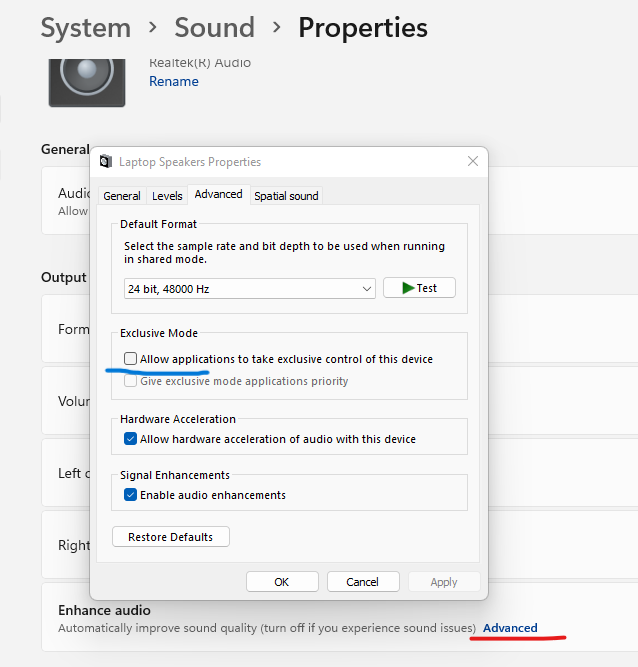
Q. GTT stops the audio from other application when launched?
A. GTT doesn’t stops audio from other application, However If user face any such difficulty.
Change the properties of the sound settings in your laptop/ PC. Uncheck the check box which says, “Allow application to take exclusive control of device.”
9.Compatibility/Sub-Versioning
This release requires the following software to be installed for SW developers:
- Microsoft Visual Studio 2017 and 2022
- For customers using VST3 : Microsoft Visual Studio 2017 or 2022
- CMake 3.24 and above
- Python 2.7
10.Contact Information
Platform Lead/Lead architect HarmanAudioworX:
| Ravish Hegde | Ravish.Hegde@harman.com | +91 9880449934 |