You can create your own configuration and write this configuration to the target device. The Send Device Config option sends the device configuration (Core Objects, Device Routing, and Virtual Core routing) to the target device.
Before sending the device configuration, all the input and output connection points of the core objects must be connected. If any of the pins are not connected, an error message is displayed.

The Device view (number of Cores, Physical Cores, Connection points, Sample Rate, and Block Length) inside GTT and the data inside the Device. The flash file on the target should match before Sending the Device configuration. If the data doesn’t match then the below transmission error is seen
The data in the device view (number of cores, physical cores, connection points, sample rate, and block length) and the data in the device. The flash file on the target device should match before the device configuration is sent. If the data doesn’t match, you will see the transmission error.

If any changes are made to the configuration, the send device config must be completed before sending the signal flow.
The device identification feature is enabled for audio libraries version 13 and higher.
Feedback Loop
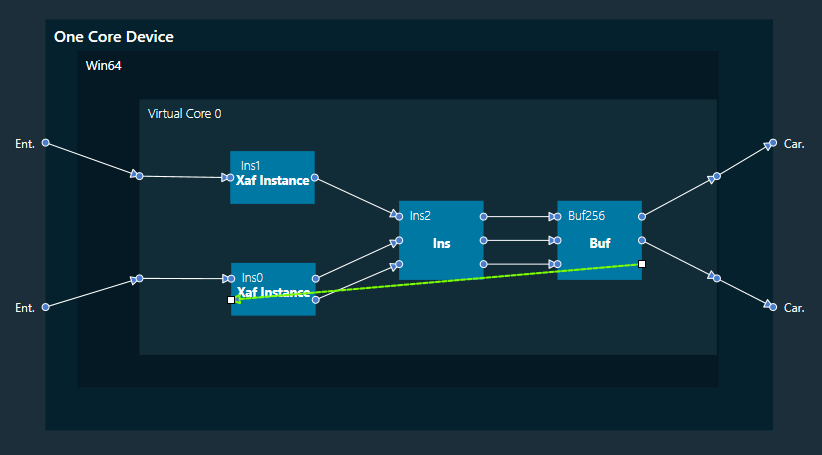
In the device view, feedback connections are allowed. You can connect the output of any core object as input to any other core object.
Core object Id defines the order of execution of core objects. Execution order of any core object depends on the IO dependency. IO side dependency is not considered when there are feedback loops.
Self-loop is not supported as feedback.
In the image, connection highlighted in green color is a feedback connection.