Description:
Multi Stage Envelope creates a control signal that changes over time in both deterministic and non-deterministic way. It is a control signal generator that generates signal that changes over time by successively interpolating from one stage to the next, where each stage consists of a time/level pair. It allows the possibility to randomize or adjust time, level and shape curve within deterministic ranges. And supports optional looping back to a specified segment when the final stage has been reached.
The SHAPE control bends the curvature for all steps to allow linear, quasi exponential and inverse exponential behavior, the exponential curve is approximated by a 4th order polynomial.
Default number of stages/steps (nSteps) is set to 2. It supports up to a maximum of 16 stages and looping back to any stage based on the configuration is allowed. So, the envelope generation can be continued in loop between stages. Time and level of each step is controlled by a fade parameter enabling the randomness and adjustments.
Below are the control input params:
1. Reset
2. Loop
3. Shape
4. Shape_Random
5. Fader
6. Fader_Random
First 6 of the Tuning params mentioned below are same as the control input params above. So, these 6 params can be controlled externally as well as internally.
Tuning Parameters:
| Parameter name | Data type | Default value | Range | Notes |
| Reset | UInt | 0 | 0 to 2 |
Reset the envelope generation to initial envelope value when set to 1 and no effect and continue generation when set to 0. When set to 2, AO stops envelope generation immediately and continue outputting last stage target value |
| Loop | UInt | 0 | 0 to nSteps | Loop back to specified segment when last step is completed and continues envelope generation in loop when Loop is not 0. |
| Shape | Float | 0.0 | -1.0 to 1.0 | Specify shape of the envelope segments. It shall be varied in between the values -1.0(inverse exponential) to 1.0(quasi exponential), 0.0 being Linear shape. |
| Shape_Random | Float | 0.0 | 0.0 to 1.0 | For a new random value to be created on start of each new segment, the value is added to SHAPE and result is limited to [-1:1]. Full scale generated shape value will then be in the range [-SHAPE_RND to SHAPE_RANDOM] |
| Fader | Float | 0.0 | 0.0 to 1.0 | Specify fade to linearly vary between levels/times. Pair of values of level and time is configured for each step. For each next level/time, the value is varied linearly between the pairs with FADER and FADER_RANDOM to get the target level/time. |
| Fader_Random | Float | 0.0 | 0.0 to 1.0 | For a new random value to be created on start of each new segment, the value is added to FADER and result is limited to [0:1]. Full scale generated fader value will then be in the range [-FADER_RANDOM to SHAPE_RANDOM] |
| OutScalFac | Float | 1.0 | -32767.0 to 32767.0 | Scale the envelope output level |
| LevelMinValue | Float | 0.0 | -32767.0 to 32767.0 | Used to set lower value of envelope output range. By default, the env output range is between 0.0 to 1.0. The output envelope is scaled in range LevelMinValue and LevelMaxValue. |
| LevelMaxValue | Float | 1.0 | -32767.0 to 32767.0 | Used to set highest value of envelope output range. By default, the env output range will be between 0.0 to 1.0. The output envelope is scaled in range LevelMinValue and LevelMaxValue. |
| TimeA1 | Float | 100.0 ms | 1.0 to 10000.0 ms | First time value from the time pair of Step 1. The time duration to reach next step from Step1 is varied between TimeA1 and TimeB1. |
| TimeB1 | Float | 100.0 ms | 1.0 to 10000.0 ms | Second time value from the time pair of Step 1. The time duration to reach next step from Step1 is varied between TimeA1 and TimeB1. |
| LevelA1 | Float | 0.0 | 0.0 to 1.0 | First level value from the level pair of Step1. The source level of Step1 is varied between LevelA1 and LevelB1. |
| LevelB1 | Float | 0.0 | 0.0 to 1.0 | Second level value from the level pair of Step1. The source level of Step1 is varied between LevelA1 and LevelB1. |
| Shape1 | Float | 0.0 | -1.0 to 1.0 | Specify shape of the envelope between Step1 and Step2. This value can be overridden by the 3rd Tuning param, i.e., Shape, which is common for all the steps. |
| … | … | … | … | … |
| TimeAN | Float | 100.0 ms | 1.0 to 10000.0 ms | First time value from the time pair of Step N. The time duration to reach next step from Step N is varied between TimeAN and TimeBN. |
| TimeBN | Float | 100.0 ms | 1.0 to 10000.0 ms | Second time value from the time pair of Step N. The time duration to reach next step from Step N is varied between TimeAN and TimeBN. |
| LevelAN | Float | 0.0 if N is odd 1.0 if N is even |
0.0 to 1.0 | First level value from the level pair of Step N. The source level of Step N is varied between LevelAN and LevelBN. |
| LevelBN | Float | 0.0 if N is odd 1.0 if N is even |
0.0 to 1.0 | Second level value from the level pair of Step N. The source level of Step N is varied between LevelAN and LevelBN. |
| ShapeN | Float | 0.0 | -1.0 to 1.0 | Specify shape of the envelope between Step N and the next Step. This value can be overridden by the 3rd Tuning param, i.e., Shape, which is common for all the steps. |
State Parameters:
| Parameter name | Data type | Default value | Range | Notes |
| Envelope | Float | 0.0 | -32767.0 to 32767.0 | To stream the control output It is streamable |
Illustration:
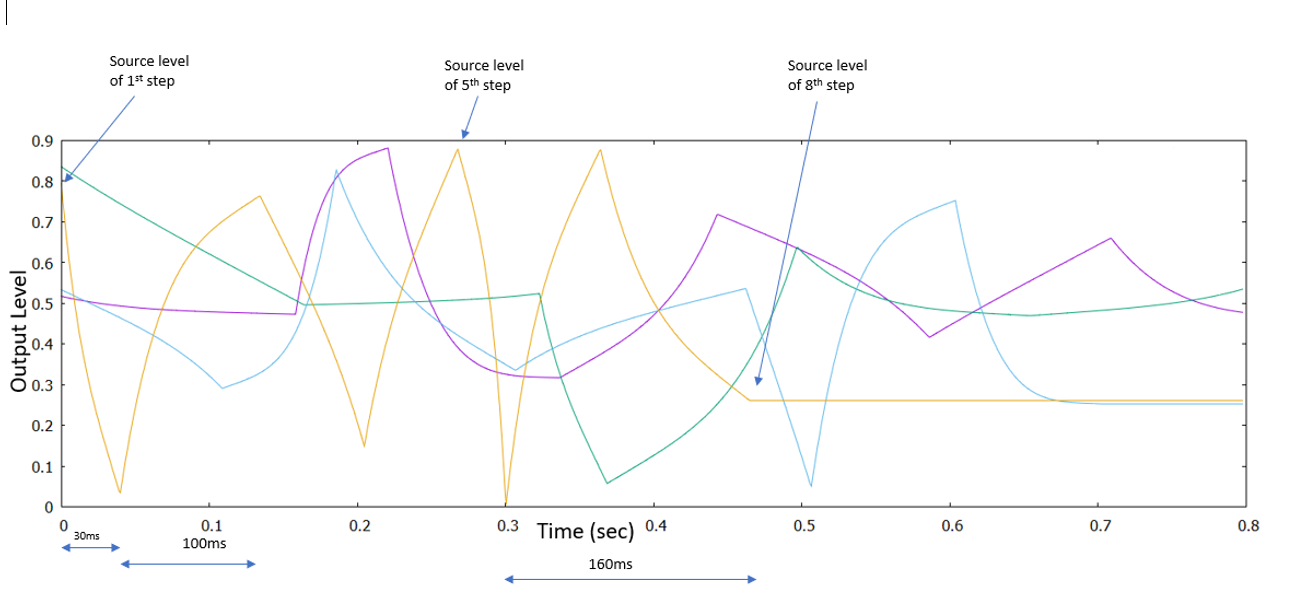
Above diagram shows four 8-stage envelopes obtained from different settings of Time, Level and Shape. Each color-coding describes envelopes obtained from different runs of the algorithm.
For Example, settings of Orange colour envelope are as below.
1. nSteps = 8
2. So, Time and Level pairs will be: TimeA1,TimeB1,LevelA1,LevelB1,…,TimeA8,TimeB8,LevelA8,LevelB8
3. TimeA1=30ms, TimeB1=30ms
4. TimeA2=20ms, TimeB2=100ms
5. Fader=1.0
6. Fader_Random=0.0
7. LevelA1=0.8, LevelB1=0.8
8. LevelA2=0.1, LevelB2=0.03
Imp Note:
To scale envelope output tuning parameter “LevelMinValue” and “LevelMaxValue” are used. There is no restriction added for “LevelMinValue” to be lower than “LevelMaxValue” in Tuning. It is required to set “LevelMinValue” to be smaller than “LevelMaxValue”. User can choose the values as per requirement of envelope output scaling.
Linear regrssion is used to scale the envelope output. Below is formula used for scaling the output
outValue = LevelMinValue + (LevelMaxValue – LevelMinValue)*stepLevelValue
if want to scale level value from 0 to 1 to -128 to 128 LevelMinValue and LevelMaxValue value used should be
LevelMinValue = -128
LevelMaxValue = 128