The object needs to inform the toolbox regarding the number of additional variables it needs. This is already described above as part of the object description. Besides the number of additional variables, the object needs to have a description of each additional variable. The audio object developer can provide the following:
Besides the number of additional variables, the object needs to have a description of each additional variable. The audio object developer can provide the following:
- Label for additional variable (example: filter enable or disable)
- Data type for the additional variable

String data type is not supported, as it will add additional bytes to the flash memory. Strings are used only in GTT and not required on target.
- Defaults & Range
- Min
- Max
- Default value
- The dimension for each additional variable
- Data order – Describes how data is ordered. e.g. ascending or descending order
- Dimension description
- Label
- Size of each dimension
- Axis start index (Float always irrespective of datatype)
- Axis increment (Float always irrespective of datatype)
Starting in R release – the sizes of a dynamic additional variable (NOT the count of variables, the size of each variable) can change based on user inputs.
To enable this functionality, make sure to see the static metadata page. You must set the static metadata parameter isAddVarUpdateRequired to true.
Here are the restrictions and features:
- You can access the following members to change your size –
- m_NumElements
- m_NumAudioIn
- m_NumAudioOut
- You can only refer to these if they are true inputs (IE: you are NOT setting them in getObjectIO)
- Example : Your mask says m_NumElements and m_NumAudioOutare NOT configurable by the user (so they are considered derived values).
- You cannot utilize m_NumElements and m_NumAudioOut for changing additional var size – this would create a two way dependency as additional vars are INPUTS to getObjectIO
- You can use m_NumAudioIn freely
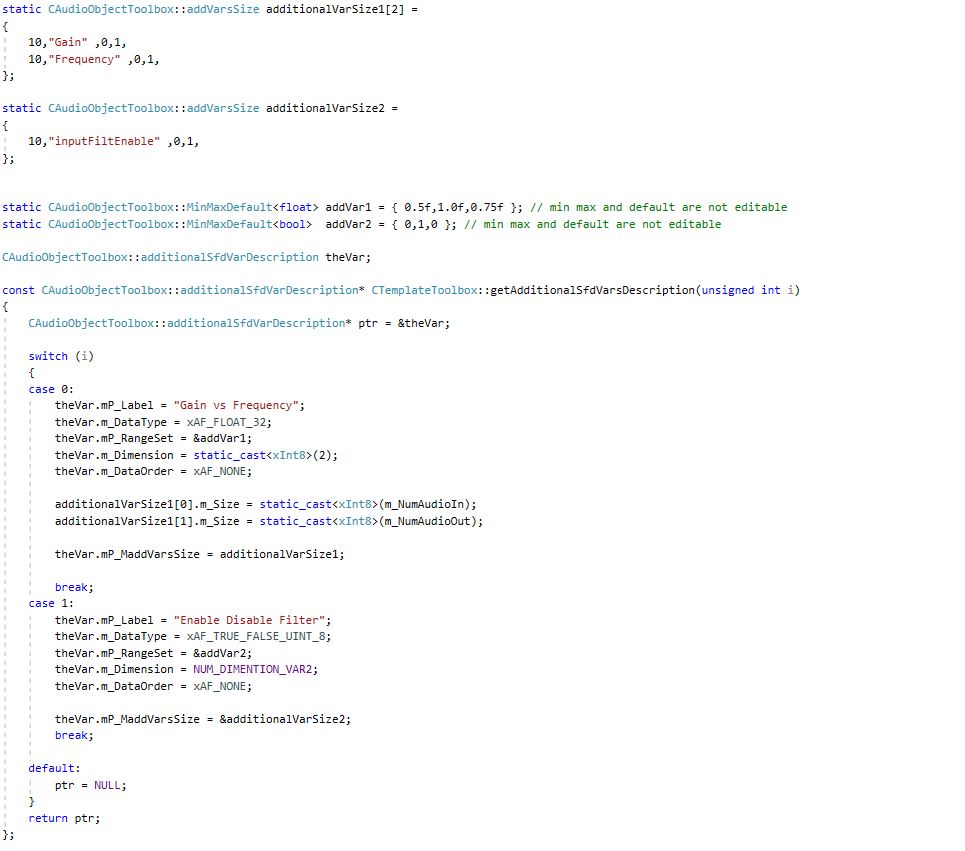
Below is an example of an object that has four additional variables.
- First additional variable
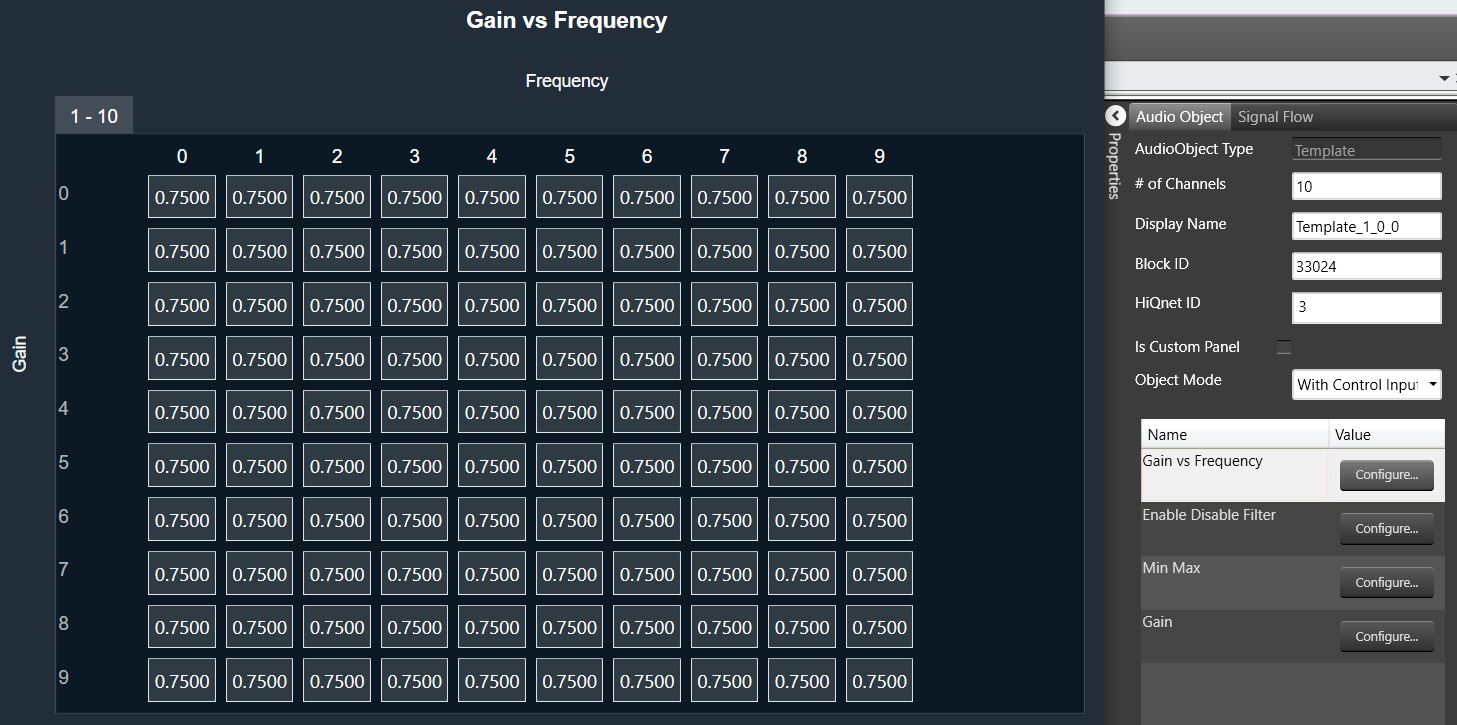
- Label : “ Gain Vs Frequency “
- Data type : Float
- Defaults : Min Value = 0.5 Max Value = 1.0 and Default value = 0.75
- Number of dimension = NUM_DIMENTION_VAR1 (2)
- Data order : xAF_NONE (no specific order required)
- Dimension details :
- 1st dimension:
- Size of 1st dimension : SIZE_ADDVAR_1_XAXIS (10)
- Label : “Gain“
- Axis start index : 0
- Axis increment : 1
- 2nd dimension:
- Size of 2nd dimension : SIZE_ADDVAR_1_YAXIS (20)
- Label : “Frequency“
- Axis start index : 0
- Axis increment : 1
- 1st dimension:
- Second additional variable
- Label : “Enable Disable Filter“
- Data Type : Int8 / char
- Defatults : Min Value = 0 Max Value = 1 and Default value = 0
- Number of dimension = 1
- Data order : xAF_NONE (no specific order required)
- Dimension details :
- 1st dimension
- Size of 1st dimension : 10
- Label : “ inputFiltEnable“
- Axis start index : 0
- Axis increment : 1
- 1st dimension
- Third additional variable
- Label : “ Min Max “
- Data type : Int
- Defatults : Min Value = 0 Max Value = 30 and Default value = 5
- Number of dimension = 1
- Data order : xAF_ASCENDING (Data has to be entered in ascending order)
- Dimension details :
- 1st dimension
- Size of 1st dimension : 2
- Label : “ 1st – Min 2nd – Max“
- Axis start index : 0
- Axis increment : 1
- 1st dimension
- Fourth additional variable
- Label : “ Gain “
- Data type : Int
- Defatults : Min Value = -30 Max Value = 20 and Default value = 1
- Number of dimension = 1
- Data order : xAF_NONE (Data has to be entered in ascending order)
- Dimension details :
- 1st dimension
- Size of 1st dimension : 1
- Label : “ Gain “
- Axis start index : 0
- Axis increment : 1
- 1st dimension
The example can be referred to here
An example of the result in the SFD is shown below, with the configuration of additional variable 1: