The main GTT tuning panel of VSS 1.5 is shown in the following Figure. It is divided into Source Sections, Main Loudspeaker Processing Section, Headrest Processing Section and Reverb Section as follows. For details please see VSS documentation.

Source Section
Each mono input source has an individual tuning section on the main panel.

Each source section includes:
|
Parmeter Name
|
Description
|
|
Angle and Distance
|
There is one control knob for the Angle control signal and one control slider for the Distance control signal, which are used for manually placing the sound source during a tuning session. |
|
Input EQ
|
It opens the biquad panels for the input EQ
|
|
Distance EQ
|
It opens the biquad panels for the distance EQ
|
|
Amplitude Panning
|
It opens the look-up table (LUT) panels for the angle-dependent speaker amplitude values.
|
|
Panning Correction
|
It opens the LUT panel for angle-dependent overall amplitude correction.
|
|
Distance EQ LUT
|
It opens the LUT panel for adjusting the minimum and maximum cutoff frequency for the Distance EQ, i.e. a distance-dependent low-pass filter.
|
|
Distance to Gain
|
It opens the LUT panel for distance-dependent dry and wet gains of the input source.
|
|
Input Gain
|
This section allows to adjust the input gain of the source using the text input field and to mute the source using the On/Muted button.
|
|
Distance EQ
|
It opens the biquad panels for the input EQ and distance EQ, respectively.
|
The Crossover Filters section allows to access the panels for cue/main processing crossover filters tuning. It includes the following buttons:
|
Parmeter Name
|
Description
|
|
Front Cues
|
It opens the biquad panels for the front channel cue high pass filters (i.e. front left, front center, front right, height side left, height side right) |
|
Virtual Rear Cues
|
It opens the biquad panels for virtual rear channel cue high pass filters |
|
Main Headrest
|
It opens the biquad panel for the main headrest playback channel low pass filters |
Main Loudspeaker Processing Section
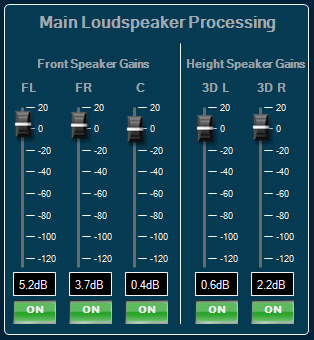
The main loudspeaker processing section allows to adjust the gains of the high frequency cue signals, which are played back on the main loudspeakers (front left, front center, front right, height side left, height side right).
|
Parmeter Name
|
Description
|
|
Front Speaker Gains
|
The Front Speaker Gains sections allows to adjust the gains of the front left (FL), front right (FR) and front center (C) speakers. |
|
Height Speaker Gains
|
The Height Speaker Gains section allows to adjust the gains of the support height speakers, height side left (3D L) and height side right (3D R). For each channel there is a gain slider, a gain text field and a mute button. |
Headrest Processing Section
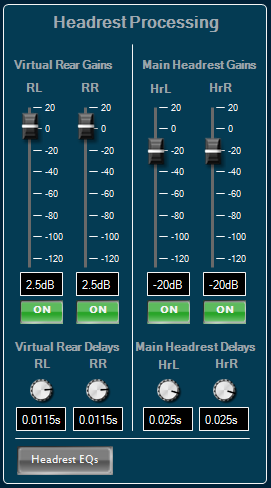
The headrest processing section allows to adjust the gains of the channels, which are played back through the headrest loudspeakers.
|
Parmeter Name
|
Description
|
|
Virtual Rear Gains
|
The Virtual Rear Gains section allows to adjust the gains of the virtual rear left (RL) and the virtual rear right (RR) channels. The virtual rears play on when the corresponding angle control is directing to an angle of a rear speaker direction. |
|
Virtual Rear Delays
|
The Virtual Rear Delays section allows to adjust the delays of the virtual rear channels. There is a rotary knob and a text entry field for each of the virtual channels. |
|
Main Headrest Gains
|
The Main Headrest Gains section allows to adjust the gains of the main playback, which is played back over the headrest speakers. |
|
Main Headrest Delays
|
The Main Headrest Delays section allows to adjust the delay of the main playback channels, to allow tuning of the delay alignment between the cue playback channels and the main playback channels. |
|
Headrest EQs
|
The Headrest EQs button opens the biquad panel for the headrest EQ, which is a two channel filter object that applies equalizing filters to the mix of the virtual rear and the main headrest signals of the left and right channels. |
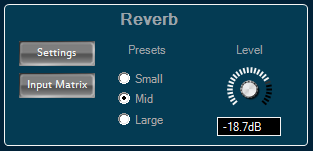
Reverb Section
The Reverb Section includes a button to open the settings panel of the reverberation algorithm (VenueVerb), a button for opening the reverb input matrix, a preset section for calling pre-generated venue presets, as well as a knob for controlling the reverb master level.