The Sound Card Settings dialog can be either accessed through the Settings button on the ribbon bar or via the Channels window. One can select the audio driver (Host API), the sample rate and the block length of the audio processing.
RTA supports two Host API’s:
- MME: This is the standard windows audio driver. It allows operation of multiple audio devices at the same time. Sample rates are handled by the operating system. RTA can be set to any sample rate. If the sample rate of the physical audio device is different the OS takes care of the sample rate conversion. This mode is recommended if multiple devices are running at the same time, e.g. measuring with an USB microphone while playing back generator signals with an internal sound card. It is recommended to keep the block length at the maximum value of 4096 and the sample rate at 44.1kHz or 48kHz.
- ASIO: This driver is being used with multi-channel sound cards. It enables low latencies and ensures that all input and output channels are in sync. Depending on the latency requirements of the audio signal processing provided by a loaded plugin (future feature) the block length can be reduce down to 64 samples. The RTA sample rate setting has to be equal to the audio device driver sample rate.
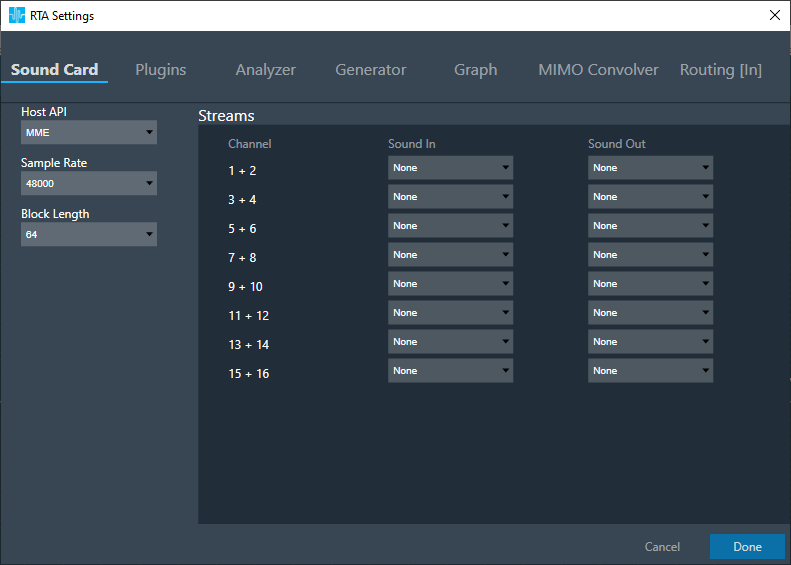
Once a Host API has been selected the Sound In and Sound Out devices have to be selected. If no device has been selected RTA runs in a silent mode. This can be used to check the generator modes or to analyze a prerecorded measurement provided by a .wav file.
All devices are provided as two channel devices. The Channels column in the Streams area show to which channel pair a Sound In or Sound Out device is mapped to. These channel pairs will show up at the analyzer and routing settings as SoundIn1..16 and SoundOut1..16 channels. These channels can be selected from contect menu in order to connect sound card channels to RTA processing blocks.
In the example above the mapping is configured as follows:
- SoundIn1, SoundIn2: Analog (1 + 2)
- SoundIn3, SoundIn4: Analog (3 + 4)
- SoundIn5, SoundIn6: Analog (5 + 6)
- SoundOut1, SoundOut2: Analog (7 + 8)
Device has to be reconnected if Sample Rate / Block Length/ Host API is modified
ASIO sound card is preferred over Windows drivers. Use blocklength greater than 1024 while using Windows drivers to avoid noise distortion effect which is a limitation of Windows driver (even seen in audio mulch)