The designing of the audio object, start with configuring object descriptions.
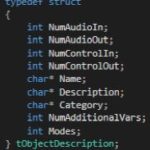
The object description describes the default configuration of the object, when the object is dragged into signal flow designer view in GTT. Default configuration of the object will be Name, Description and Category of the object. Additionally, supported operating Modes and the objects required Additional configuration variables.
The table provide details of description of variables :
|
Member
|
Description
|
|
NumAudioIn
|
This is the default number of audio inputs. It can be overridden as the object is configured.
|
|
NumAudioOut
|
This is the default number of audio outputs. It can be overridden as the object is configured.
|
|
NumControlIn
|
This is the default value, which can be overridden during the design of the audio object and refers to the number of input control signals an object receives.
|
|
NumControlOut
|
Same as NumControlIn but for output.
|
|
Name
|
This is a string with the name of the object.
|
|
Description
|
This describes what the audio object does.
|
|
Category
|
There are various categories in the SFD. This will sort the audio object under that category. For example, the category for a biquad object is “filter”
|
|
NumAdditionalVars
|
This is the number of additional variables an object needs for design configuration purposes. The minimum is 0
|
|
Mode
|
This is the number of modes the object supports. The minimum is 1.
|
The object developer needs to set m_Descriptions in the header file:

Once the object description is set, developers need to override the virtual getObjectDescription method inherited from the base class CAudioObject:
