Introduction
A Compound Audio Object (CAO) packages a project with complex signal flow into a single audio object, with clearly defined I/O pins. A custom panel created for the CAO provides user with integrated control interface. The following is a CAO created for Virtual Sound Sources (VSS) as a reference project.
VSS places mono sound sources with variable distance and angle in a 360° environment (Figure 1). The technology is scalable in terms of number of input sources (‘virtual sound sources’), number of speakers and positions of speakers. The reference compound audio object (CAO) of VSS is configured for four independent input sources and five output speakers (Front Left ‑30°, Front Right +30°, Center 0°, Rear Left ‑155°, Rear Right +155°).

Signal Flow
The CAO of VSS has the following inputs and outputs (Figure 2):
Audio input:
- Mono sound source #1
- Mono sound source #2
- Mono sound source #3
- Mono sound source #4
Audio output:
- Speaker channel Front Left
- Speaker channel Front Right
- Speaker channel Center
- Speaker channel Rear Left
- Speaker channel Rear Right
Control input:
- Control signal Angle Source #1
- Control signal Distance Source #1
- Control signal Angle Source #2
- Control signal Distance Source #2
- Control signal Angle Source #3
- Control signal Distance Source #3
- Control signal Angle Source #4
- Control signal Distance Source #4
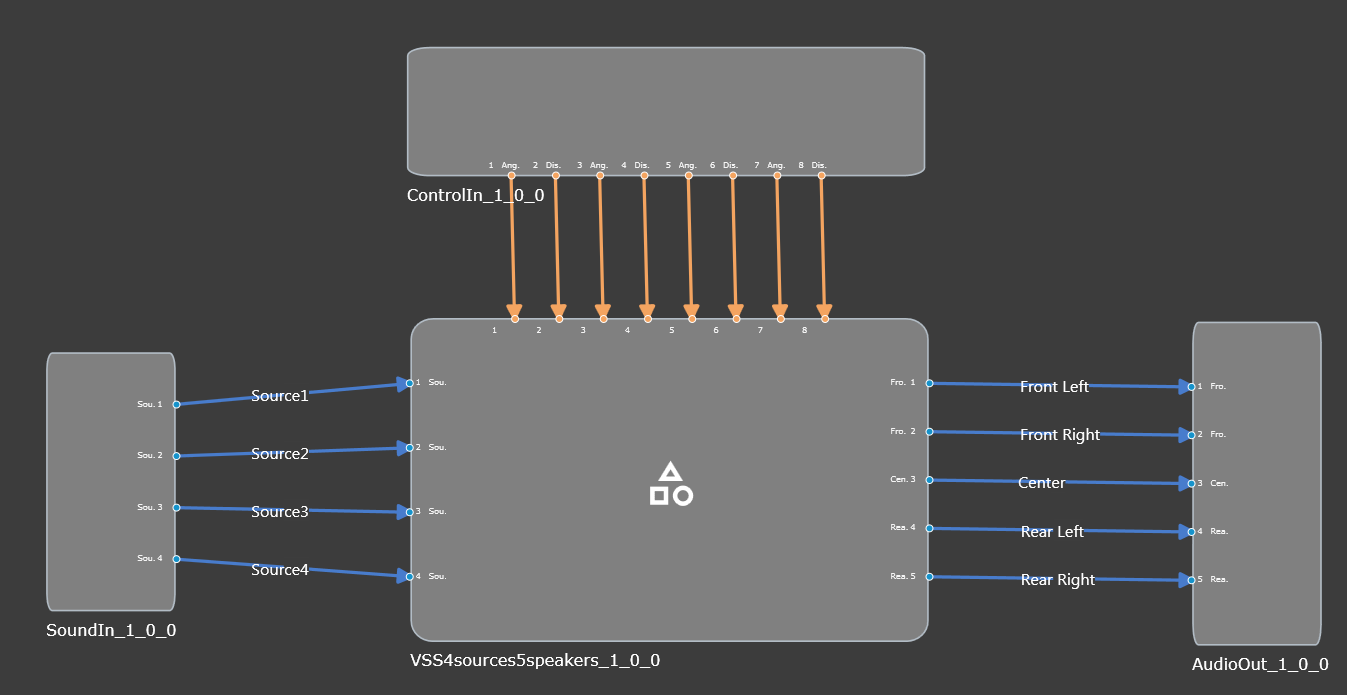
Figure 3 shows the internal signal flow of VSS.

VSS CAO Panel
The main GTT tuning panel of VSS is shown in Figure 4. It is divided into Source Sections, Mixer Section and Reverb Section as follows. For details please see VSS documentation.

Source Section
Each mono input source has an individual tuning section on the main panel, see Figure 5.

Each source section includes:
- Two controls knobs for the two control signals Angle and Distance are for manually placing the sound source during a tuning session.
- Input EQ and Distance EQ buttons open the biquad panels for the input EQ and distance EQ, respectively.
- Amplitude Panning opens the look-up table (LUT) panels for the angle-dependent speaker amplitude values.
- Panning Correction opens the LUT panel for angle-dependent overall amplitude correction.
- Distance EQ LUT opens the LUT panel for adjusting the minimum and maximum cutoff frequency for the Distance EQ, i.e. a distance-dependent low-pass filter.
- Distance to Gain opens the LUT panel for distance-dependent dry and wet gains of the input source.
- The Input Gain section adjusts op mutes the input gain of the source.
Mixer Section
The Mixer Section of the main panel (Figure 6) includes a button Output Matrix that opens the matrix mixer panel as well as a section for controlling the output levels of each speaker channel individually.

Reverb Section
Figure 7 shows the Reverb Section of the main panel. It includes a button to open the settings panel of the reverberation algorithm (VenueVerb), a button for opening the reverb input matrix, a preset section for calling pre-generated venue presets, as well as a knob for controlling the reverb master level.
