Harman Logo
AUDIOWORX
  • Home
  • Documentation
  • Videos
  • Release Notes
Harman Logo
AUDIOWORX
  • Home
  • Documentation
  • Videos
  • Release Notes
Harman Logo
AUDIOWORX
  • Home
  • Documentation
  • Videos
  • Release Notes
  • Getting Started
  • User Guides
  • Developer Guides
  • Reference Projects

Table of Content

Global Tuning Tool User Guide

  1. About Global Tuning Tool
    1. System Requirements
    2. Global Tuning Tool Workflow
  2. Exploring GTT Workspace
    1. Home Screen
    2. Device Designer Overview
    3. Panel Designer Overview
    4. Parameter Set Overview
  3. Working with GTT Project
    1. Create a New Project
    2. Create a Custom Panel in GTT
    3. Create a Parameter Set in GTT
    4. Custom Device Usage
    5. Multi-xAF Library Support
    6. Configuring Preset Controller
  4. Streaming and Polling
    1. Start Live Streaming
    2. Viewing Streaming Data in Custom Panel
    3. Search Variable
    4. Record Streaming Data
    5. Pause/Play Streaming
    6. FFT for Streaming
    7. Limitations in Streaming

Real Time Analyzer

  1. Introduction
  2. RTA Quick Start Guide
  3. Integrated Virtual Processing
  4. Sound Card Settings
  5. Plugin Host
  6. Analyzer Settings
  7. Generator
  8. RTA Graph Display Settings
  9. Mimo Convolver
  10. Recorder
  11. Routing
  12. RTA IR/Spectrum viewer
  13. Channel Viewer
  14. Real Time data view
  15. RTA Settings ImportExport
  16. Microphone Calibration
  17. Traces
    1. A, B, C Weighting on Captured traces
    2. Smoothing on Captured Traces
    3. Select/ Deselect All Traces
  18. Reboot
  19. Probe Points

Griffin Reference Projects User Guide

  1. Terms and Abbreviations
    1. Multi dll support for CAO
    2. Tuning Panel Compound Audio Object
  2. Purpose Of This Document
    1. Apply tuning to Compound Audio Object Template
    2. Testing New Post 2025
  • Global Tuning Tool User Guide
  • Search Variable

4.3.Search Variable

You can search for a specific variable from the object tree in the Streaming window and then drag and drop it onto the chart.

To find a variable in the Streaming window, enter at least two keywords of the variable in the search bar. The GTT will use these keywords to search and display the filter results in the object tree.
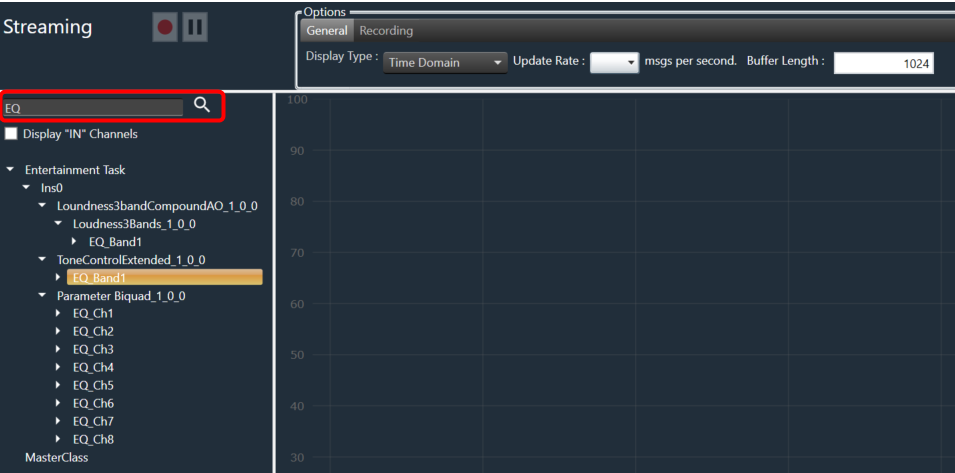
A screenshot of a computer Description automatically generated with medium confidence

Last updated on October 24, 2024
« Viewing Streaming Data in Custom PanelRecord Streaming Data »
Suggest Edit
  • Careers
  • Contact
  • Sitemap
  • News

© 2024 HARMAN International. All Rights Reserved. Privacy Policy | Cookies | Terms of Use

If you are using a screen reader and are having problems using this website, please call (800) 645-7484 for assistance.