

Table of Content


2.3.Properties View
You can view the properties of an audio object used in the signal flow design through the Properties view. This allows you to configure the properties of the audio object to suit your requirements. The properties can be viewed by selecting a specific audio object.

 Using that tab, you can choose from a wide list of available control signals and associate them with control outputs of the ControIln block. Re-ordering of the items in the control signals grid is done via the Up and Down buttons.
You can also define your own custom control signals (Control IDs) and assign them to control pins.
Using that tab, you can choose from a wide list of available control signals and associate them with control outputs of the ControIln block. Re-ordering of the items in the control signals grid is done via the Up and Down buttons.
You can also define your own custom control signals (Control IDs) and assign them to control pins.
 When a custom Control ID is defined for a device, it can be accessed in the Control In tab of any ControlIn audio object, along with the predefined Control IDs.
In terms of tuning, the custom control signals are treated as part of the Master Class object, just like the predefined control signals.
When a custom Control ID is defined for a device, it can be accessed in the Control In tab of any ControlIn audio object, along with the predefined Control IDs.
In terms of tuning, the custom control signals are treated as part of the Master Class object, just like the predefined control signals.
Audio Object Modes
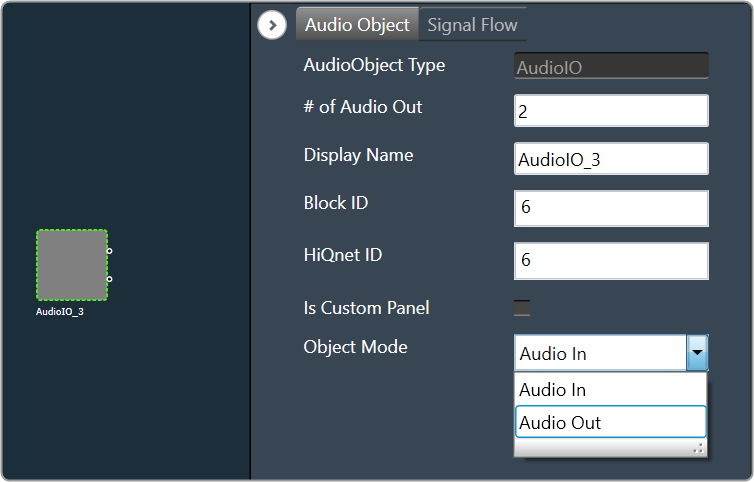
Some audio blocks support multiple configuration modes. For instance, the AudioIO block can function as both an audio input and an audio output block. Similarly, the Biquads block can operate either as a parameters-based or coefficients-based Biquad. In previous versions of the Signal Flow Designer, each mode of an audio block was displayed as a separate audio block. However, in the latest version of the tool, it is assumed that every block can support at least one configuration mode. For those blocks that support multiple modes, an extra drop-down field is now shown on the properties view. By selecting an appropriate value from the drop-down, you can modify the mode.
Control Configuration
In the latest version of GTT, the Signal Flow Designer supports control routing from the control hub (Master Control) to xAF framework instances. The ControlIn block is used to configure a control flow for each instance. By designating certain control signals to the output pins of a ControlIn block within a given instance, you can decide which control signals that instance will receive. To make the process easier, a new tab is added to the property configuration.
Using that tab, you can choose from a wide list of available control signals and associate them with control outputs of the ControIln block. Re-ordering of the items in the control signals grid is done via the Up and Down buttons.
You can also define your own custom control signals (Control IDs) and assign them to control pins.
When a custom Control ID is defined for a device, it can be accessed in the Control In tab of any ControlIn audio object, along with the predefined Control IDs.
In terms of tuning, the custom control signals are treated as part of the Master Class object, just like the predefined control signals.
Mapping Custom Panel
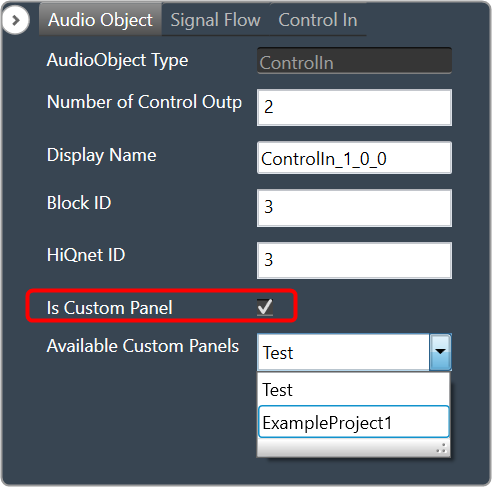
Open any audio object property view, enable “Is Custom Panel” option, and select the appropriate custom panel from the drop-down list. For details about creating a custom panel in GTT, refer to link Create a Custom Panel in GTT.
 Was this helpful?
Help Guide Powered by Documentor