Harman Logo
AUDIOWORX
  • Home
  • Documentation
  • Videos
  • Release Notes
Harman Logo
AUDIOWORX
  • Home
  • Documentation
  • Videos
  • Release Notes
Harman Logo
AUDIOWORX
  • Home
  • Documentation
  • Videos
  • Release Notes
  • Getting Started
  • User Guides
  • Developer Guides
  • Reference Projects

Table of Content

Signal Flow Designer User Guide

  1. Overview Of Signal Flow Designer
  2. Components of Signal Flow Designer
    1. Toolbox
    2. Design Operations
    3. Properties View
    4. Audio Object Operations
  3. Operations in Signal Flow Designer
    1. Pin Labelling
    2. View Audio Object Metadata
    3. Open column name Configuration Panel
    4. Upgrade Audio Object
    5. Change Audio Object Processing State
    6. Metering a Signal Flow
    7. Copy and Paste Operation
    8. Undo and Redo Operation
    9. Block Control
    10. Signal Flow Design Validation
    11. Securing Audio Objects
  4. Create a Signal Flow
  5. Tune a Signal Flow
  6. Native Panels
    1. Launching Native Panel from Signal Flow Designer
    2. Common Operation in Native Panel
    3. Launching Native Panels
  7. Additional Audio Block Configuration Parameters
  8. Harman Audio Library Service
  9. Support for Multiple Framework Instances
  10. Feedback loop in Signal Flow
  11. Compound Audio Object
    1. Create a Compound Audio Object
    2. Rename a Compound Audio Object
    3. Export a Compound Audio Object
    4. Import a Compound Audio Object
    5. Tuning and Editing Compound Audio Object
    6. Tuning Panel Compound Audio Object
    7. Multi dll support for CAO
    8. Delete a Compound Audio Object (CAO)

Audio Object Gain

  1. Basic Audio Object Gain Introduction
    1. Hello world!
  2. Basic Audio Object Gain Descrption
  3. Testing New Post 2025

Griffin Reference Projects User Guide

  1. Terms and Abbreviations
    1. Multi dll support for CAO
    2. Tuning Panel Compound Audio Object
  2. Purpose Of This Document
    1. Apply tuning to Compound Audio Object Template
    2. Testing New Post 2025
  • Signal Flow Designer User Guide
  • Feedback loop in Signal Flow

10.Feedback loop in Signal Flow #

GTT does not support feedback connection in signal flow. In the below example, it is not possible to connect “Gain_1_0_0” to ToneControlExtended_1_0_0” in Signal Flow, as this connection leads to loop. Hence if you try to connect any audio objects which will lead to a loop, a notification is shown that “Connection is not possible”.

For a legacy project.

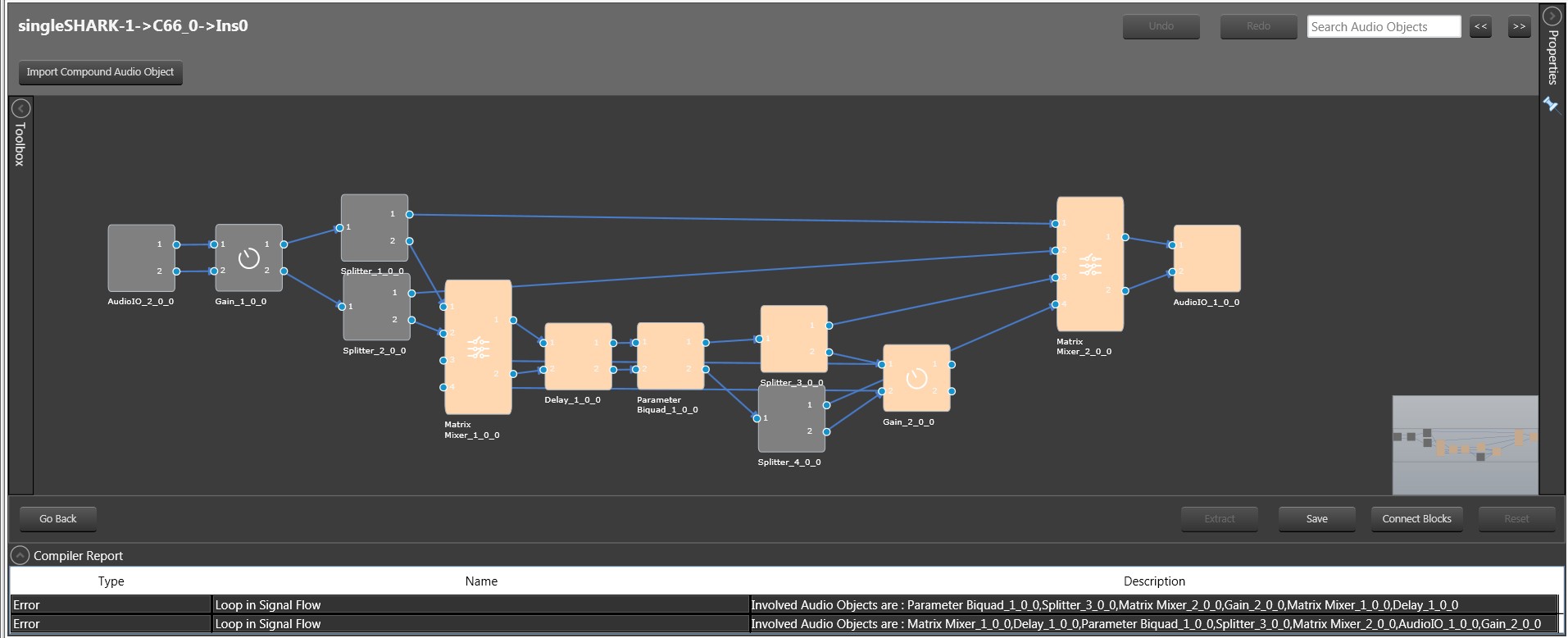
If a signal flow already has a feedback loop, the designer will indicate this and an error with the compiler will be reported. In order to save the signal flow, you must first remove any existing loops.

There is no restriction to add loops in control signals.
Was this helpful? Yes No Suggest edit
Last updated on October 7, 2024
« Support for Multiple Framework InstancesCompound Audio Object »
Help Guide Powered by Documentor
Suggest Edit
  • Careers
  • Contact
  • Sitemap
  • News

© 2024 HARMAN International. All Rights Reserved. Privacy Policy | Cookies | Terms of Use

If you are using a screen reader and are having problems using this website, please call (800) 645-7484 for assistance.