

Table of Content


6.2.Common Operation in Native Panel
Passing pin labels to native panels
The native panels display the corresponding names of the pin labels assigned to an audio object in SFD, thereby ensuring visibility. This feature applies to the listed native panels.- Delay
- Gain
- EQ/Biquad
- FIR, FIRMIMO, FastConv
- Limiter
- Mixer
- Router
On the Router panel first three characters of the out-pin labels will be displayed as a channel out names.
Look-up Table (LUT) panel has a separate mechanism to change the names of the channel.
Editing labels in native panels
You can modify Native panels pin labels. Double-click on a label, a text box will appear, enter the new name. The provided name will be updated both on the panel itself and on the corresponding pin in SFD. For audio objects that have a configurable number of channels, the new value will be set for both the input and output pins. However, for other audio objects, the value will be updated separately for the input and output pins. Depending on the panel, the displayed text may be trimmed if it exceeds the available space. This feature applies to all native panels except for the Biquad panel and the LUT panel.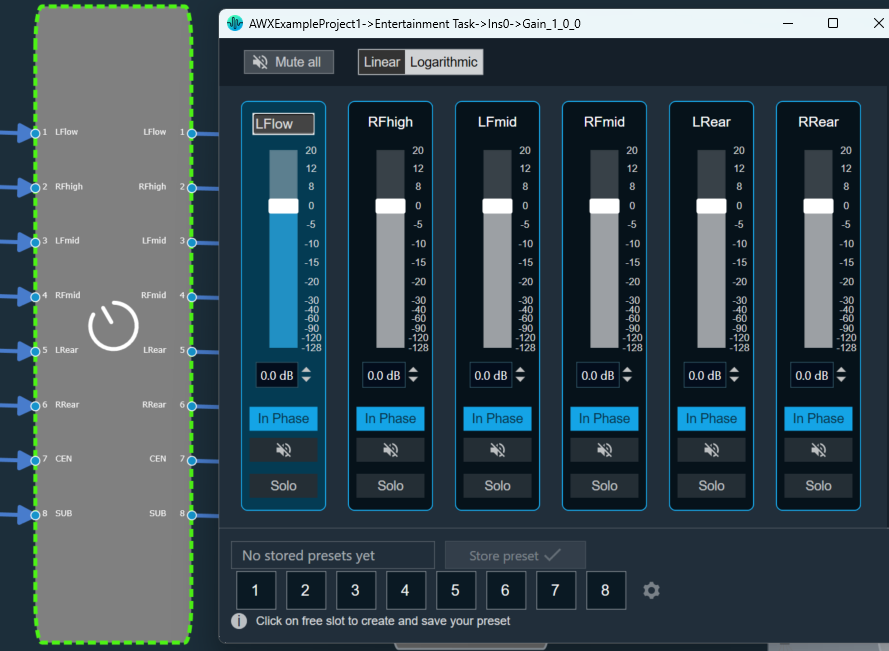
Resizing Native Panel
When the native panel window is resized, the controls are resized to fit the window. Following are the native panel which support resizing:- Parameter Biquad,
- Crossover Biquad and
- Tone Control Extended Panels
Native Panel Presets
Preset or Tuning sets can be used to store the tuning data set of the native panel. This control is available in every Native panel.
Creating a Preset
Follow the below steps to create a preset:- On the native panel, tune audio objects signal flow.
- Select a free preset slot (numbers), enter a slot name in the text box.
If you do not enter a preset name, it will take the default name of the New Preset.
- Click on Store Preset to save and store the preset. The preset will be stored in the slot you had chosen. The blue color indicates that the preset is applied to the respective native panel.
 Resetting the Presets
Follow the below steps reset a preset:
Resetting the Presets
Follow the below steps reset a preset:
- On the Preset section, select the slots, and then click on the settings icon.

- Click on Reset Selected to reset the selected preset slots.
 Was this helpful?
Help Guide Powered by Documentor