Harman Logo
AUDIOWORX
  • Home
  • Documentation
  • Videos
  • Release Notes
Harman Logo
AUDIOWORX
  • Home
  • Documentation
  • Videos
  • Release Notes
Harman Logo
AUDIOWORX
  • Home
  • Documentation
  • Videos
  • Release Notes
  • Getting Started
  • User Guides
  • Developer Guides
  • Reference Projects

Table of Content

Audio Object Developers Guide

  1. Purpose of this Document
    1. Terms and Abbreviations
    2. Requirements
  2. Overview
    1. Audio Object Workflow
    2. Audio Object Class
  3. Audio Object Configuration
    1. Design Time Configuration
    2. Advanced Design Time Configuration
  4. Basic Features and APIs
    1. Constructor
    2. GetSize
    3. Init
    4. Calc
    5. TuneXTP
    6. Control
  5. Advanced Features and APIs
    1. Audio Object Additional Configuration
    2. Audio Object Sub Blocks
    3. Audio Object AO Switch Processing State
    4. Debug and Monitoring
    5. Background Method
  6. Audio object Examples
    1. Example 1 - AwxAudioObjExt.cpp
    2. Example 2 - AwxAudioObjExtToolbox.cpp
    3. Example 3 - AwxAudioObjExtMemRecs.cpp
    4. Example 4 - AwxAudioObjExt.h
    5. Example 5 - AwxAudioObjExtToolbox.h
    6. Example 6 - AwxAudioObjExtMemRecs.h
  7. General Guidelines
    1. Hardware Abstraction
    2. Hardware Abstraction for Header files
    3. Memory Enums
    4. Overlays
  8. Adding external audio object into AudioworX package
    1. Building External AO

Device Description File

  1. Terms and Abbreviations
  2. Purpose of this Document
  3. Root Element
  4. Node Elements
    1. Communication Parameters
    2. Identification of Target Device
  5. Virtual Device
  6. Objects
    1. Object
    2. Definition of a Table Object
    3. Definition of a Biquad Coefficients Object
  7. StateVariables
    1. Common
    2. NumericalSV
    3. EnumSV
    4. FilterTypeSV
    5. FloatArraySV
    6. Float16ArraySV
    7. FixedPoint16ArraySV
    8. StringSV
    9. FixedPointM_NArraySV
  8. TargetValue
    1. Common
    2. Target Value
    3. Block Target Value
  9. Templates
    1. StateVariables
  10. Revision History

Griffin Reference Projects User Guide

  1. Terms and Abbreviations
    1. Multi dll support for CAO
    2. Tuning Panel Compound Audio Object
  2. Purpose Of This Document
    1. Apply tuning to Compound Audio Object Template
    2. Testing New Post 2025
  • Audio Object Developers Guide
  • Audio Object Workflow

2.1.Audio Object Workflow

Design Time Work flow

The work flow during design time is described below. Design time is when the user is creating a signal flow from the Signal Flow Design tool within GTT. These are the interactions that go on between the tool and dll loaded into the tool:
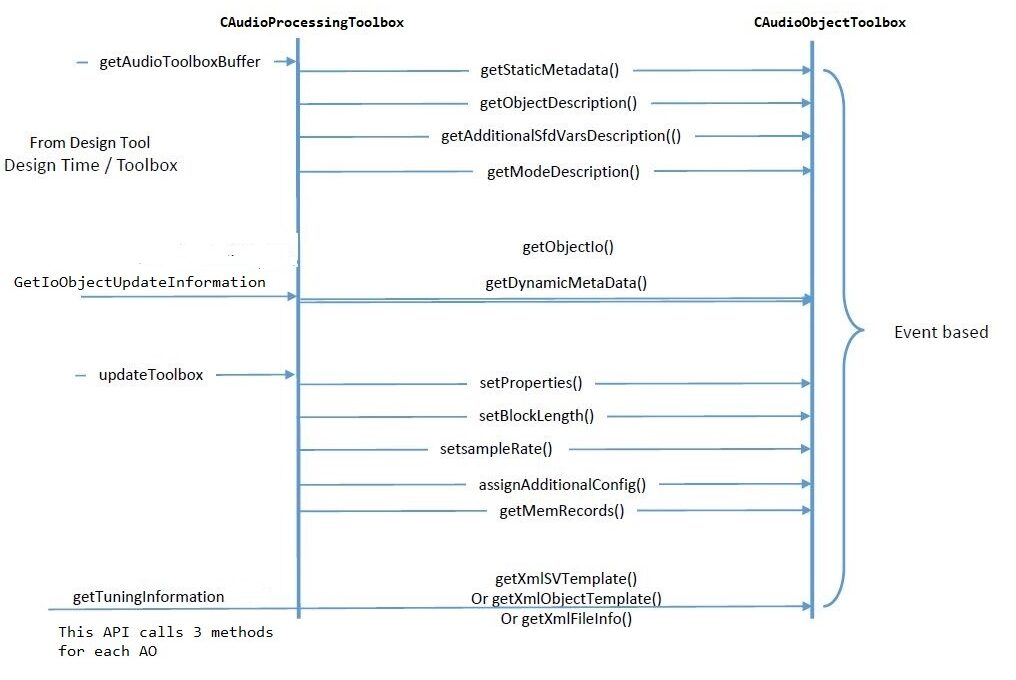
Runtime Workflow

The workflow during runtime between the framework class, CAudioProcessing, and the audio objects base class, CAudioObject, is described below.

Last updated on October 24, 2024
« OverviewAudio Object Class »
Help Guide Powered by Documentor
Suggest Edit
  • Careers
  • Contact
  • Sitemap
  • News

© 2024 HARMAN International. All Rights Reserved. Privacy Policy | Cookies | Terms of Use

If you are using a screen reader and are having problems using this website, please call (800) 645-7484 for assistance.