


Table of Content

5.2.Audio Object Sub Blocks
The Sub-blocks represents logical divisions of a block’s (or audio object’s) memory. They are partitions of the audio object’s memory.
There are many reasons to use sub-blocks in an object.
- Tuning data preservation is facilitated by the use of sub-blocks.
- The data can be organized into more logical chunks.
- The data will also be easier to debug.
- In some cases, tuning preset files can store much less data. This is due to the fact that sub-blocks of the memory can be individually stored in the preset files as opposed to the entire object’s memory.
Sub-blocks belonging to the same object do not necessarily need to have the same sub-block size.
The two API calls associated with setting up sub-blocks in an object are:
xInt8* getSubBlockPtr(xUInt16 subBlock)
xSInt32 getSubBlockSize(xUInt16 subBlock)
- getSubBlockPtr() is called by the framework to retrieve pointer to start of the subblock.
- getSubBlockSize() is called by framework to get size of the subblock in bytes
Here we will create an example of a simple object. This object has one parameter (m_Gain). It’s a float so its size is four bytes. Since it is our only parameter we will only have one subblock it’s subblock will be zero (we start at zero).
In this code we only return a valid pointer if our subblock is as expected. If subblock is zero then we return a pointer to our parameter memory – which in this case is the address of our member float. Memory referenced doesn’t have to be a member variable of course, often it is a reference directly to a requested memory record. Sometimes objects will allocate one record but map several subblocks to the memory, spacing them out appropriately. You are free to do what you want as long as you don’t reference global memory as your object has to support multiple instances.

Likewise for this method the return for an error case is the default (0). If the framework sees a 0 size record or nullptr returned from the subblock method it will return an error over xTP and not attempt to write out of bounds. It will also return an error if address + size in the tuneXTP method exceeds the bounds dictated here. (Eg: subblock size is 16, but I want to write 8 bytes starting at address 12, this would be denied).
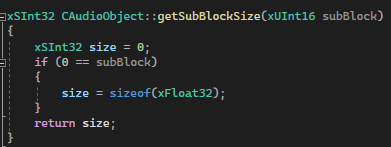
Whether your data is defined in DDF as ‘Tuning’ or ‘State’ it still will have a subblock. The following fields in GTT’s SV Viewer.
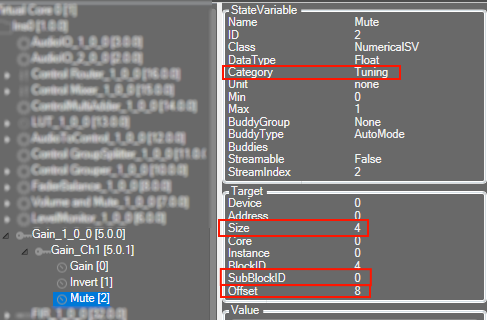
In the above picture we can see how this information translates to the DDF side.
SubBlockID is the same subblock as above. Offset is your address within the subblock, size is the size of the variable. You can also see above the category here is ‘Tuning’. A subblock is either ‘Tuning’ or ‘State’ and it cannot be split between them.
If an audio object not require any sub-blocks (no tuning or state parameters), these methods don’t need to be overridden.


Help Guide Powered by Documentor